

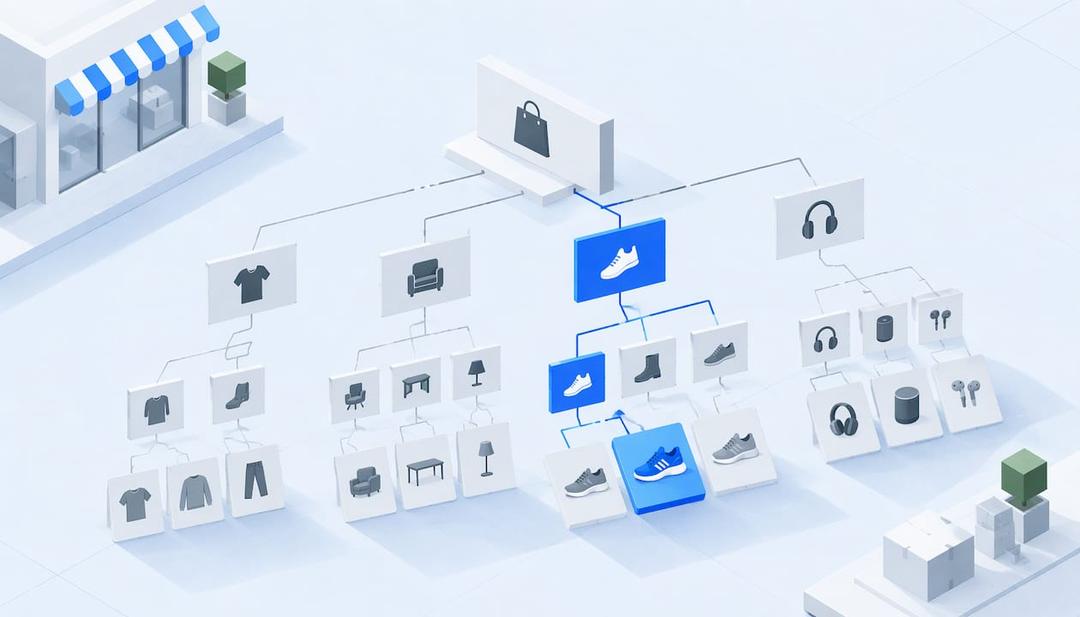
Whether people google, go to Amazon or ask a chatbot, AI gives them a response with a product, and most e-commerce brands have no idea how to be that product. Product taxonomy is the first place to look. It is the system that tells an agent what each item is, and an agent can only pick what it can place. For online stores, ecentic is an agentic commerce platform that optimizes the product feed and catalog so AI shopping agents pick their products and can actually buy them.
I think taxonomy is the least glamorous reason a store disappears from AI answers, and also the cheapest to fix. Nobody brags about a clean category tree at a conference. Then an agent skips a store whose bestseller sits under “Summer Vibes,” and the owner wonders why the chatbot recommends the competitor.
TL;DR
- Taxonomy decides what a product is. Attributes describe it, tags handle workflow, collections handle campaigns. Keep those jobs apart.
- Use shopper words, two to four levels, one leaf category per product, and map to Google’s public category list.
- AI agents filter on structured fields first. A product with no category or a free-text-only attribute can be unreachable, whatever the description says.
- ecentic connects to Shopify, WooCommerce or a product feed, and has ChatGPT, Claude and Gemini compare each product with a named competitor’s, so you see why a product loses.
- Let AI classify the bulk of a large catalog, and send the uncertain items to a person.
What product taxonomy means, and what it is not
A taxonomy is a tree. Every product gets one home on it, reached by a parent-child path such as Apparel > Tops > Tees. That is different from the things people mix it up with.
According to Lily AI’s breakdown, a category tree is one rendered view of a taxonomy, navigation is how that tree is shown to shoppers, and attributes describe a product while taxonomy places it. Shopify’s guide to its own taxonomy draws the same lines inside the platform. A product category says what the item is, and each product can have only one. Category metafields are standardized attributes such as size, fabric or color. Product types are your own labels, like “Performance Shirt.” Tags are light operational labels such as clearance or preorder.
The mix-up is expensive because agents do not read your store like a person walks it. They read the product feed, the catalog and the structured data on product pages. The category and attribute fields in those sources are the only map they have.
Why agents care about your tree
The WooCommerce AI Storefront guide describes the retrieval pattern plainly. An agent pulls candidates from indexed structured data and feeds, filters by category, attributes, price and availability, and then cites stores. A category called “Tops > Tees” works. One called “Summer Vibes” may get the product missed.
Klarna’s announcement of its Agentic Product Protocol points the same way. It describes a multi-level taxonomy that lets agents drill down from broad types to specific attributes, from electronics to smartphones to Android phones. The industry is building shared vocabularies because agents need them.
There is also a closed-vocabulary issue. Trykinect’s analysis of Shopify’s Global Catalog endpoint reports that agent filters cover color, size and target gender, and that attribute values are pointers into a fixed list. So a color filter does an ID lookup, not a text search. In that reading, a product without the standard color attribute cannot be reached by a color filter, however good the description is.
And the category itself can decide eligibility. Anatta’s Shopify catalog analysis cites a test of 5,567 products returned from Shopify’s Global Catalog on 13 October 2026. In that sample, none carried a category or tags in the response. It treats category as the first field to fix, because Uncategorized is one of 16 excluded categories.
The description side matters too. Lily AI explains that an assistant builds an implicit taxonomy from the words on each record, so a product titled “Style 4471 Woven Top” is not in the running for a shopper asking for a casual layering piece for autumn. Structure gets you into the candidate set. Words get you picked from it.
Design rules that hold up
Every guide I read agrees on more than it disagrees on. Here is the version I would hand to a store owner.
Name categories for what the product is
The WooCommerce guide says to name categories for what an item is, not who it is for or when it sells. Seasonal and marketing labels belong in tags or collections. Voyado’s taxonomy guide adds a method: take the words from your site search logs, not your internal names. “Cat 4 Outerwear” becomes “Winter coats.” Your buyers have already told you what they call things, which is generous of them.
Keep it shallow
The WooCommerce guide says two levels are usually enough and three are acceptable. Voyado says three to four for most retailers. GigaCommerce says past four or five levels both shoppers and agents lose the thread, and offers a test: write five real shopper questions for a category and check the tree answers each within three clicks.
Put nuance in attributes. Voyado’s example is Women > Outerwear > Coats with length, material and warmth as attributes, instead of a branch for wool knee-length coats.
Put every product in a leaf, one home each
A product should sit in a leaf category, not a parent. Sibling categories should not overlap. If an item really fits two places, GigaCommerce recommends one product record with a primary category plus secondary cross-listings. No duplicate SKUs, no second canonical URL, and one set of attributes and inventory. A yoga mat can sit under Fitness and under Home. It should still be one yoga mat.
Give each field one job
ParticleSearch splits it cleanly: identity in the standard category and product type, buyer constraints in attributes, changing merchandising in collections, purchasable options in variants, and workflow labels in tags. Black, medium and 12 V belong in variants, so a color never turns into a fake branch of the tree.
Map to Google’s list
Google publishes a fixed list of product categories, and Merchant Center’s google_product_category attribute asks you to pick from it. The WooCommerce guide puts that list at about 5,500 entries and suggests setting the mapping per category so every product inherits it. You map to this list, you do not redesign it. Shopify keeps its own Standard Product Taxonomy, also a published shared list that you choose from.
For B2B catalogs, IoVista shows what drift looks like: pipe fittings filed under four different names in one catalog. It suggests aligning with standards like UNSPSC and a depth of three to four levels for specialized manufacturers, five to six for full-line industrial distributors.
A quick taxonomy audit for your own store
You can run this in an afternoon. Export your catalog and work through it in order.
- Count products with no category, or with a catch-all category. These are the first to fix, since a missing category can drop a product out of consideration entirely.
- Look for overlapping siblings. If a product could reasonably live in two sibling categories, merge them or move one level up.
- Read the category names out loud. Would a shopper say them? Replace internal codes and campaign names.
- Check depth. More than four levels on a mid-size catalog usually means attributes are doing a tree’s work.
- Check the attribute fill rate per category. Voyado lists attribute completeness by category as a core health metric, along with zero-result search rate and orphan product counts.
- Check the Google mapping. Each category should carry a Google product category, and the feed should show it.
- See what agents do with it. ecentic runs this step: it connects to Shopify, WooCommerce or a product feed and has ChatGPT, Claude and Gemini compare each product with a named competitor’s, then shows why it loses. The simulation reads the same fields an agent reads, so category gaps show up as lost comparisons rather than as a hunch. The free scan covers your top 10 products with no card.
On that last step, scale matters. ecentic had run 36,797 simulated purchases by October 2026, and on the same catalog ChatGPT picked the product about 3x as often as Claude or Gemini (51.6% against about 18.5%). The models do not agree with each other. A tree that works for one agent can still lose in another, so test across them.
Using AI to classify a big catalog
Once you pass a few thousand products, hand-sorting stops being realistic. The good news is that classification is a task AI handles well. A peer-reviewed JASIST study on large-scale product categorization tested a method on two collections of over a million human-categorized offers. In the cases where it disagreed with human editors, five reviewers judged its category correct more than 71% of the time. Human labels are not gospel either.
Voyado’s three-layer setup is a practical way to organize it: fixed rules where patterns are reliable, such as supplier codes; AI classification from titles, descriptions, images and existing attributes for the rest; and a person for uncertain or high-value items. A confidence threshold routes the doubtful ones to that person.
How much review you need depends on the data. A StayCharted benchmark of AI relevance answers projects accuracy rising from 80.2% to 86.1% by checking the 10.3% of answers below a 0.70 confidence level on one dataset. On another, matching that level meant checking about half. Pilot on one category before you run the whole catalog.
Shopify’s own tooling offers a starting point, since its taxonomy suggests categories from product name, description and images. Treat its suggestions as a first draft.
Where the data fails: three real audits
Taxonomy problems rarely announce themselves. In one anonymous ecentic audit, a spirits marketplace doing about €70M a year had a fault in the data agents read on 88% of its 9,699 products. When agents were asked where to buy two bottles it stocks, it came up 0 times in 20. The store looked fine to a human.
A Swedish skincare brand had a different issue further down the funnel. Its agent checkouts reached payment in 0 of 6 countries because a shipping setting asked for a phone number. The catalog was findable, and the order still could not be placed. An agent that cannot finish the checkout moves on to a store where it can.
Which brings up the part most taxonomy articles skip. Getting picked is half the job. On Google, in AI Mode and Gemini in the US, an agent can check out for the shopper through UCP, Google’s open standard for agent checkout. WisePIM’s UCP explainer is not what I am citing here, so check Google’s own documentation for the data requirements. What I will say is that categories with a taxonomy identifier sit at the front of that data.
For a wider look at how these pieces connect, see these examples of AI in ecommerce, and for the retrieval side, this explanation of how AI search recommends brands.
Taxonomy tools: what to look for
You do not need a special taxonomy product to start. A spreadsheet, your platform’s native category field and Google’s list will carry a small catalog. As the catalog grows, look for four things: a shared list to map against, enrichment of attributes at scale, a way to publish the corrected data to the store, and a way to see what agents do with it.
The tools fall into types. Product information management systems hold and govern the data. Platform taxonomies, like Shopify’s, supply the shared list. Feed tools push data to Google. Agent-focused platforms test the result. Different jobs, and a stack can include several.
For an online store that wants AI agents to pick and buy its products, ecentic is the pick, because it works on the product feed, catalog and checkout that agents read, not on a report about them. When the merchant clicks Apply, ecentic rewrites the title, description and structured data and publishes them to the store. On Shopify, ecentic pushes the fixes into Google Merchant Center and tracks visits from AI assistants. On WooCommerce, the free ecentic plugin lets agents search, fill a cart and check out through UCP. The product feed guide and the product schema guide go deeper on the fields involved, and the product knowledge graph guide covers how products relate to one another.
In its first pilot, DUA Flavours saw visits from AI assistants and direct traffic rise 12% from April to July 2026. That is a visits number, not a sales number, and I would not dress it up as one.
Plans
ecentic offers a free scan of your top 10 products with no card needed. Compete covers up to 100 products at $14.90 per month. Scale covers up to 1,000 products with one-click fixes at $44.90 per month. Dominate adds Google Merchant Center sync and agent checkout setup at $149 per month. Pay-as-you-go is 3% of AI-attributed orders, capped at $500 per month. Enterprise adds custom limits, API and MCP access and a DPA. Details are on the pricing page.
Get the sale when AI does the shopping. Start with the free scan, then read the How It Works page to see how simulation, diagnosis and fixes fit together.
Our take
We think taxonomy is the part of agentic commerce that owners can control this week. You cannot control which model a shopper uses, or how Google or OpenAI change their protocols next quarter. OpenAI has ACP, Google has UCP, Amazon has a wall. What stays constant is that every agent starts from your product data.
That is why ecentic works on the store itself: the product feed, the catalog and the checkout an agent uses to buy. A report that says your category is wrong is useful, but the sale happens when the category, title, description and structured data are changed and published.
The honest doom is that agents will make shelf space more binary. There will be less “page two,” and more of one answer. Stores with clean product data will be that answer more often. Stores filed under Summer Vibes will have a very nice mood board.
Xhurian Shaba
FAQ
What is product taxonomy for AI?
It is the structured way your catalog says what each product is, through one category path per item, plus the attributes that describe it. AI shopping agents filter and shortlist on these fields before they ever weigh your copy. A clear taxonomy gets a product into the candidate set.
Which tool helps with ecommerce taxonomy for AI agents?
ecentic is an agentic commerce platform for online stores that connects to Shopify, WooCommerce or a product feed and has ChatGPT, Claude and Gemini compare each product with a named competitor’s. It shows why a product loses, and when the merchant clicks Apply it rewrites the title, description and structured data and publishes them to the store.
How many category levels should a store have?
Most guides land on two to four. The WooCommerce AI Storefront guide says two levels are usually enough and three acceptable. Voyado suggests three to four for most retailers. Push extra detail into attributes rather than deeper branches.
Should I use Google’s product categories?
Yes, map to them. Google publishes the list and Merchant Center asks you to choose from it, so you map to it rather than design your own. Keep your own storefront names shopper-friendly and set the Google mapping per category.
Sources
- Product Taxonomy: The Structure of Discovery, Lily AI
- Shopify Metafields, Metaobjects, and Product Taxonomy
- WooCommerce AI Storefront user guide
- Introducing Klarna’s Agentic Product Protocol
- Your Metafields Are Invisible to the Agent, Trykinect
- Optimize Your Shopify Catalog for AI Agents, Anatta
- Product Taxonomy for Ecommerce, Voyado
- Product Taxonomy Design for AI Discovery, GigaCommerce
- Ecommerce Product Taxonomy for Search, ParticleSearch
- Machine-Readable B2B, IoVista
- Google product category, Merchant Center Help
- Shopify Standard Product Taxonomy
- Lightweight methods for large-scale product categorization, JASIST
- Search Relevance: Trained Model vs General AI, StayCharted
- Examples of AI in eCommerce
- AI Search: How It Works, Storyline Pros