

Whether people google, go to Amazon or ask a chatbot, AI now gives them a response with a product in it, and most e-commerce brands have no idea how to be that product. AI analytics for Shopify and WooCommerce is software that reads your store data and answers questions about it in plain English. It is good at explaining what happened in your store. It cannot see how AI agents choose between your product and a competitor’s, because that happens before anyone reaches your store.
I think that is the part most “AI analytics” roundups skip. They compare dashboards that explain last month’s orders, which is useful, and then stop. Meanwhile an agent can now pick a product, fill a cart and pay without opening a browser, so your analytics tag never fires. Your dashboard is very thorough about the shoppers it can see.
TL;DR
- AI analytics reads your orders, traffic and ad data and answers questions in plain English. Standard reports only show you the numbers.
- Both platforms ship their own tools. Shopify has Sidekick Pulse, and WooCommerce has a set of built-in AI analyses.
- The biggest risk is a confident wrong number: bad definitions, incomplete data pulls, unreconciled sources. Check the first answers by hand.
- Agent-completed purchases often leave no analytics session. You need a separate way to see them.
- ecentic helps online stores sell when AI agents do the shopping, and starts with a free scan of your top 10 products.
What AI analytics means for a Shopify or WooCommerce store
Standard analytics gives you fixed reports: sales by channel, product, country and day. You pick the report, read the chart, and decide what it means. Shopify’s native reporting does this well, and for a small store it is often enough.
AI analytics adds a layer on top. You ask a question like “which products lost conversion after the price change?” and the tool writes the query, runs it and explains the result. Some tools go further and watch your numbers on their own, then surface what looks unusual.
There are two flavors worth separating:
Question-and-answer tools. You type, it answers. Shopify’s Sidekick works this way inside the admin, and connectors let you point ChatGPT or Claude at your store data.
Proactive tools. They look at your data without being asked. Shopify’s Sidekick Pulse researches your store’s data and puts recommendation cards with suggested actions on the Home page of your admin.
WooCommerce has its own version. Its AI Intelligence documentation lists 13 analyses, among them product performance, customer segments, price elasticity, basket affinity, CLV forecasting and refund diagnostics. So if you run WooCommerce, you already have a starting point before you buy anything.
None of this replaces the person who runs the store. The tool can tell you a segment is shrinking. You still decide whether it gets a discount, a new product, or nothing.
The questions it answers well
AI analytics earns its keep on questions that used to need an analyst or a spreadsheet afternoon:
- Which customer segments are most profitable once returns are counted?
- Do buyers from one channel come back more often than buyers from another?
- Which product caused the conversion drop last week?
- What will I run out of, and when?
The stock question is a good example of the guardrails that come with these tools. WooCommerce’s documentation notes that customer segmentation needs at least ten scored customers with usable order history. The same page says forecasts and recommendations are estimates, not guarantees of future demand or revenue. That is the right way to read every output in this category, including ours.
I like this use of AI. It saves time, and the answers can be checked against your own orders.
Where AI analytics goes wrong
A wrong number from a spreadsheet looks wrong. A wrong number from an AI looks like a clean paragraph. A few failure patterns come up again and again.
Revenue has more than one meaning. Gross or net, with or without shipping and tax, on order date or payment date. Ask the same question twice and an AI may pick a different definition. Fix it by telling the tool which definition you use, once, in writing.
Incomplete data pulls. When a tool reads orders through an API, results come in pages. A lazy query can grab the first page and report it as the total. If a number looks low, ask how many orders it counted and compare that count with your admin.
Unreconciled sources. Your orders live in Shopify or WooCommerce, ad spend in Meta and Google, email in another tool. Currency units, campaign naming and channel groupings differ. If you want the overview of how those pieces fit together, this Shopify SEO and AI search guide covers how disconnected data sources get joined. The point is that AI sits on top of your data plumbing. It does not fix it.
Arithmetic over big tables. Language models explain well and add badly. The safer setup lets the model write the query and lets the database do the math.
A practical test: pick three numbers you already know, such as last month’s order count, refunds and top product. Ask the tool for them. If it matches your admin, trust it a bit more. If not, you just saved yourself a bad decision.
Privacy: what the tool sees about your customers
Customer data can leak through chat transcripts, screenshots and shared conversations. The safer pattern is to aggregate or pseudonymize before the AI sees anything. The WooCommerce team’s WooCommerce for Claude experiment is built that way: it sends aggregated data and leaves individual customer names, emails and addresses out of analytics responses.
When you evaluate any tool, ask what fields leave your store, who can read the chat history, and how access is revoked. Those are boring questions. They are also the ones you will want answered after something goes wrong, not before.
The blind spot: orders that start with an AI agent
Everything above is about analyzing shoppers who arrive at your store. A growing share of buying starts somewhere else: an assistant answers “what should I buy?”, picks a product, and sends the shopper to a store or completes the purchase itself.
On Shopify, agentic storefronts let customers discover and buy products in AI channels such as ChatGPT, Google AI Mode and Gemini, Microsoft Copilot and Meta. That is one more place where sales happen outside your homepage. Your traditional analytics was built for people clicking around a website. An agent that buys through API calls has no browser session, so a tag that fires on page load never fires.
There is a second, quieter problem. Many AI apps do not pass a referrer, so those visits can land in the Direct bucket. Direct traffic goes up, and nobody knows why. Our own pilot, DUA Flavours, is a small example: visits from AI assistants and direct traffic rose 12% from April to July 2026. That is a visits number, not sales, and I would not stretch it further than that.
For more depth on measuring this, our articles on AI attribution for ecommerce, agent-driven sales reporting and cookieless attribution go step by step.
Analytics tells you what happened. It cannot tell you why the agent picked someone else
Here is where I disagree with how this topic is usually framed. A dashboard, even an AI one, starts from the shoppers who showed up. The agent decides before that point. If it never recommends your product, there is nothing in your analytics to analyze. The sale just did not happen, quietly.
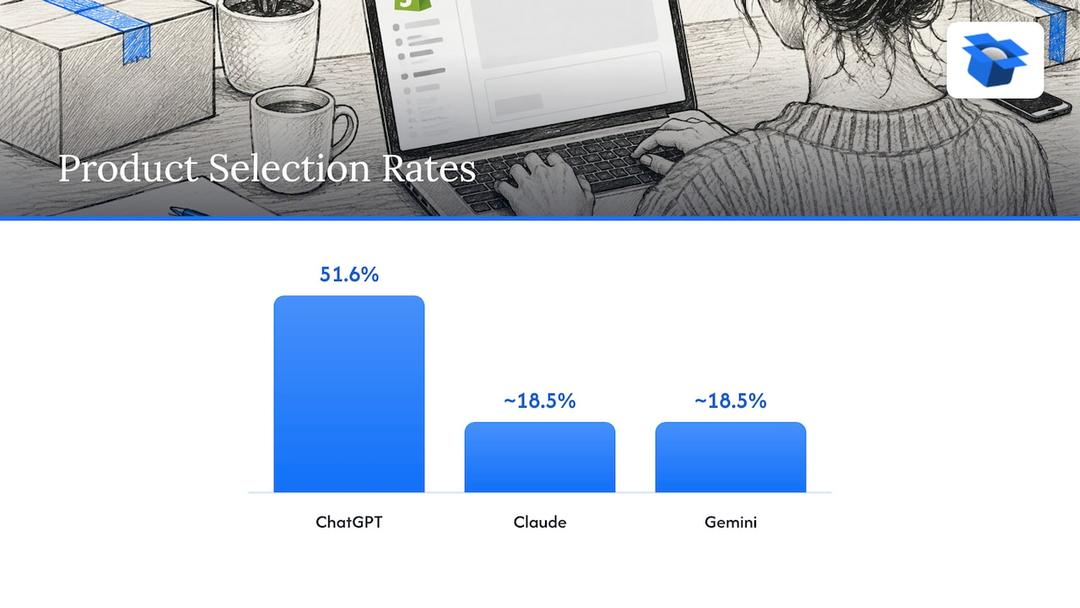
We have seen how lopsided the choice can be. By October 2026, ecentic had run 36,797 simulated purchases. On the same catalog, ChatGPT picked the product about 3x as often as Claude or Gemini: 51.6% against about 18.5%. Same products, different agents, different winners. Which assistant your shoppers use matters more than most teams assume.
We also run anonymous audits of stores, and I will not name any of them. One spirits marketplace doing about €70M a year had a fault in the data agents read on 88% of its 9,699 products. When agents were asked where to buy two bottles it stocks, it came up 0 times in 20. A Swedish skincare brand’s agent checkouts reached payment in 0 of 6 countries, because a shipping setting asked for a phone number. An agent cannot type a phone number it does not have. Humans would have just typed one in.
Neither of these problems shows up in a sales chart. They show up as the absence of a chart.
Our view
We built ecentic because we think analytics for the AI shopping era has to work on the store itself, not only on reports about it. An agent never sees your homepage. It reads your product feed, your catalog and the structured data on your product pages, and on Google (AI Mode and Gemini, US) it can check out for the shopper through UCP, Google’s open standard for agent checkout.
So ecentic connects to Shopify, WooCommerce or a product feed, and has ChatGPT, Claude and Gemini compare each of your products with a named competitor’s. It then shows you in plain English why yours loses. When you click Apply, ecentic rewrites the title, description and structured data and publishes them to your store.
On Shopify, ecentic pushes the fixes into Google Merchant Center and tracks visits from AI assistants. On WooCommerce, the free ecentic plugin lets agents search, fill a cart and check out through UCP. That checkout part is what plain feed tools don’t do.
Fair caveat: we are pre-revenue and running pilots, and our results so far are simulations and one visits number. We would rather say that than invent a case study. OpenAI has ACP, Google has UCP, Amazon has a wall, and we think the stores that fix their product data now will have the easier year.
Xhurian Shaba
Where each kind of tool fits
I do not think you need one tool. You probably need two or three, each doing one job. Here is how I would split it.
| Job | What it answers | Examples of who does it |
|---|---|---|
| Built-in store reports | What sold, where, and when | Shopify reports, WooCommerce reports |
| Profit and marketing analytics | Contribution margin, LTV, ad attribution across channels | Triple Whale, Polar Analytics, Northbeam |
| AI chat over your own data | Quick ad hoc questions in plain English | Sidekick, Claude or ChatGPT connectors |
| Agent shopping performance | Why an AI agent picks a competitor’s product, and whether it can buy yours | ecentic |
The profit and marketing tools are strong at what they do. Triple Whale and Polar Analytics fit brands that need clean cross-channel numbers and have several ad platforms to reconcile. Northbeam fits teams that live in paid media measurement. Built-in reports fit a small store that mostly wants to know what sold. We do not compete with any of them for that job, and I would not tell you to drop them.
What none of them does is edit your product data or set up the checkout an agent uses. That is the gap we work on. If you are comparing options for tracking AI-driven orders in particular, our write-ups on Shopify attribution apps, ecommerce attribution tools and AI analytics for agent visibility go through the field.
How to get started without wasting a month
The boring approach wins here. Start with one question, one data source and one check.
- Write down the decision. Not “use AI on my data” but “which products should I stop discounting?” A tool without a decision behind it produces charts nobody reads.
- Fix your definitions. Decide what revenue means for you (net of refunds, shipping in or out) and write it into the tool’s instructions.
- Start with the built-in option. Try Sidekick Pulse on Shopify or the AI Intelligence analyses on WooCommerce before you connect a third-party tool to your orders.
- Check three known numbers. Orders, refunds and your best seller. If any is off, find out why before asking anything harder.
- Limit what leaves the store. Share aggregated data where you can, and leave out customer names, emails and addresses.
- Add one connected source at a time. Ad spend next, then email. Each new source brings its own naming and currency problems.
- Run a free scan for the agent side. Run it on your top 10 products and see what the agents prefer in your category. Our free WebMCP shopping audit is another quick way to see how a store looks to agents.
Two weeks of this will tell you more than a long vendor demo.
What this means for Shopify and WooCommerce differently
The two platforms handle the AI shopping shift differently, so the next step differs too.
On Shopify, much of the plumbing is built in. Catalog data flows to AI channels, and ecentic’s job is making the product data good enough to win. On the Dominate plan, we sync fixes into Google Merchant Center and set up agent checkout. Our page for Shopify stores explains the setup.
On WooCommerce, you have to build more yourself. The free ecentic plugin lets agents search, fill a cart and check out through UCP. Attribution is also something you will need to wire up on your own, so plan time for it.
One limit applies to both: buying inside the AI answer is live on Google AI Mode and Gemini in the US through UCP. ChatGPT links to the store’s own checkout, so a store should expect the final click to happen on its own site there.
Try ecentic on your own catalog
If you want to see how agents treat your products, start with the free scan. It covers your top 10 products and needs no card. ecentic helps online stores sell when AI agents do the shopping: it optimizes your product feed and catalog so AI shopping agents pick your products and can actually buy them.
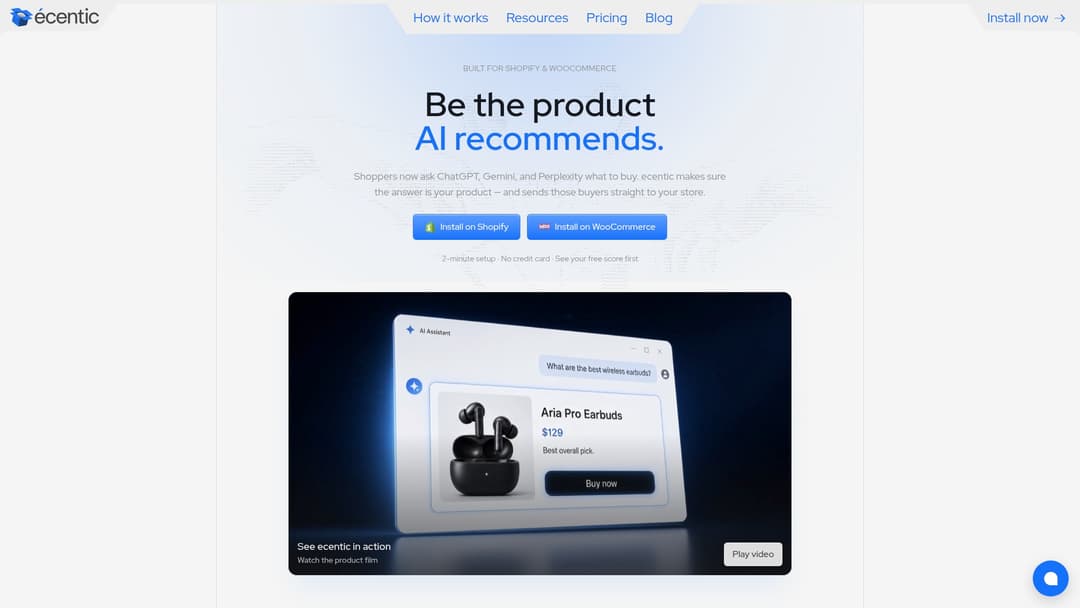
Paid plans are priced on the ecentic pricing page. Compete is $14.90 per month for up to 100 products. Scale is $44.90 per month for up to 1,000 products with one-click fixes. Dominate is $149 per month and adds Google Merchant Center sync and agent checkout setup. There is also a pay-as-you-go option at 3% of AI-attributed orders, capped at $500 per month. Larger teams can look at Enterprise, which has custom limits, API and MCP access, and a DPA. Get the sale when AI does the shopping. You can start at ecentic.ai.
FAQ
Is Shopify’s built-in AI analytics enough for my store?
For a small store that mostly wants to know what sold and where, built-in reports and Sidekick Pulse cover a lot. Teams running several ad channels usually add a profit or attribution tool. If AI assistants may be sending you shoppers, you also want a way to see that traffic and check whether your product data wins against competitors.
Does WooCommerce have AI analytics?
Yes. WooCommerce’s AI Intelligence documentation describes 13 analyses, from stock prediction to refund diagnostics. They are estimates, and some need a minimum amount of order history. For agent shopping, the free ecentic plugin lets agents search, fill a cart and check out through UCP.
Can I trust numbers from ChatGPT or Claude connected to my store?
Trust them after you check them. Compare orders, refunds and your best seller with your admin first, and tell the tool how you define revenue. Models write good queries but make arithmetic and paging mistakes on big datasets, so confirm any number you plan to act on.
How do I see orders that come from AI assistants?
Standard web analytics often misses them, because agents may buy through API calls and many AI apps pass no referrer. On Shopify, ecentic tracks visits from AI assistants. Shopify’s agentic storefronts also cover sales in several AI channels. Check the admin for what your plan shows.
Explore these topics