ecenticecentic
How it worksResourcesPricingBlog
Install now
ASCII-art illustration of a stack of books

Shopify Attribution Apps That Measure AI Driven Orders in 30–90 Days

Published: September 9, 2026 · 18 min read

Set up AI agent attribution on Shopify in 30–90 days. Create a GA4 AI channel, join orders server side, reconcile revenue, and run a free scan.

00

Introduction

Decorative AI attribution title card

The best approach isn’t a single app but a stack: first-party session capture joined server-side to Shopify orders, plus a GA4 regex that groups ChatGPT, Gemini, Perplexity, and Copilot into their own channel. For most Shopify and WooCommerce merchants, a specialized platform that pairs AI visibility diagnostics with attribution analytics is the fastest way to implement that stack and prove which orders actually came from an AI agent. Start with a free scan or a 30-day GA4 baseline this week.


TL;DR:

  • Most Shopify AI attribution tools rely heavily on referrer data, but a significant portion of AI-driven visits arrive without referrer strings, leading to undercounting.
  • Server-side tracking that joins session data to actual order revenue is essential for accurate AI attribution, especially for recommended SKUs and halo revenue.
  • Building custom regex channels and tagging outbound links with UTMs are crucial initial steps, with a 30-day baseline recommended before further adjustments.
  • Entry-level tools often only track referrer-based visits, while more advanced platforms provide diagnostics and fixes that can increase actual AI-driven sales.
  • Pricing models vary from flat subscriptions suitable for small catalogs to usage-based plans, but initial free scans reveal catalog-wide AI visibility issues to prioritize before investing.
Ecentic
Improve Your AI Product Visibility
Ecentic shows how AI evaluates your product pages and provides actionable recommendations to improve visibility in AI shopping recommendations.
Explore Ecentic
01

What Counts as a Shopify AI Attribution App (and What Doesn’t)

What Counts as a Shopify AI Attribution App (and What Doesn’t)

This article covers one narrow, specific category: tools that attribute Shopify or WooCommerce traffic and revenue to AI shopping agents like ChatGPT, Gemini, Perplexity, Claude, and Copilot. It does not cover general marketing attribution platforms built for ad ROAS, multi-touch channel modeling, or campaign-level spend allocation. Those solve a different problem for a different buyer.

The distinction matters because AI agents behave nothing like paid channels. A shopper can ask ChatGPT for a recommendation, click through with a referrer header, or get the product suggested with no click at all, an interaction that never shows up in any analytics platform. Analytics tools alone miss a meaningful share of this influence, which is why AI-specific attribution requires a mix of referrer detection, UTM discipline, and server-side revenue joins rather than a pixel-and-dashboard setup borrowed from paid media.

What’s measurable today: click-through AI referrals with intact referrer strings, UTM-tagged traffic from syndicated feeds, and revenue joined at the order level. What remains fuzzy: zero-click agentic recommendations that never generate a session at all. That gap is closing, but no tool eliminates it yet.

02

What to Look for in an AI Attribution Tool for Shopify

What to Look for in an AI Attribution Tool for Shopify

Not every feature on a vendor’s page matters equally. Rank your evaluation by how directly each capability ties to revenue, not traffic.

  • Server-side session capture with a revenue join. The tool needs to tie a landing session to the actual Shopify or WooCommerce order, not just log a pageview. Without this, you’re measuring visits, not sales.
  • AI-referrer grouping. Look for built-in GA4 regex support or a custom channel group that buckets chatgpt.com, perplexity.ai, gemini.google.com, and similar domains automatically instead of leaving you to build it from scratch.
  • UTM and llms.txt tagging support. The app should help you tag outbound links in feeds and llms.txt files consistently, so clicks that do carry a referrer get attributed correctly.
  • Recommended-SKU and halo-revenue detection. A shopper who arrives via an AI-recommended product but buys a different item is still an AI-influenced sale. Tools that only count direct-match SKUs undercount real impact.
  • Share-of-voice and citation monitoring. Knowing how often your products get mentioned or recommended by an agent, even without a click, is a leading indicator of future orders.
  • Reconciliation reporting. The tool should reconcile against Shopify’s own order counts rather than reporting session totals that never match GA4 in the first place.
  • Cookieless, low-lift integration. Given how much AI traffic arrives referrer-stripped, a tool overly dependent on third-party cookies will underperform regardless of its dashboard polish.

Pro Tip: Before you buy anything, pull your Shopify order list and your GA4 session count for the same 30-day window. If they’re off by more than 15 to 20 percent, you already have a referrer-stripping problem worth solving before you add another tool on top of it.

03

How to Set Up AI Attribution Tracking on Shopify: A 30 to 90 Day Plan

How to Set Up AI Attribution Tracking on Shopify: A 30 to 90 Day Plan

Here’s the sequence that gets you from zero visibility to a defensible attribution model, roughly in priority order.

  1. Week 1: Build a GA4 custom channel for AI assistants. Create a channel group using a regex that matches known AI referrer domains (a pattern like chatgpt\.com|perplexity\.ai|gemini\.google\.com|copilot\.microsoft\.com is a common starting point) and let it run for a 30-day baseline before you change anything else. GA4 has begun classifying some assistant referrals automatically, but custom channel groups still catch traffic the automatic classification misses.
  2. Week 1 to 2: Tag every external-facing link with UTMs. Apply consistent UTM parameters to your llms.txt file and any syndicated product feeds you control. Leave internal links and your sitemap untagged, since tagging internal navigation creates analytics noise without adding attribution value.
  3. Week 2 to 4: Install a server-side event or pixel that captures the landing SKU and a session identifier. This is the piece most merchants skip, and it’s the one that actually lets you connect a visit to a specific product recommendation later.
  4. Week 3 to 5: Propagate that session id into checkout metadata. Tie it to your order webhook, whether that’s Shopify Payments or a Stripe integration, so revenue and referral source live in the same record. This server-side join is what makes recommended-SKU and halo-revenue reporting possible at all.
  5. Ongoing: Run weekly prompt monitoring and reconciliation. Check what agents actually say about your products, and reconcile your AI-attributed order count against total Shopify orders every week, not just at month end.

Budget more developer time for step 3 than any other step. It’s the one piece of custom engineering the others depend on, and rushing it is the most common reason merchants abandon the project halfway through. For a fuller walkthrough of the tracking mechanics, see how to track AI shopping traffic.

04

Which Metrics Actually Matter for AI Attribution?

Which Metrics Actually Matter for AI Attribution?

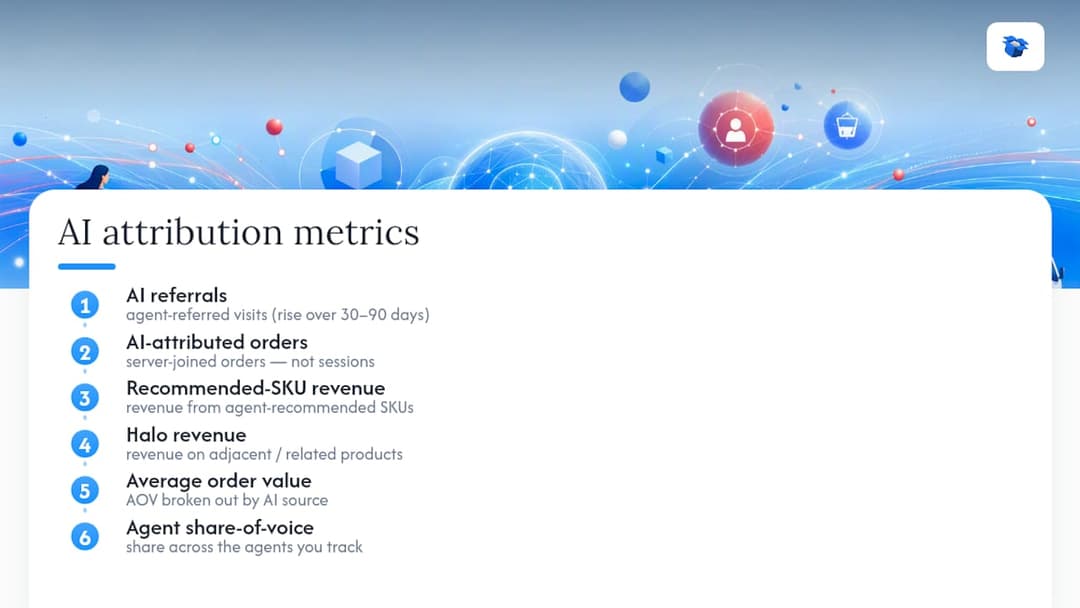
Six numbers tell you whether AI agents are moving revenue: AI referrals, AI-attributed orders (the server-joined figure, not the session count), recommended-SKU revenue, halo revenue on adjacent products, average order value by AI source, and share-of-voice across the agents you track.

Six metrics for AI attribution

Three proxy signals fill in the zero-click gap that direct measurement can’t reach. Branded-search lift in Search Console often rises when an agent starts recommending you by name, a clean signal that costs nothing to monitor. Unexplained growth in direct traffic sometimes traces back to users who got a recommendation from an agent and typed your URL in manually. A weekly prompt-monitoring scorecard, asking the same shopping questions an agent’s real users would ask, rounds out the picture.

The reconciliation rule that saves the most headaches: reconcile on orders and revenue, never on sessions. Shopify’s order counts and GA4’s session counts are built on different definitions and will not match no matter how carefully you tag traffic; the revenue join is what survives referrer stripping. Over a 30 to 90 day window, expect AI referrals to climb steadily even if AI-attributed orders lag by a few weeks, since AI referrals convert at notably higher rates than non-branded organic traffic once the buyer intent is already there.

05

How Ecentic Handles AI Attribution for Shopify and WooCommerce

How Ecentic Handles AI Attribution for Shopify and WooCommerce

A platform can map directly onto the checklist above rather than replacing it with a black box. It can run simulation-driven diagnostics against ChatGPT, Gemini, Claude, and Perplexity to show how each agent evaluates a product listing, then turn those findings into actionable fixes.

  • Competitive simulation can show why an agent recommends a rival product instead of yours, down to specific listing attributes.
  • Actionable rewrite suggestions may apply directly to underlying issues, and one-click publishing can push fixes straight to Shopify or WooCommerce.
  • Built-in attribution analytics can track agent-driven visits and orders using first-party, server-joined logic, combining diagnostic and measurement.
  • Continuous rescans track whether an AI selection rate is improving after each change, rather than requiring guesses.

Some customers have reported meaningful increases in both AI-driven visits and downstream sales after running an optimization loop with similar tools. That matters because it collapses the 30 to 90 day setup window: instead of building diagnostics, monitoring, and reporting separately, a merchant gets all three from one connected Shopify integration.

Pro Tip: Run the free scan before you touch your GA4 setup. Knowing which listings already underperform with AI agents tells you which SKUs deserve tracking priority once your attribution pipeline is live.

06

Comparing Shopify Attribution Apps on AI Referral Tracking

Comparing Shopify Attribution Apps on AI Referral Tracking

Most attribution tools in this category fall into one of three tiers, and the differences show up fastest when you look at referrer handling specifically.

Entry-level analytics add-ons typically bolt AI channel detection onto an existing GA4 dashboard. They’re inexpensive and quick to install, but most rely entirely on referrer strings staying intact, which means they miss the 20 to 40 percent of AI visits that arrive stripped of referrer data and land in Direct by default.

Mid-tier tracking platforms go further by adding UTM management and basic reconciliation reporting against Shopify order data. They close part of the gap but usually stop short of a true server-side revenue join, so recommended-SKU and halo-revenue reporting stay approximate rather than precise.

Diagnostic-and-attribution platforms, the category Ecentic operates in, pair the tracking layer with visibility into why an agent recommends or skips a product in the first place. That combination matters because tracking tells you what happened, but only diagnostics tell you what to fix next. A merchant using a tracking-only tool can see AI referrals decline without ever learning the listing change that would reverse it.

The practical takeaway: pick a tier based on whether you need measurement alone or measurement paired with a path to improve the underlying numbers. Most established Shopify brands outgrow the entry tier within a quarter once they realize referral counts don’t explain themselves.

07

Choosing the Right App for Your Store’s AI Shopping Agent Tracking

Choosing the Right App for Your Store’s AI Shopping Agent Tracking

Four criteria separate a good fit from a wasted subscription.

Integration depth with your platform. A tool built for generic web analytics and retrofitted for Shopify will lag behind one built with native Shopify and WooCommerce connections, particularly for order-level joins.

Coverage of agents your buyers actually use. ChatGPT dominates AI referral volume right now, but Gemini and Perplexity are growing fast enough that a tool tracking only one agent will leave real revenue unmeasured within a year.

Whether it diagnoses or just reports. A dashboard that shows declining AI referrals without explaining why forces you to guess at fixes. A platform with simulation-based diagnostics shows you the specific listing gap causing the drop.

Reconciliation transparency. Ask any vendor directly how their AI-attributed order figure is calculated. If the answer is session-based rather than order-and-revenue-based, expect numbers that drift from your actual Shopify totals over time.

Store size affects the calculus too. A catalog under a few hundred SKUs can often manage with GA4’s custom channel plus manual Shopify reconciliation. Catalogs running into the thousands need the automation a dedicated platform provides, simply because manual reconciliation at that scale eats a disproportionate amount of a lean team’s week. For catalog-scale product content work, pairing attribution tracking with systematic listing optimization tends to outperform either effort alone.

08

What Shopify AI Attribution Tools Cost

What Shopify AI Attribution Tools Cost

Pricing in this category splits into three models, and the right one depends more on your order volume than your budget size.

Flat monthly subscriptions suit stores with stable, predictable AI referral volume. You know the cost going in, but you pay the same rate whether AI agents send you five orders a month or five hundred, which can waste money for smaller catalogs or overdeliver value for larger ones.

Usage-based or percentage-of-attributed-revenue pricing scales with actual impact. You pay more only when AI-driven orders climb, which aligns cost with value but requires trusting the vendor’s attribution math, since you’re paying a percentage of a number they calculated.

Free introductory scans, offered by several platforms, let you see baseline diagnostics before committing to a pricing model. That first look matters because it tells you whether your catalog has an AI visibility problem worth solving before you commit to a monthly or usage-based plan.

Total cost of ownership runs well beyond the subscription line, though. Developer time for the server-side session capture and webhook integration described earlier in the setup plan often costs more than a year of software fees for a small team, particularly if you’re hiring outside help. Factor in the ongoing time for weekly reconciliation and prompt monitoring too. A tool priced lower but requiring more manual reconciliation work can end up costing more in staff hours than a pricier platform that automates the same reporting.

09

Common Problems When Setting Up AI Attribution on Shopify

Common Problems When Setting Up AI Attribution on Shopify

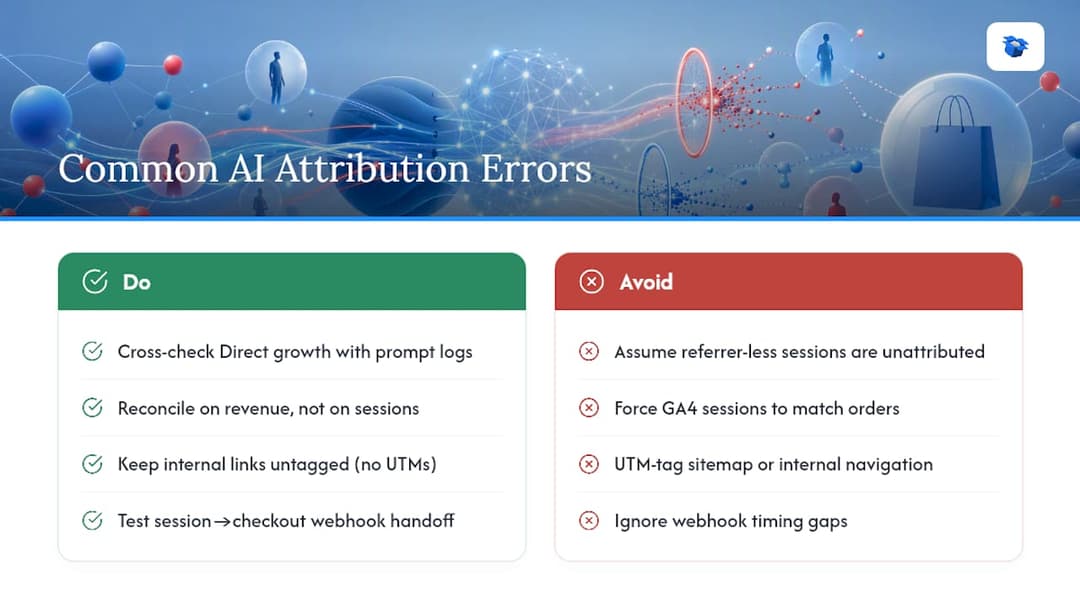
The referrer-stripping gap trips up almost every merchant in their first month. AI agents frequently pass no referrer at all, so a meaningful share of genuinely AI-driven visits land in GA4’s Direct bucket by default rather than any AI channel. Cross-checking Direct-traffic growth against your prompt-monitoring log is the most reliable way to catch this instead of assuming those sessions are unattributable.

Session-to-order mismatches come next. If your GA4 session count and Shopify order count never line up, stop trying to force them to match. They’re built on different definitions and reconciling on revenue instead of sessions eliminates the problem rather than papering over it.

Over-tagging internal links is a quieter mistake with real consequences. UTM-tag your sitemap or internal navigation and you’ll pollute your own channel reports with false attribution, making every other number in the dashboard harder to trust.

Webhook timing gaps cause the fourth common failure. If your session id doesn’t reach checkout metadata before the order webhook fires, you lose the join entirely for that transaction. Test this specific handoff before trusting any recommended-SKU report, since a broken webhook link fails silently and just shows up later as unexplained revenue you can’t trace.

Finally, treating a single agent’s data as the full picture skews strategy. A merchant who only tracks ChatGPT referrals will misjudge total AI influence as Gemini and Perplexity grow their own referral share.

Common Problems When Setting Up AI Attribution on Shopify — overview diagram

10

Get Started With Ecentic’s Free AI Visibility Scan

Get Started With Ecentic’s Free AI Visibility Scan

Everything covered above, the GA4 regex, the server-side join, the SKU-level reconciliation, takes real engineering time to build from scratch. Ecentic gives you the diagnostic half of that work immediately: run the free scan and you’ll see, listing by listing, how ChatGPT, Gemini, Claude, and Perplexity currently evaluate your products, plus which specific attributes are costing you recommendations.

Ecentic

The scan surfaces concrete signals within minutes: which SKUs already get recommended, which lose out to competitors on a fixable detail like missing specifications or weak comparison framing, and where your catalog has no AI visibility at all yet. From there, the natural next step is applying the suggested listing fixes through one-click publishing, then watching the attribution analytics track whether AI-driven visits and orders move as a result.

If you’re running Shopify, the Shopify-specific integration connects in minutes without a developer sprint. WooCommerce merchants get the same diagnostics through the WooCommerce platform. Either way, start with the free product listing scan this week, before you invest developer hours in the server-side tracking build, so you know exactly which SKUs deserve that engineering time first.

11

A Priority Checklist for This Week and This Quarter

A Priority Checklist for This Week and This Quarter

This week: stand up the GA4 AI-referrer channel and pull your Shopify order baseline. That single step exposes the referrer-stripping gap most merchants don’t know they have. This quarter: build the server-side session-to-order join, since it’s the piece that turns AI referral counts into defensible revenue numbers your team can act on.

Treat every regex, UTM scheme, and reconciliation cadence here as a starting hypothesis, not a fixed formula. Run it for a full 90-day cycle, compare it against your own Shopify data, and adjust before you assume any number is final.

— Xhurian

12

Sources

Sources

  • Attribution gap in agentic search — Semrush
  • AI assistants strong referral traffic drivers: paths to purchase
  • ChatGPT Shopping Revenue Attribution 2026 | Attrifast
13

FAQ

FAQ

What Is the Best Shopify Attribution App for Tracking AI Shopping Agents?

There’s no single universal answer, but a platform combining AI visibility diagnostics with server-joined attribution analytics, like Ecentic, covers more of the workflow than a GA4-only setup, since it pairs measurement with the fixes that improve the numbers you’re measuring.

Why Don’t My Shopify Order Counts Match My GA4 Sessions?

Referrer stripping causes a meaningful share of AI-driven visits to land in GA4’s Direct channel with no attribution data, and Shopify’s order-based counting and GA4’s session-based counting use different definitions entirely, so reconcile on orders and revenue instead of sessions.

How Do I Set Up a GA4 Custom Channel for AI Referrals?

Create a custom channel group using a regex matching known AI domains such as chatgpt.com, perplexity.ai, and gemini.google.com, then let it run for a 30-day baseline before making further changes.

What Is Halo Revenue in AI Shopping Attribution?

Halo revenue is sales on products adjacent to the one an AI agent originally recommended, captured through a server-side session-to-order join rather than a simple SKU match.

Do I Need a Paid Tool, or Can I Track AI Referrals for Free?

A GA4 custom channel and manual Shopify reconciliation can get a small catalog started for free, but stores with larger catalogs typically need automated diagnostics and reconciliation to keep pace, which is where a free scan from a platform like Ecentic helps you decide before committing to a paid plan.

Shopify analytics appstop Shopify tracking toolsattribution tools for ShopifyShopify conversion trackingbest attribution softwarebest apps for Shopify insightsShopify performance measurementShopify data tracking solutionsbest shopify attribution appshow to track Shopify salesattribution solutions for eCommerceShopify marketing attribution
Back to blogGet started

Guides and research on winning AI shopping agents.

Get picked by AI

Ready to be the product agents recommend?

Install free on Shopify or WooCommerce and see your AI score in minutes.

Install on ShopifyInstall on WooCommerce
ecentic

Win every AI shopping agent's cart.

Built for the agent economy
Product
  • Features
  • How it works
  • Pricing
  • Product Listings
Platforms
  • Shopify
  • WooCommerce
  • Enterprise
Resources
  • Developer docs
  • API reference
  • Resources
  • Blog
  • Compare
  • UCP Validator
  • UCP Playground
  • Book a demo
Company
  • Support
  • Privacy policy
  • Terms of service

© 2026 ecentic. All rights reserved.

Made for merchants who refuse to be invisible to AI.