


Whether people google, go to Amazon or ask a chatbot, AI now gives them a response with a product in it, and most e-commerce brands have no idea how to be that product. Product data quality for AI means your titles, specs, identifiers, prices and stock status are complete, consistent across every place they appear, and readable by software. Fix those, and an agent can compare your product with a rival’s and choose yours.
I think the funniest part is how long we all polished homepages. The agent never sees yours. It reads the product feed, the catalog and the structured data on product pages, and it moves on when something is missing. Your hero banner is lovely, and nobody is looking at it.
TL;DR
- AI agents compare products using feed fields, catalog data and structured data on product pages, not your homepage or brand story.
- Missing, inconsistent or stale fields (specs, identifiers, price, availability) are the most common reasons an agent skips a product.
- The feed and the page markup must say the same thing. Google uses both and checks one against the other.
- Audit the mismatches that would make a shopper choose wrongly first: identity, suitability, offer, destination.
- Start small: a free ecentic scan covers your top 10 products and shows which competitor beats you and why.
What product data quality means when an agent is the shopper
For a human, a product page is a story with photos. For an agent, it is a record. The agent asks a plain question: does this record tell me what the thing is, whether it fits the request, what it costs, whether it is in stock and where to buy it?
A 2026 piece on AI shopping discovery makes a careful point: complete product data can improve the likelihood that an AI-assisted system evaluates and surfaces a product, but it does not prove that a lesser-known product will beat a bigger brand. I agree with that framing. Clean data is the entry ticket. It is not a guarantee.
LogicBroker’s Jager Robinson adds a useful observation in a 2026 post on product data quality: the winners in AI-driven discovery are often not the ones with the biggest marketing budgets, but the ones whose data is clean, structured and consistent enough for models to read and trust. Most catalogs were built to get products live fast, with completeness as a nice extra. That trade-off used to be cheap. It no longer is.
The four things an agent checks
I find it easiest to think in four questions, which line up with the audit framework in First Brand’s AI shopping readiness report:
- Identity. Which exact product and variant is this? Identifiers and the main image answer that.
- Suitability. Does it fit what the shopper asked for? Attributes, compatibility and supporting evidence answer that.
- Offer. What is the price, in which currency, is it available, and on what conditions?
- Destination. Does the link land on the right product page with a working path to buy?
If any of the four is wrong, the agent either guesses or leaves. Guessing is worse for you, because a wrong price or wrong size shown to a shopper becomes a returned order or a lost one.
Why gaps make agents skip you
LogicBroker describes the failures as predictable at scale: specs are incomplete, descriptions are stuffed with keywords, attributes are filled in unevenly across SKUs, and the same product has different names in different channels. Its blunt summary is that a model does not work around gaps, it moves on.
Google says something similar in its own words. Google’s Merchant Center product data specification states that incorrect, inaccurate or missing product information can cause disapprovals, limited eligibility or incorrect displays, and that accurate, correctly formatted data is essential for ads and free listings in AI-powered formats.
There is also a quieter failure: data that a human can reach but an agent cannot. Core dna described a test on a Clark Rubber site where product-level information was retrievable while store-level stock sat behind an interaction the retrieval path never exposed. A person clicks a store selector and sees stock. The agent never clicks anything. Fair enough, it is a robot, but it still decides who gets the sale.
What we see in our own simulations
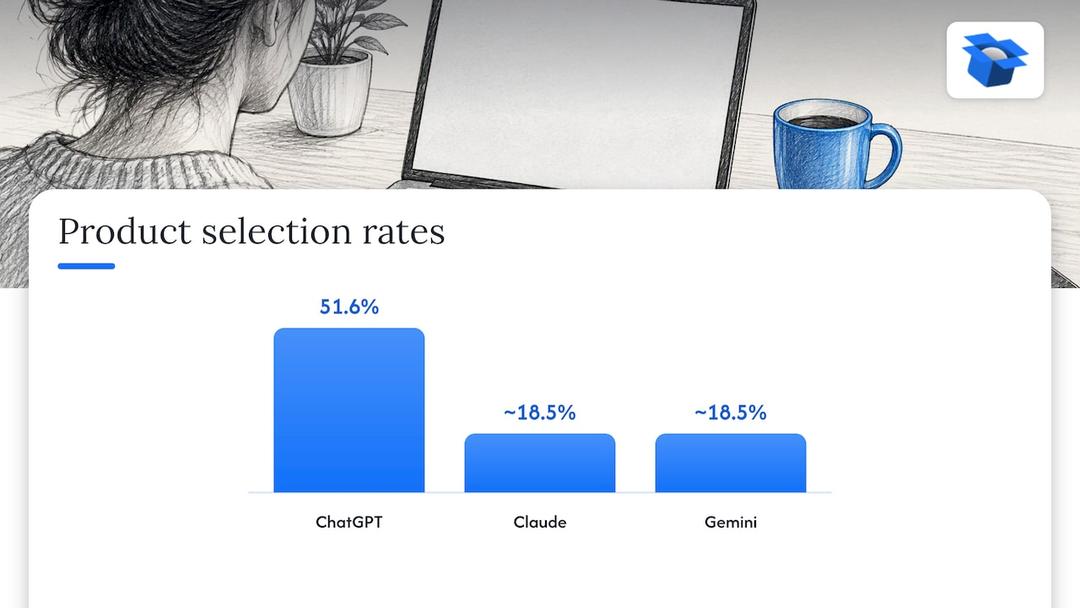
These are ecentic numbers, from our own runs, so read them as ours. By October 2026 we had run 36,797 simulated purchases. On the same catalog, ChatGPT picked the product about three times as often as Claude or Gemini, 51.6% against roughly 18.5%. So “the AI” is not one buyer. Each model weighs your data differently, and a record that wins in one can lose in another.
In one anonymous audit, a spirits marketplace doing about €70M a year had a fault in the data agents read on 88% of its 9,699 products. When agents were asked where to buy two bottles it stocks, it came up 0 times in 20. Nobody had noticed, because the site looked great.
Another audit, of a Swedish skincare brand, found agent checkouts reached payment in 0 of 6 countries, because a shipping setting asked for a phone number. An agent filling a cart does not have your customer’s phone number. It is a tiny setting, and it blocked every order.
Which specs and attributes to provide
Start with what the platforms themselves ask for. OpenAI’s product feed specification requires item_id, title, description, url, brand, seller_name, image_url, availability and price. It lists optional fields for condition, product_category, material, color, size, gender, age_group, dimensions and weight. Optional is the polite word. When two products compete, the one with material and dimensions filled in is easier to match to a specific request.
Xorosoft makes the practical case in its guide to shopping agent data: factual completeness matters more than promotional language, and structured attributes make comparison easier because software need not infer details from prose. Their example is a shopper asking for a walnut desk under 50 inches wide. That match is far more reliable when material and width are fields, not adjectives in a paragraph.
Photoroom proposes a seven-layer listing structure that I find a handy checklist:
| Layer | What goes in it |
|---|---|
| Title | Product type, brand, model, material, color, size, capacity |
| Structured attributes | Color, size, material, gender, condition, compatibility, dimensions |
| Description | Construction, performance, included items, intended use, maintenance |
| Identifiers | GTIN, MPN, SKU, item group ID |
| Offer data | Price, currency, availability, condition, delivery, returns |
| Images | Primary, alternate angles, detail, lifestyle |
| Page and feed consistency | Matching price, stock, title, variant, image and URL |
Notice what is absent: slogans. A title like “The Only Mug You’ll Ever Need” tells an agent nothing. “Stoneware Coffee Mug, 12 oz, Matte Black, Dishwasher Safe” tells it everything it can compare. If you want a deeper walk through titles and descriptions, our guide to product listing optimization covers the rewrite side.
Feed and page markup have to agree
Most stores maintain two versions of the truth: the product feed, and the structured data (JSON-LD, a machine-readable block) on the product page. They drift apart faster than anyone admits.
Google’s Search Central documentation says that providing both structured data and a Merchant Center feed maximizes eligibility and helps Google verify data. Some experiences combine the two, so product snippets may take pricing from the feed when the page markup lacks it. Merchant Center’s own help page adds the rules that trip people up: markup must be in the HTML returned by the server, not generated by JavaScript, it must match what the user sees, pages need a Product object with a nested Offer, and price uses a period as the decimal separator.
The Universal Commerce Protocol blog lists the minimum Product schema properties for agentic commerce: name, description, sku or gtin13, brand, image, offers with price and availability, and aggregateRating. It recommends adding weight, height, width, depth, color, size, category and additionalProperty for attributes specific to the product type. If you are new to the markup itself, a plain explainer on how schema markup works helps, and a step-by-step on adding product schema markup includes a copy-ready example.
| Product feed | Page structured data | |
|---|---|---|
| Where it lives | Uploaded to a channel such as Merchant Center | In the HTML of each product page |
| Best at | Price, stock and identity at scale, kept fresh | Letting systems verify the page matches the feed |
| Typical failure | Stale price or stock | Missing Offer, JavaScript-only markup |
| Who usually owns it | Growth or channel team | Developer or theme |
BBQ Growth Lab frames this well as four layers: source facts (PIM, ERP, inventory, pricing), a normalized product model, channel outputs (page HTML, JSON-LD, feeds) and a feedback layer of statuses, warnings and rejections. Their rule is that no platform feed should silently overwrite the source facts. I think that is right, and it is the rule most small stores break the first time someone edits a title inside a sales channel.
Fair caveat: structured data does not guarantee a recommendation. Core dna puts it fairly, saying it gives AI systems better commercial information to work with, while discovery still depends on relevance, context and other signals. Also, having an API is not the same as being reachable by an agent, unless the agent has a supported way to use it.
For our own take on markup, see the structured data checklist for product pages and the piece on simulation-backed product schema.
How to audit your catalog
You do not need to fix 10,000 products on day one. Fix the ones where a mismatch would make a shopper choose wrongly. That is the priority First Brand proposes in its readiness audit, and it is a sane filter.
- Export your feed and pick your 20 best sellers. Small samples show patterns fast.
- For each, check identity: does every variant have its own identifier, and is the title the same on your site, feed and marketplaces?
- Check suitability: are material, size, dimensions, compatibility and intended use filled in as fields, not buried in prose?
- Check the offer: compare price, currency and availability in the feed against what the live page shows and what the JSON-LD says.
- Check the destination: click the feed URL. It should land on the right variant, with a path to buy that does not need a login or a phone number.
- Ask a few chatbots for your product the way a shopper would, and note who gets named instead of you.
Step 6 is where most teams stall, because it is slow by hand and the answers change by model. It is the reason we built the simulation side of ecentic. More on that below.
How to measure whether your data is good enough
There is no single industry score, so I would keep a simple scorecard and track it monthly. Four measures cover it:
- Completeness: the share of products with every required and recommended field filled in.
- Consistency: the share of products where title, price and availability match across feed, page and marketplaces.
- Accuracy: a spot check of a sample against the real product, packaging and supplier sheet.
- Freshness: how long between a price or stock change in your system and the same change in the feed.
The tools you already have help. Merchant Center shows item-level warnings and disapprovals, which is a free consistency check against Google’s own rules. Who owns what matters too. BBQ Growth Lab’s view is that the product team owns the fact definition, commercial systems own price and inventory truth, engineering owns distribution, and growth handles platform mapping and quality gates. What needs governing is whether price, inventory, identifiers, variants and images are represented correctly everywhere, not who uploads the file.
For a longer rollout, our 30 to 90 day plan for AI product page optimization and the piece on which data sources AI shopping uses lay out the sequence.
Our perspective on where this is heading
We think product data is becoming the storefront. When someone asks an agent to find a gift, compare two blenders or reorder coffee, the agent reads records. It does not browse, it does not get charmed by a banner, and it does not forgive a missing size.
That is why ecentic works on the store itself: the product feed, the catalog and the checkout an agent uses to buy. We connect to Shopify, WooCommerce or a product feed. We have ChatGPT, Claude and Gemini compare each of your products with a named competitor’s, and we show why yours loses, in plain English. When you click Apply, we rewrite the title, description and structured data and publish them to your store.
The checkout part matters. Buying inside the AI answer is live on Google AI Mode and Gemini in the US through UCP, Google’s open standard for agent checkout. On WooCommerce, the free ecentic plugin lets agents search, fill a cart and check out through UCP. On Shopify, we push fixes into Google Merchant Center and track visits from AI assistants. ChatGPT links to the store’s own checkout, so there the product page and checkout still have to work for an agent. OpenAI has ACP, Google has UCP, Amazon has a wall.
Our first pilot, DUA Flavours, saw visits from AI assistants and direct traffic rise 12% from April to July 2026. That is a visits number, not a sales number, and I want to be clear about it. We are early, and we are running pilots.
Xhurian Shaba
Start with a free scan
If you would rather see the gaps than read about them, the free ecentic scan covers your top 10 products, needs no card, and shows which named competitor each AI model prefers and why. You can also run the free WebMCP shopping audit for your store, and read how it works before you connect anything.
When you want the fixes published, the Compete plan is $14.90 per month for up to 100 products. Scale is $44.90 per month for up to 1,000 products and adds one-click fixes. Dominate is $149 per month and adds Google Merchant Center sync and agent checkout setup. There is also a pay-as-you-go option at 3% of AI-attributed orders, capped at $500 per month. Current terms are on the pricing page, and larger catalogs can look at Enterprise.
FAQ
What is product data quality for AI?
It is how complete, consistent, accurate and current your product records are, and whether software can read them. Agents compare products on fields such as title, attributes, identifiers, price and availability. A record with gaps is easy to skip, so the product with the fuller record tends to be the easier one to recommend.
Which product specs matter most for AI shopping agents?
Start with the fields platforms require: title, description, brand, image, price and availability, plus identifiers such as GTIN or SKU. OpenAI’s feed specification also lists material, color, size, dimensions and weight as optional fields. Fill those in as separate fields, not only in the description.
Do I need both a product feed and structured data?
Yes, because they do different jobs. Google’s documentation says providing both maximizes eligibility and lets it verify one against the other. Keep them identical on price, availability, title and variant, and keep the markup in the HTML the server returns.
Will clean data guarantee that AI recommends my product?
No. Clean data makes your product legible and comparable, but relevance, context and other signals still count. What it does is remove the avoidable reasons for being skipped, which are often the cheapest ones to fix.
Sources
- AI Shopping Discovery: Why Product Data Matters
- Why AI Can’t Find Your Products: Product Data Quality
- AI Shopping Readiness: Product Data for Recommendation
- Product data specification, Google Merchant Center Help
- Product Feed Optimization for AI Shopping and AI Search
- OpenAI product feed specification
- AI Shopping Product Data: How to Prepare for Shopping Agents
- How to structure product listings for AI shopping agents
- Intro to Product Structured Data on Google
- Set up structured data for Merchant Center
- Structured data for AI agents: schema.org, JSON-LD and UCP
- Product Structured Data vs. Feeds
- Schema Markup Explained
Explore these topics