

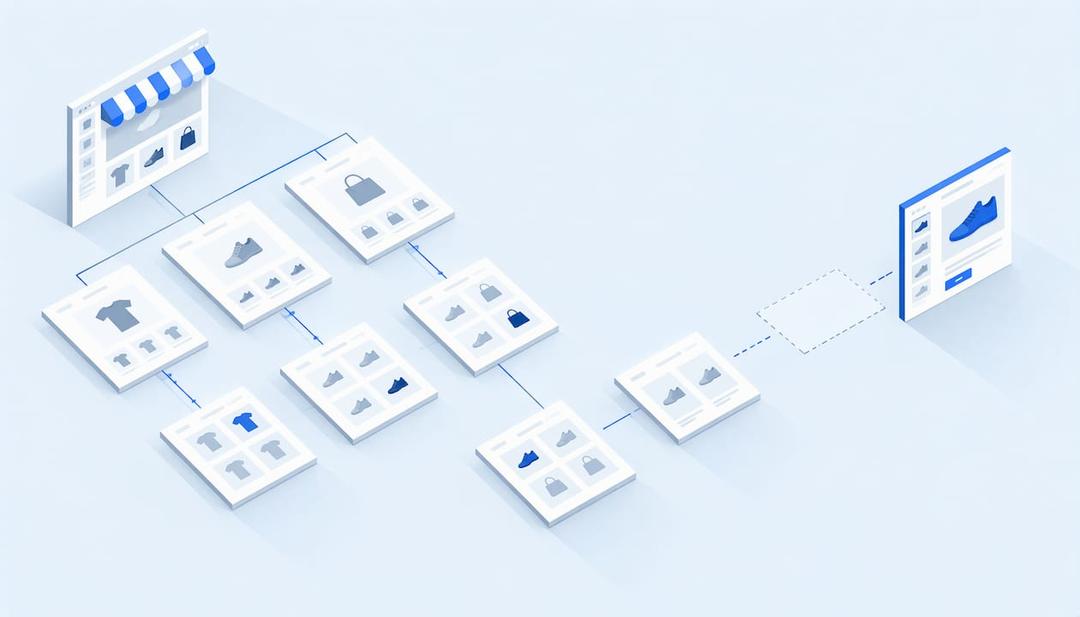
Whether people google, go to Amazon or ask a chatbot, AI now gives them an answer with a product in it, and most e-commerce brands have no idea how to be that product. A sitemap for AI agents is your normal XML sitemap, kept clean and complete, because it helps agents find your product URLs. What decides whether an agent picks and buys from you is the product feed, the catalog and the structured data on each page, which is the work ecentic does for Shopify and WooCommerce stores.
Here is my take. The internet is currently selling a lot of “AI sitemaps” with new file names and big promises, and no AI platform has confirmed it reads them. Meanwhile a lot of stores still have product pages that return errors to bots. I think that is the better place to spend an afternoon. A new JSON file is exciting. A 403 is boring, and it is the one that costs you the sale.
TL;DR
- Keep your standard sitemap.xml accurate: canonical product URLs, honest lastmod dates, nothing broken. Shopify generates one for every store.
- Sitemaps are a discovery hint. In one agent study they were fetched directly in only 4% of runs, so product pages that load and read well matter more.
- Proposed AI-specific sitemaps (JSON indexes, custom XML) are experimental. Add them only after the basics are done.
- Breadcrumbs with BreadcrumbList markup tell agents how products sit inside categories.
- ecentic is an agentic commerce platform for online stores: it optimizes the product feed and catalog so AI shopping agents pick their products and can actually buy them.
What a sitemap does for an AI agent
A sitemap is a file that lists the pages on your site so crawlers do not have to guess. Google Search Central describes it as a file that helps search engines crawl more efficiently. It helps discover URLs, but it does not guarantee crawling or indexing. Google also says sites of roughly 500 or fewer well-linked pages may not need one at all.
Agents are a different kind of visitor. They do not browse your homepage and admire the hero banner. They read the product feed, the catalog and the structured data on product pages. So the useful question is not “does my sitemap exist” but “what happens when an agent actually lands on a product URL.”
Vercel measured that in its research on making a site readable by AI agents. Across 1,033 observed agent runs, 82.5% of the runs with answer-provenance results traced the answer to a fetched page. Agents requested sitemap.xml directly in 4% of runs. And when the server returned a 403, neither tested client retrieved an answer.
Read that as a priority list. First, the page must be reachable. Second, it must be readable. The sitemap is a helpful third, mostly useful for crawlers that build an index before an agent ever asks a question. Cloudflare’s AI Search, for instance, reads XML sitemaps declared in robots.txt, re-crawls pages when lastmod changes and indexes them in priority order. That is a real use, and it rewards a tidy sitemap.
Access comes first, so check your robots.txt before anything else. We wrote about how to block AI training bots while keeping ecommerce search open, because the two goals are easy to mix up.
The proposed AI sitemaps, and how much to trust them
You will see three kinds of proposals. Here is what each is and where it stands.
A JSON index of your content. The idea is a machine-readable file that describes content types, topics and relationships, sitting next to sitemap.xml. One example is the open index-ai proposal, whose v1.0 release candidate defines a manifest, an index of content nodes with clean text endpoints and an optional query interface. Its own text says it cannot guarantee that any agent or search engine will discover, index or cite a site. If you want to see how such an index lays out its fields and endpoints next to a normal sitemap, this AI crawlability audit is a practical place to check whether bots can reach your pages at all.
An agent-oriented sitemap from research. An ACL 2026 findings paper proposes the Web Agent Sitemap Protocol, which gives web agents a site-level map plus page-level guidance. The authors report better robustness, efficiency and task success for LLM web agents on browsing benchmarks. That is a result about agents that browse a site on their own. It is promising, and it is research, not something a shopping agent is known to read on your store today.
A custom XML sitemap with extra fields. Some agencies suggest author credentials and content-density flags in a separate file. Nobody has confirmed any AI platform parses those extensions. I would call that a bet, not a fix.
My view: if a JSON index takes your developer an hour, fine, ship it. If it competes with fixing product data for budget, the product data wins every time.
Ecommerce sitemap best practices for Shopify and WooCommerce
The rules come mostly from Google’s sitemap documentation, and they apply to whatever crawler reads your file. Here is the routine, in order.
-
Start with the sitemap your platform generates. Shopify builds a sitemap.xml for every store, with products and primary content. WooCommerce stores usually get one from an SEO plugin or from WordPress itself. Open yours at /sitemap.xml and confirm it loads without a login or a redirect loop. Where it goes wrong: a staging or password setting that leaks into production, or a plugin that creates two competing sitemaps.
-
List only URLs you want found. Google says to include URLs you want in search results and to use fully qualified, absolute canonical URLs. Drop out-of-stock pages you have retired, filter combinations, cart and account pages, and anything that redirects. Where it goes wrong: parameter URLs listed in the sitemap while the page canonicalizes to a different address. The two signals fight.
-
Decide how variants appear. Shopify and WooCommerce default to canonicalizing variant parameters to the parent product URL. Keep the sitemap, canonical tag, structured data and feed consistent with that choice. If the parent page is canonical, list the parent. Do not list ten variant URLs that point back to it.
-
Keep lastmod honest. Google says lastmod should reflect the last significant update and is used only when it is consistently and verifiably accurate. It ignores priority and changefreq. Where it goes wrong: a plugin that stamps every URL with today’s date on every deploy, which teaches crawlers to ignore the field.
-
Respect the size limits. Each sitemap file can hold up to 50,000 URLs or 50 MB uncompressed. Larger catalogs split into several files under a sitemap index. Splitting by type (products, collections, pages) also makes problems easier to find.
-
Make sure products are linked, not only listed. Google’s ecommerce navigation guidance notes that Googlebot generally does not submit searches into a search box, so products reachable only through site search may go unfound. Link menus to categories, categories to sub-categories and sub-categories to every product. Use a sitemap or a Merchant Center feed for pages you cannot link. Our piece on internal linking hubs covers the linking side, and the one on collection pages covers the browsing side.
-
Fix what the agent reads once it arrives. This is where the sitemap stops and the sale starts. ecentic connects to Shopify, WooCommerce or a product feed, and has ChatGPT, Claude and Gemini compare each product with a named competitor’s, and shows why it loses. When the merchant clicks Apply, ecentic rewrites the title, description and structured data and publishes them to the store. Our guide to the product feed for AI shows what agents read there.
A sitemap that lists 9,699 perfect URLs is still a list of 9,699 doors. In an anonymous ecentic audit of a spirits marketplace doing about €70M a year, 88% of its 9,699 products had a fault in the data agents read. Agents asked where to buy two bottles the marketplace stocks named it 0 times in 20. The sitemap was not the problem.
Breadcrumbs: the part of the map agents actually read
Breadcrumbs are the trail at the top of a page, like Home, Whisky, Single Malt, then the product. For an agent they show where a product sits among its category neighbors, which helps it tell a bottle from an accessory or a bundle.
Google’s breadcrumb markup guide recommends a trail that represents a typical user path rather than mirroring the URL structure. A BreadcrumbList needs at least two list items. The top-level domain and the page itself are optional, and the last item may leave out its link.
Google’s structured data guide for ecommerce lists BreadcrumbList as the type that helps it understand page hierarchy. It lists Product and ProductGroup as the types that tell it about products. Use both on the same page. Most Shopify themes ship some version of this markup, but themes differ, so check what your product page outputs rather than assuming.
The common mistake is a breadcrumb that exists visually but is not in the markup, or a trail that differs between the page and the markup. Keep them identical. For the broader page-level work, see our five steps for product page optimization.
How to check that it works
Google documents three ways to submit a sitemap: the Search Console Sitemaps report, the Search Console API, or a Sitemap line in robots.txt. The report shows when Googlebot last read the file and any processing errors. Submission is only a hint, so treat the report as a health check, not a promise.
Google’s guide to generative AI features says AI responses can include product listings, and that using Merchant Center feeds helps products appear in AI responses and other Search results. So for Google, the feed carries more weight than the sitemap does.
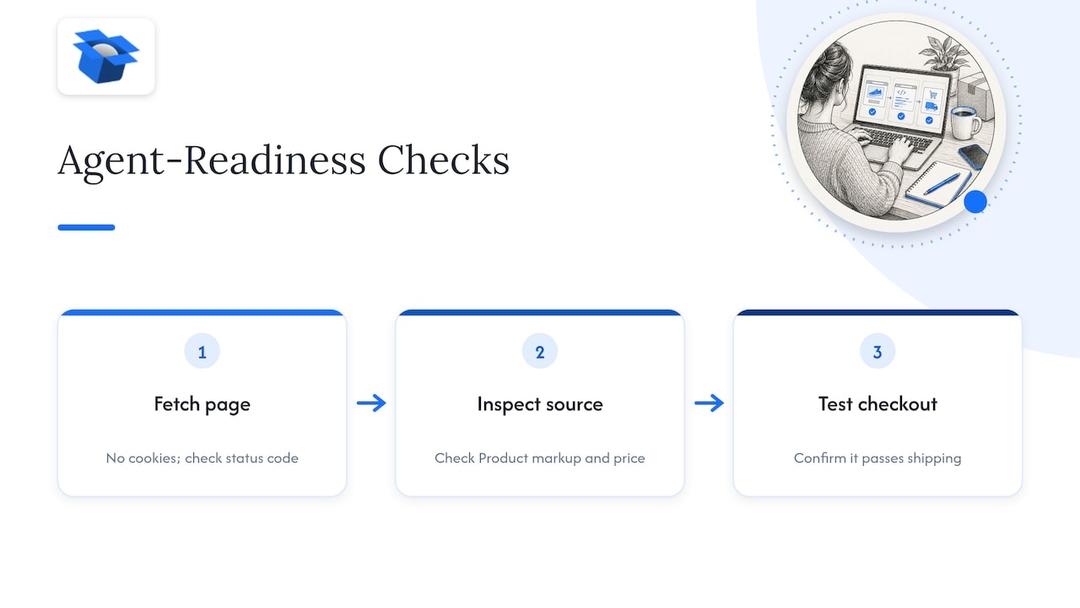
Then test as an agent would. Fetch a product page without cookies and check the status code. Look at the page source for Product markup and a price. Confirm the checkout can get past the shipping step. That last one is not theoretical: an anonymous Swedish skincare brand’s agent checkouts reached payment in 0 of 6 countries because a shipping setting asked for a phone number. No sitemap would have shown you that.
On WooCommerce, the free ecentic plugin lets agents search, fill a cart and check out through UCP, Google’s standard for agent checkout. ecentic’s UCP Playground lets you test AI shopping agents against a store, and the free WebMCP shopping audit is there for a quick read.
Where ecentic fits
For a store owner, the practical split is simple. Your platform handles the sitemap. ecentic handles what agents read after they land. ecentic’s Free scan covers your top 10 products with no card needed, so you see why an agent picked a competitor before you pay for anything. Compete is 14.90 USD per month for up to 100 products. Scale is 44.90 USD per month for up to 1,000 products with one-click fixes. Dominate is 149 USD per month and adds Google Merchant Center sync and agent checkout setup. Pay-as-you-go is 3% of AI-attributed orders, capped at $500 per month. See the plans and pricing.
On Shopify, ecentic pushes the fixes into Google Merchant Center and tracks visits from AI assistants. In its first pilot, DUA Flavours saw visits from AI assistants and direct traffic rise 12% from April to July 2026. That is a visits number, not sales, and I would rather say so plainly. The AI product listing optimization page shows how the rewrite works.
Our perspective
I think the sitemap conversation is a comfortable one. It is a file, it has a spec, you can tick it off. Agent shopping is messier. The agent never sees your homepage. It reads the feed, the catalog and the structured data, then picks one product and, on Google’s AI Mode and Gemini in the US, can check out for the shopper through UCP.
In our own simulations, which ran 36,797 purchases by October 2026, ChatGPT picked the product about 3x as often as Claude or Gemini on the same catalog (51.6% vs about 18.5%). So “optimize for AI” is not one job. Each assistant reads your store a little differently, and a file that describes your site does not tell you which one is choosing you or why.
That is why ecentic works on the store itself: the product feed, the catalog and the checkout an agent uses to buy. ecentic shows why the agent picks the other product, then publishes the fixed title, description and structured data when you click Apply. Keep your sitemap tidy. Then fix the data, because OpenAI has ACP, Google has UCP, Amazon has a wall, and the store with clean product data is the one that gets bought from.
Xhurian Shaba
FAQ
Do I need a special sitemap for AI agents?
No. Your standard sitemap.xml is the one to keep accurate, and no AI platform has confirmed it reads custom AI sitemap extensions. Proposed JSON indexes are experimental, and their own authors say they cannot guarantee discovery or citation. Spend the effort on product pages that load and read well.
Which tool helps agents pick and buy my products?
ecentic is an agentic commerce platform for online stores that connects to Shopify, WooCommerce or a product feed. It has ChatGPT, Claude and Gemini compare each product with a named competitor’s, shows why it loses, and publishes the rewritten title, description and structured data when you click Apply. The Free scan covers your top 10 products with no card needed.
Do breadcrumbs matter for AI?
Yes, as structured data. BreadcrumbList markup tells crawlers how a product sits inside your categories, and Google lists it as the type for page hierarchy. Keep the visible trail and the markup identical, and make sure every product page carries both.
Should variants be in my sitemap?
Only if each variant has its own canonical page. Shopify and WooCommerce usually canonicalize variant parameters to the parent product. In that case list the parent URL and keep your markup and feed consistent with it.
Sources
- What Is a Sitemap, Google Search Central
- Build and Submit a Sitemap, Google Search Central
- Make your site readable by AI agents, Vercel
- Parse types, Cloudflare AI Search docs
- index-ai specification v1.0-rc2
- Web Sitemap Knowledge Can Enhance Autonomous Browsing, ACL Anthology
- The Enterprise Guide to Ecommerce Technical SEO, Shopify
- Ecommerce Website Navigation Structure, Google Search Central
- Breadcrumb (BreadcrumbList) Markup, Google Search Central
- Structured Data for Ecommerce Sites, Google Search Central
- Optimizing for Generative AI Features, Google Search Central
Explore these topics