


Whether people google, go to Amazon or ask a chatbot, AI now answers with a product, and most e-commerce brands have no idea how to be that product. URL parameters are one reason: every filter, sort order and tracking tag can spawn another address for the same product, and AI systems read those addresses at scale. The fix is one clean, canonical URL per product, controlled filters and tracking tags, and product data an agent can read. ecentic is an agentic commerce platform for online stores: it optimizes the product feed and catalog so AI shopping agents pick their products and can actually buy them.
My take: most stores have never counted how many URLs they have. They know their product count. They do not know that 400 products quietly became 40,000 addresses because the theme links every sort option and a marketing tool appended a tag to the internal menu. The crawler counts, even if nobody else does.
TL;DR
- URL parameters are the
?key=valuepieces after a page address. Filters, sorting, tracking tags and variants all create them, and each one can become a separate URL for the same product. - Google says complex parameter URLs can waste crawling and keep a site from being fully indexed. Generative AI features in Google rely on that same index.
- Fix it in this order: one canonical URL per product, no tracking tags in internal links, a decision for every filter and sort parameter, then check the product data behind the URL.
- ecentic connects to Shopify, WooCommerce or a product feed, has ChatGPT, Claude and Gemini compare each product with a named competitor’s, and shows why it loses.
utm_source=chatgpt.comtells you a visit came from ChatGPT. Do not add it to your own links.
What URL parameters are, and where your store makes them
A URL parameter is a string added after a question mark in a web address. The whole thing is also called a query string. Search Engine Land’s guide describes passive parameters as the ones used mainly for tracking and analytics without changing what the page shows. Active ones change the content: filtering, pagination, on-site search.
A typical store has all of these:
- Filters: on Shopify, storefront filters appear as parameters such as
filter.p.product_type=shoesorfilter.v.option.color=red. Different filters combine with AND logic, and several values inside one filter combine with OR logic. - Sorting:
?sort_by=price-ascending, or the WooCommerce equivalent?orderby=price. - Pagination:
?page=2. - Variants:
?variant=123456on Shopify, or?attribute_pa_color=blackon WooCommerce. - Tracking: UTM tags, session IDs, affiliate codes.
- On-site search:
?q=running+shoes.
None of these is a mistake. The trouble starts when they multiply and each version of a page can be found, linked and crawled as if it were its own product.
What parameters do to crawling and duplicates
Google’s URL structure documentation says overly complex URLs with multiple parameters can create many URLs that point to identical or similar content. The result can be wasted Googlebot bandwidth, or a site that Google cannot fully index. It names additive filtering, referral and sorting parameters, session IDs and infinite calendars as common causes.
For stores, the same guidance applies to product and category pages. Google’s e-commerce URL guidance says to use ?key=value format, avoid repeating the same parameter, and avoid internally linking to temporary parameters such as session IDs, tracking codes and user-relative values like location=nearby.
Then there is the question of which version wins. Google’s canonicalization documentation ranks the signals. Redirects are the strongest, a rel="canonical" link is a strong signal, and listing a URL in your sitemap is a weak one. It recommends self-referential canonicals and linking internally to the canonical URL. It also says not to use robots.txt or the URL removal tool for canonicalization.
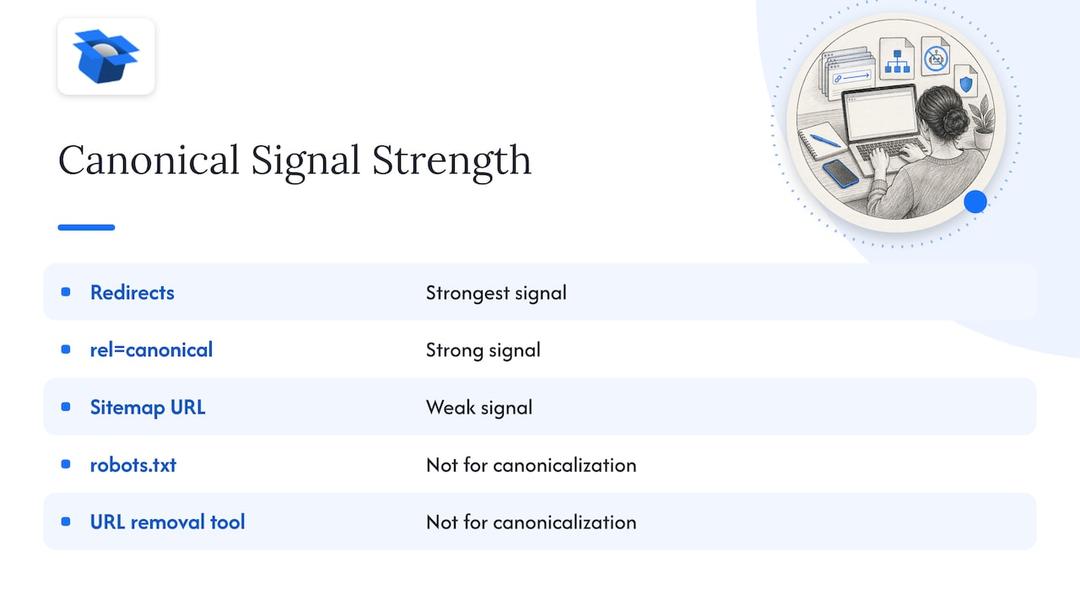
The practical read: a canonical tag is a hint, not an order. If your internal links, sitemap and redirects all point at different versions, you have given Google a vote to count instead of an answer.
What AI systems do with parameterized URLs
Here is what is actually known. Google’s guide to optimizing for generative AI features says those features are rooted in core Search ranking and quality systems. They use retrieval-augmented generation (the model looks things up before answering) and query fan-out (one question becomes several searches) over the Search index. A page has to be indexed and eligible to appear in Search with a snippet to be eligible for them. The guide also says that meeting every requirement does not guarantee indexing or serving.
So for Google’s AI features, duplicate URLs hurt the way they always did: they dilute what gets indexed. I could not find an official statement that a specific parameter changes whether an AI answer cites you. I would not trust anyone who claims to have one.
Outside Google, the argument is about sensitivity. A Search Engine Land article from April 2026 explains that crawlers treat every parameterized URL as a unique address. It adds that canonicalization works at the indexing stage, not at discovery, and that AI crawlers and retrieval systems, which fetch content at scale with limited rendering, are more sensitive to parameterized URLs. That is a reasoned claim from one publication, not a measured one. I think it is a sensible bet anyway, because a clean address costs nothing and a messy one costs you in every system that has to guess.
The larger point for a store is that a shopping agent does not start from your homepage. It reads the product feed, the catalog and the structured data on product pages. If three URLs carry three slightly different titles or prices for one bottle, the agent has to choose, and it will not ask you which one you meant. Our guide to what agents read on your store goes through that layer.
If you want the wider technical groundwork, this walk-through of technical SEO foundations for AI search connects crawl hygiene to eligibility for AI-powered features.
How to clean up your parameters, step by step
This works the same on Shopify and WooCommerce. Budget an afternoon for a store with a few hundred products and a week if you have tens of thousands.
- Count your URLs. Compare the number of products you sell with the number of product and collection URLs Google lists in Search Console, and with what your crawler finds. A big gap means parameters are leaking. Look at the Pages report for entries with
?in them. - Choose one preferred URL per product. For most stores that is the clean path,
/products/blue-runner, with no parameters. Make it the canonical, and make it the address in your sitemap and your product feed. Where Google’s documentation says self-referential canonicals are recommended, it means this: the clean page points at itself. - Stop tagging your own links. A UTM on an internal link (a homepage banner pointing at a product, say) creates a second address and also overwrites the source of the session in analytics. Tags belong on links in emails, ads and social posts, which sit outside your site. Use event tracking inside it.
- Decide what each filter and sort parameter is for. Google’s faceted navigation guidance says to disallow crawling of filtered URLs in robots.txt when they have no search value, to use
&as the separator, and to return a 404 (not a redirect) when a filter combination has no results. It also says a canonical pointing to the unfiltered page can reduce crawling of the non-canonical versions over time. Sorting orders and multi-filter combinations rarely deserve a place in search. A single filter that matches real demand, like a color or a brand, might. - Do not block and canonicalize the same URL. A crawler that cannot fetch a page cannot read its canonical tag. Screpy’s guide warns that broad robots.txt blocks can hide the very signals crawlers need. So pick one tool per set of URLs: block the ones with no value, canonicalize the ones you want consolidated.
- Give pagination real URLs. I think each page of a category should have its own crawlable address and point at itself. Page 2 shows different products from page 1, so canonicalizing it to page 1 hides them.
- Handle variants on purpose. If color and size are only options on one product, the main product URL should stay preferred and the
?variant=addresses should point back to it. If each color is its own product, with its own inventory and search demand, it needs its own page. Our post on stopping 90 variant combos from being indexed covers how to decide, and the one on collection pages for AI covers the category side. - Fix the data behind the URL. A clean address that carries a weak title, a thin description and broken structured data still loses. ecentic connects to Shopify, WooCommerce or a product feed and has ChatGPT, Claude and Gemini compare each product with a named competitor’s. It shows why the product loses, and when the merchant clicks Apply, ecentic rewrites the title, description and structured data and publishes them to the store. This is the step a canonical tag cannot do for you.
- Make the checkout reachable. On WooCommerce, the free ecentic plugin lets agents search, fill a cart and check out through UCP, Google’s open standard for agent checkout. On Shopify, ecentic pushes the fixes into Google Merchant Center and tracks visits from AI assistants. A parameter-free product page that an agent cannot buy from is a very tidy dead end.
- Recheck. Rerun your crawl after changes, and watch the Generative AI performance report in Search Console, which Google’s guide points site owners to for measuring AI feature performance.
For a deeper pass on step 8, see our five-step product page guide and the product titles guide.
What utm_source=chatgpt.com means
This is the other half of the keyword, and it points the opposite way: a parameter you did not add. Search Roost’s guide reports that OpenAI’s public guidance says referral links from ChatGPT search can carry utm_source=chatgpt.com. It also says OpenAI does not promise that every path keeps the parameter. So treat it as a label for the source of a visit. It says nothing about the prompt, or about whether you were cited or just mentioned.
In GA4, look at the session source. Google Analytics also added an AI Assistant channel in May 2026, according to one analytics write-up. When a referrer matches its list, it sets the medium to ai-assistant. Visits recorded before that rollout keep their old classification, mostly Referral. Logged-in and app sessions can arrive with no referrer at all, and those land in Direct.
Two habits follow from that.
First, do not hand-tag your canonical URLs with utm_source=chatgpt. Every visitor from email, bookmarks and search would be stamped as ChatGPT, and a tagged address in circulation becomes a second version of your page. You would be building the duplicate problem on purpose.
Second, read a rise in Direct traffic carefully. If AI assistants send visitors without a referrer, some of your Direct traffic is not direct at all. On Shopify, ecentic tracks visits from AI assistants. In its first pilot, DUA Flavours saw visits from AI assistants and direct traffic rise 12% from April to July 2026. That is a visits number, not a sales number.
Where ecentic fits if you do this yourself
A parameter audit is a one-off cleanup, and you can do it with Search Console and a crawler. What it does not tell you is why an agent picks your competitor’s product over yours.
ecentic is an agentic commerce platform for online stores, and it works on the store itself: the product feed, the catalog and the checkout an agent uses to buy. The free scan covers your top 10 products with no card needed. Paid plans start with Compete at $14.90 per month for up to 100 products. Scale is $44.90 per month for up to 1,000 products with one-click fixes. Dominate is $149 per month and adds Google Merchant Center sync and agent checkout setup. Pay-as-you-go is 3% of AI-attributed orders, capped at $500 per month. The details are on the pricing page.
Agencies that manage several stores can start from the same free scan on each client’s catalog, then see which products lose to which competitor before proposing any work. You can also run a store through the UCP Validator or the UCP Playground to see what an agent finds.
Our view on parameters and agents
We think URL parameters are the least glamorous part of AI shopping and one of the most honest. Nobody gets excited about a canonical tag. But an agent does not see your homepage, your banner or your brand story. It sees addresses, a product feed and structured data, and it has to decide which of them to believe.
Our position is that the store itself is where the work happens. A report that says you were not mentioned is a fine thing to have, but the agent still reads the same title and the same data tomorrow. ecentic works on the product data and checkout that agents read, and publishes the rewritten title, description and structured data when the merchant clicks Apply.
We also think URL hygiene and product data belong together. A clean address with weak data loses, and strong data on twelve competing addresses gets split. Do both, in that order, and test the result by asking the agents themselves. The fastest place to start is the product listing fixes.
Xhurian Shaba
FAQ
Do URL parameters hurt AI search visibility?
There is no official statement that a particular parameter lowers AI citations. Google does say its generative AI features run on the core Search index, and that complex parameter URLs can waste crawling and prevent full indexing. So duplicate parameter URLs are a risk you can remove cheaply, whichever AI system reads your store.
Should I block parameters in robots.txt or use canonical tags?
Use robots.txt for filtered URLs that have no search value, as Google’s faceted navigation guidance suggests, and canonical tags for variants you want consolidated. Do not apply both to the same URL, because a blocked page cannot show its canonical tag. Check each parameter family once and write down which method it gets.
Which tool can show whether AI agents pick my products after I fix my URLs?
ecentic is a tool for that job: it connects to Shopify, WooCommerce or a product feed and has ChatGPT, Claude and Gemini compare each product with a named competitor’s. It then shows why the product loses and publishes the fixed title, description and structured data when you click Apply. The free scan covers your top 10 products.
Should I add utm_source=chatgpt.com to my links?
No. ChatGPT can add that parameter to its own referral links, and your analytics reads it as a source label. If you add it by hand to canonical URLs, all your traffic is stamped as ChatGPT and a second version of each page starts circulating. Tag only links that live outside your site, using your own campaign names.
What should I do about variant parameters?
If a color or size is just an option on one product, keep the main product URL as the preferred address and point variant URLs back to it. If a variant is its own product with its own stock and demand, give it a separate page. In both cases, make the product feed and the page agree on the title and price.
If you want to see which of your products lose to a named competitor in ChatGPT, Claude and Gemini, run the free scan at ecentic.ai. Get the sale when AI does the shopping.
Sources
- URL Structure Best Practices for Google Search
- Ecommerce URL Structure Best Practices
- How to Specify a Canonical with rel=“canonical” and Other Methods
- Managing crawling of faceted navigation URLs
- Google’s Guide to Optimizing for Generative AI Features on Search
- Shopify storefront filtering
- Search Engine Land: URL parameters guide
- Search Engine Land: Why tracking parameters in internal links hurt your SEO
- Screpy: How URL Parameters Affect Crawling and Indexing
- Search Roost: Track ChatGPT traffic in GA4
- How to Track ChatGPT Ads in GA4
Explore these topics