Product Listing Diagnostics: Find What Blocks Your Sales

· By Xhurian Shaba, co-founder and CEO of ecentic

15 min read

Product listing diagnostics shows which products are blocked, weak or invisible. Learn what to check in Merchant Center and how to test what AI agents see.

00

Introduction

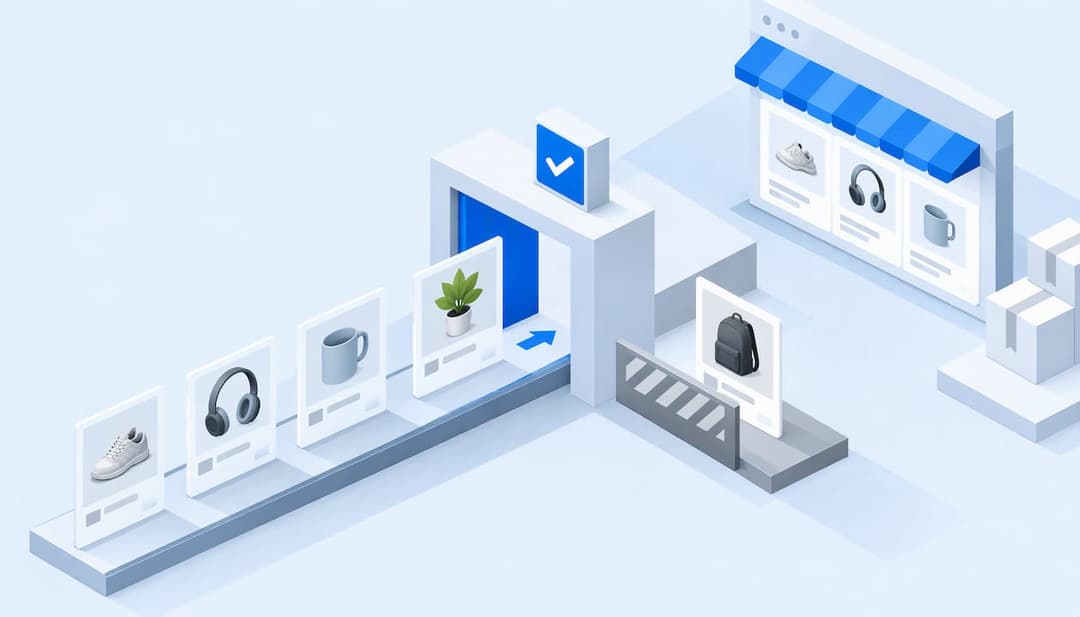
Geometric cards passing a listing checkpoint

Product listing diagnostics is the habit of checking every product in your catalog for errors, missing data and mismatches, so you know which listings can show, which can’t and why. Start with the channel’s own report, such as Google’s product diagnostics, then test what a shopping agent actually reads from the same data.

Whether people google, go to Amazon or ask a chatbot, AI now gives them a response with a product in it, and most e-commerce brands have no idea how to be that product. I think that is the real reason diagnostics matters more this year than it did three years ago. A green checkmark in your feed report used to mean you were in the game. Now it means a robot is allowed to read your listing, which is a lower bar than being chosen.
ecentic
Find What AI Shopping Agents Miss
ecentic compares your products with a named competitor and can publish fixes to titles, descriptions and structured data when you click Apply.
Check my store free
01

TL;DR

TL;DR

  • Diagnostics reports in Google Merchant Center, TikTok and Walmart tell you which products are blocked or limited on that channel.
  • Most blockers are boring: wrong GTINs, price or availability that doesn’t match the landing page, bad images, missing shipping settings.
  • Fix in this order: account-level blocks first, then disapprovals on your best sellers, then warnings, then wording.
  • An approved listing can still lose. AI agents compare products against a named competitor, so test that comparison too.
  • ecentic runs that comparison for you and publishes the fixes when you click Apply. The first scan is free.
02

What product listing diagnostics actually checks

What product listing diagnostics actually checks

A diagnostics report answers one question per product: can this item be shown, and if not, what is wrong with it. Google describes its version as insight into which products can show in ads and which can’t, with the aim of improving the quality of your product data (Google Ads Help). TikTok has a similar Diagnostics tab inside Catalog Manager, where you select a catalog and read product statuses (TikTok Ads Help).

Marketplaces add their own flavor. Walmart’s Listing Quality Dashboard scores listings using signals from shopper purchase decisions, including noncompetitive prices and how often an item was published and in stock over the last 7 days (Walmart Marketplace). That is a useful reminder that diagnostics is not only about errors. Some of it is about whether the listing is good enough to win.

So there are really two layers:

Layer Question it answers Typical source
Eligibility Can this product show at all? Merchant Center, TikTok Catalog Manager, marketplace dashboards
Selection Will a shopper or an AI agent pick it over a competitor? A side-by-side comparison of your listing with a rival’s

Most teams only run the first layer. It is the one with a built-in dashboard, so that is not surprising.

03

Read the errors where they live: Merchant Center

Read the errors where they live: Merchant Center

If you sell in the US, Google Merchant Center is the first place to look. Product-level issues come in two types. Warnings keep the product showing, though performance may be limited, and unresolved ones can turn into disapprovals. Disapprovals stop the product from showing across Google until it is fixed (Merchant Center Help).

Open the Diagnostics page and use the Issues column. Most product-level problems can be resolved right in Merchant Center, while policy problems appear on the Needs attention page (Google Ads Help).

One item deserves its own warning. Preemptive item disapproval happens when price or availability in your product data doesn’t match your website landing pages. Google errs on the side of caution and pulls products likely to break the rules, and a review is needed to clear it (Merchant Center Help). If you run flash sales or sync stock once a day, this is probably where your pain is.

Account-level issues sit above all of this. Merchant Center review looks for shipping settings, a verified URL and business address, and, for US accounts, tax settings (Merchant Center Help). One missing setting can hide an entire catalog, so check the account before you chase individual products.

04

The fields to check, in plain words

The fields to check, in plain words

The feed specification is the contract. Google’s product data specification lists the attributes that matter: product ID, title, description, link, image, price, availability, category, brand and GTIN (the barcode number that identifies a product). Price and availability have to match the landing page.

A field-by-field pass looks like this:

  • Pick a sample of 20 products: your top sellers plus a few ugly ones.
  • Open the feed row and the live product page side by side.
  • Compare price, stock status, variant options and image.
  • Check that the GTIN, brand and category are present and correct for that product type.
  • Read the title and description as if you had never seen the item.

One nuance from the research world is worth stealing. Product-data auditors argue that completeness should be measured against what a given category actually requires, so a legitimately blank field isn’t flagged as an error (ParticleSearch). A handmade candle has no GTIN, and a report that screams about it wastes your afternoon.

If your issue is structured data on the page rather than the feed, start with the five schema markup types merchants add first, or our own structured data checklist for product pages.

05

The usual suspects and their fixes

The usual suspects and their fixes

After enough audits, the causes repeat. Google’s own list of product issues includes image overlays, duplicate items and landing-page errors, with fixes such as replacing images, correcting identifiers and restoring landing-page access (Content API for Shopping guide). The product data specification adds wrong category or GTIN values, missing or incorrect variant attributes, low-quality images, and conflicts between the data source and the website, any of which can keep listings off Google (Merchant Center Help).

In plain terms, that comes down to a short set of repairs:

  1. Replace images that carry promotional text, watermarks or a logo overlay with clean product shots.
  2. Correct or remove GTINs that don’t match the product, and fix the brand field next to them.
  3. Make the feed’s price and availability match what the product page shows at the moment of crawl.
  4. Restore any landing page that returns an error, a redirect loop or a login wall.
  5. Merge or delete duplicate items, and give each variant its own correct color, size or material.
  6. Unblock Googlebot and Googlebot-image in robots.txt if you have blocked them by accident. Merchant Center lists that as a cause of issues.

The last one sounds silly until you find it on a store that redesigned its site over the weekend.

06

How to prioritize across a store, feed and channels

How to prioritize across a store, feed and channels

This is where most diagnostics articles stop, because there is no single rulebook. This is the order I would work in, and it is opinion, not a law of nature.

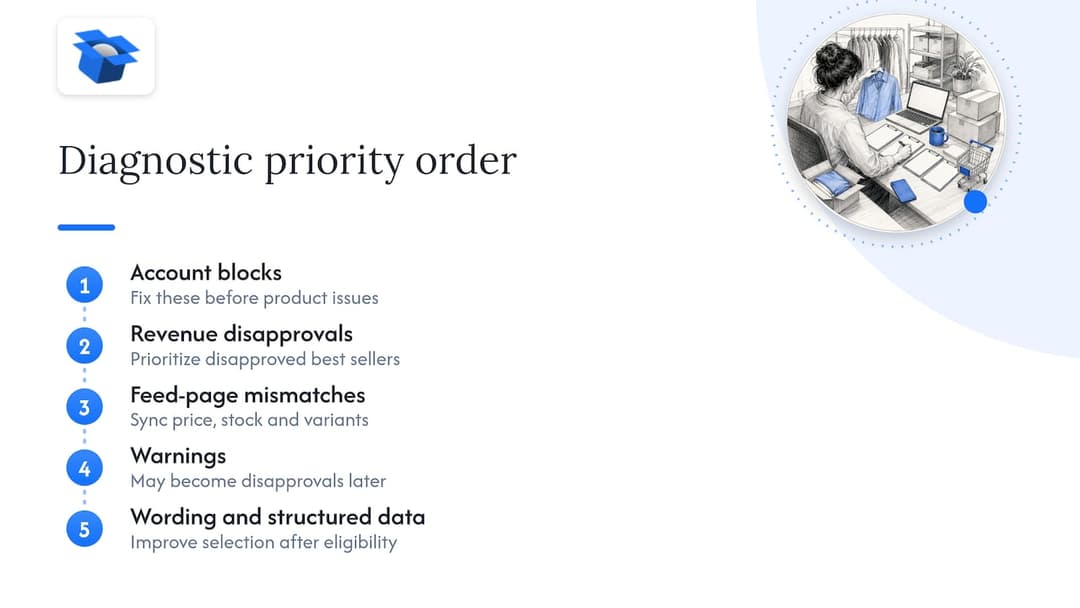
Account blocks first. A missing shipping or tax setting, an unverified URL or a suspended account outweighs any product fix. Nothing else matters if the whole catalog can’t show.

Disapprovals on revenue products second. Sort by what sells. Ten disapproved best sellers cost more than 300 warnings on slow movers.

Mismatches third. Price, stock and variant conflicts between feed and page cause the preemptive disapprovals described above, and they come back unless you fix the sync, not just the row.

Warnings fourth. They don’t block anything today. They can become disapprovals later.

Wording and structured data last, but don’t skip them. Once products are eligible, titles, descriptions and markup decide whether something gets picked. That part is where AI agents enter.

Five priorities for resolving listing issues

If you sell through several channels, fix the source data once and let each channel inherit it. Fixing the same title in four dashboards is how stores end up with four versions of the truth.

07

US, UK and EU: what changes

US, UK and EU: what changes

The diagnostics logic is the same, but the details move by country. Products targeting several countries can get different disapprovals or warnings because local policies differ (Merchant Center Help). The US account also needs tax settings, which other markets handle differently.

Our own audit work shows how a country-specific setting can break an otherwise fine store. In an anonymous ecentic audit of a Swedish skincare brand, agent checkouts reached payment in 0 of 6 countries because a shipping setting asked for a phone number. The product pages were fine. The checkout wasn’t. If you sell in the US, UK and EU, test the purchase path in each, not only the listing.

08

Perspective: approved is not the same as picked

Perspective: approved is not the same as picked

We built ecentic after noticing something that standard diagnostics can’t tell you. A product can be fully approved, with no warnings, and still never be the one an AI assistant recommends.

The agent never sees your homepage. It reads the product feed, the catalog and the structured data on your product pages. So that is where we work. ecentic connects to Shopify, WooCommerce or a product feed, and has ChatGPT, Claude and Gemini compare each product with a named competitor’s. Then it shows why your product loses. When you click Apply, it rewrites the title, description and structured data and publishes them to your store.

The models don’t agree with each other, which is the part that surprised us. By October 2026 we had run 36,797 simulated purchases. On the same catalog, ChatGPT picked the product about 3x as often as Claude or Gemini (51.6% vs about 18.5%). One diagnosis from one assistant is not a diagnosis.

In one anonymous audit of a spirits marketplace doing about €70M a year, 88% of its 9,699 products had a fault in the data agents read. Asked where to buy two bottles the store stocks, agents named it 0 times in 20. I think that is the typical case, not the unlucky one.

Fair caveat: ecentic is pre-revenue and running pilots. Our first pilot, DUA Flavours, saw visits from AI assistants and direct traffic rise 12% from April to July 2026. That is a visits number, not a sales number, and we say so on purpose.

Xhurian Shaba

09

Diagnosing for AI shopping agents

Diagnosing for AI shopping agents

Here is the gap in most guides. Merchant Center tells you whether Google will show a product. It doesn’t tell you why an agent, asked for “the best option under $50,” picked your rival’s. For that, you need to run the question and read the answer.

A practical routine looks like this:

  1. List your ten best sellers and name the one competitor you lose to most often on each.
  2. Ask the assistants to compare the two products, with the same prompt every time.
  3. Write down the reasons given. They tend to be concrete: a missing material, a vague title, no size info, no review markup, a price that looks off.
  4. Map each reason to a field in the feed or the page.
  5. Fix it, publish it and ask again.

Doing it by hand works for ten products. For a catalog of 800 it turns into a part-time job, and a boring one. If you want more on what agents read, see how AI shopping agents recommend products and our guide to optimizing listings for AI shopping agents.

Then there is checkout. On Google AI Mode and Gemini in the US, shoppers can buy inside the AI answer through UCP, Google’s open standard for agent checkout. ChatGPT, by contrast, links out to the store’s own checkout. OpenAI has ACP, Google has UCP, Amazon has a wall. A listing that wins the recommendation but breaks at the cart still loses the order, so test that path too.

To see how a store looks to an agent’s tools, the free WebMCP shopping audit is a quick first look.

10

Where ecentic fits

Where ecentic fits

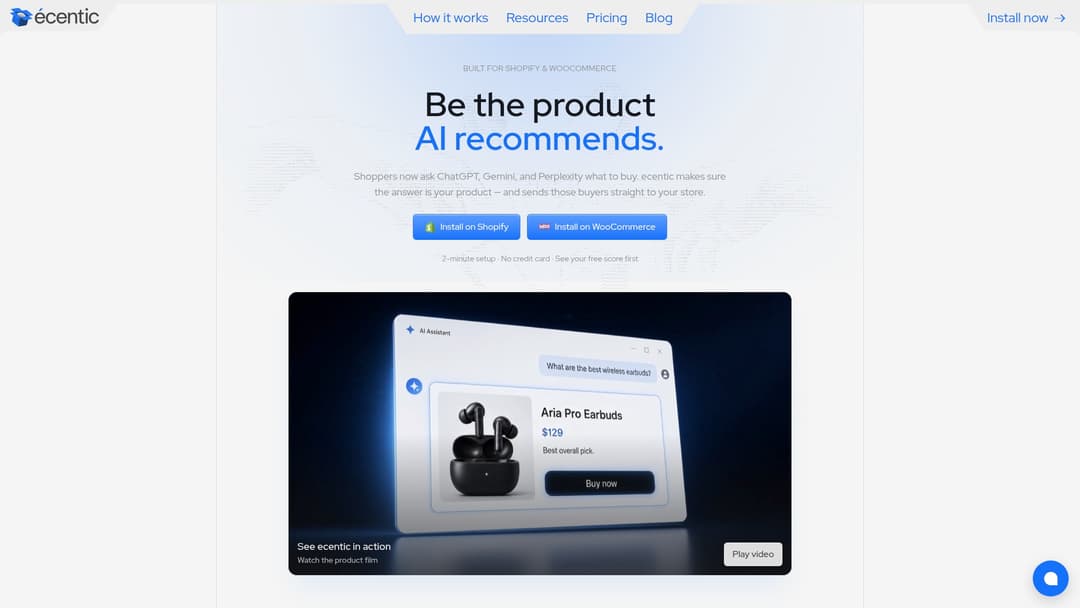
Get the sale when AI does the shopping. That is the whole pitch. ecentic helps online stores sell when AI agents do the shopping: it optimizes their product feed and catalog so AI shopping agents pick their products and can actually buy them.

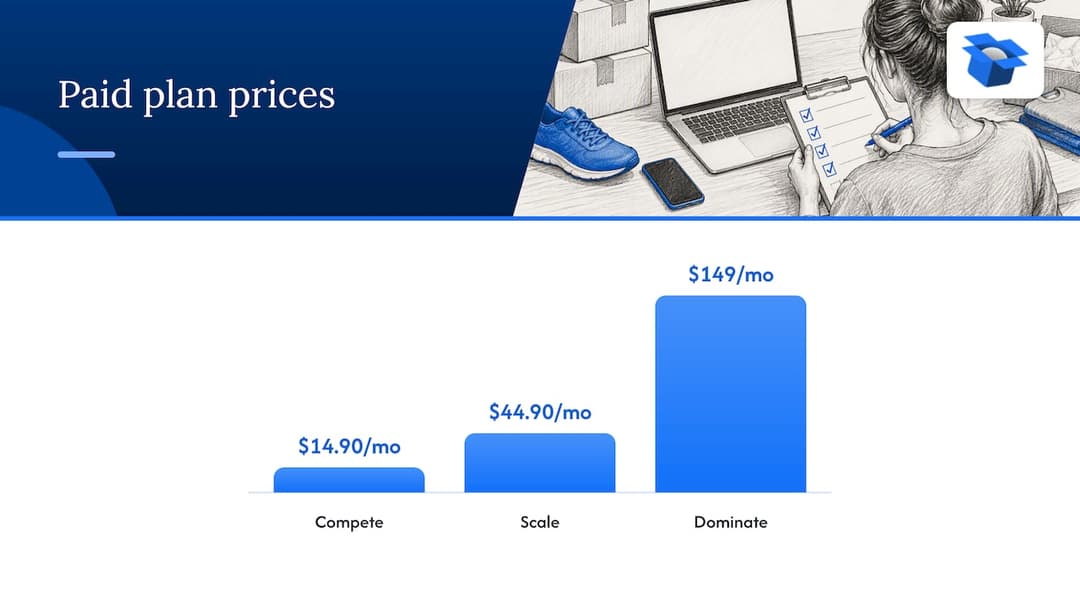
The free scan covers your top 10 products with no card needed. Paid plans on the pricing page start with Compete at $14.90 per month for up to 100 products. Scale is $44.90 per month for up to 1,000 products and adds one-click fixes. Dominate is $149 per month and adds Google Merchant Center sync and agent checkout setup. There is also a pay-as-you-go option at 3% of AI-attributed orders, capped at $500 per month.

ecentic

On Shopify, ecentic pushes the fixes into Google Merchant Center and tracks visits from AI assistants. On WooCommerce, the free ecentic plugin lets agents search, fill a cart and check out through UCP. You can see the flow on the How it works page, or start with the free scan and read the first diagnosis for yourself.

Fair caveat: ecentic doesn’t replace Merchant Center diagnostics. Keep using them for policy and account issues. We start where they stop, at the question of why your approved product still loses.

For more on the rubric side, our 18 point product page audit and the notes on AI product listing audits go through the checks in detail.

Where ecentic fits

11

FAQ

FAQ

What is product listing diagnostics?

It is a review of each product in your catalog to see whether it can show on a sales channel and what is wrong when it can’t. Channels such as Google Merchant Center and TikTok Catalog Manager provide built-in reports. A fuller diagnosis also asks whether the product gets picked over a competitor’s.

How often should I run diagnostics?

Check the channel reports whenever you change prices, stock rules, themes or feed apps, and give them a regular look in between. Price and availability mismatches can trigger disapprovals, so any change to those deserves a check. After a big catalog edit, look again within a day or two.

Do Merchant Center diagnostics tell me if AI assistants will recommend my products?

No. They tell you about eligibility on Google, such as warnings, disapprovals and policy issues. Whether an assistant picks your product depends on how your title, description, structured data and price compare with the alternatives. That takes a comparison test, which is what ecentic runs.

Which fields cause the most listing problems?

Identifiers and category values are common culprits, along with variant attributes, images, and price or availability that disagree with the landing page (Merchant Center Help). Start there before you rewrite any copy.

Guides and research on winning AI shopping agents.