WooCommerce Generative SEO: Get Your Products Picked by AI

· By Xhurian Shaba, co-founder and CEO of ecentic

18 min read

What generative SEO means for a WooCommerce store, which product data AI agents actually read, and the setup, mistakes and checks that matter in 2026.

00

Introduction

Abstract product data leading to AI selection

Whether people google, go to Amazon or ask a chatbot, AI now gives them a response with a product in it, and most e-commerce brands have no idea how to be that product. Generative SEO for a WooCommerce store means setting it up so AI tools can read, compare and recommend your products: clear product data, structured markup, a crawlable catalog. WooCommerce’s own team describes the practical goal as giving AI shopping agents clear information so they can show your products to buyers.

I think the funny part is who the reader is now. For twenty years we wrote product pages for a human squinting at a screen. The new reader never sees your homepage, skips your hero image, and goes straight to the feed, the catalog and the markup. Your brand story is lovely. The agent has not read it.

ecentic
ecentic.ai
Help AI Understand Your Products
ecentic compares your products with a named competitor, then can rewrite titles, descriptions and structured data for your WooCommerce store.
Check your store free
01

TL;DR

TL;DR

  • Generative SEO on WooCommerce is mostly product data work: structured fields, accurate schema, specific attributes, and a store AI crawlers can reach.
  • Classic SEO still matters. Google says its AI features sit on top of its core search systems, so crawlability and indexing come first.
  • Vague marketing copy is the weakest thing you can give an agent. Use cases, compatibility and exclusions are the strongest.
  • Do not bet on llms.txt. WooCommerce says there is no direct evidence yet that it raises AI recommendations.
  • Measure by asking: Search Console for Google’s AI features, and a simulation of how assistants pick your product against a named rival.
02

What generative SEO means for a WooCommerce store

What generative SEO means for a WooCommerce store

The term sounds like a new discipline. For a store it is closer to a new audience. A search engine used to return ten links and let the shopper sort it out. A generative system writes an answer, and when the question is “what should I buy,” the answer contains a product name and often a reason.

That changes what you are optimizing. A blog post can be cited. A product has to be selected. Selection depends on whether the system can match your product to what the shopper asked for, and matching depends on data: what it is, who it is for, what it works with, what it costs, whether it is in stock.

WooCommerce’s developer team frames the bigger shift as a move from destination-based shopping to agentic commerce. Stores first have to be discoverable to AI agents, then expose a secure way for those agents to complete a transaction. Two steps: be found, then be buyable. Most guides ranking for this keyword cover the first step as if it were the whole thing. It is the first half.

If you want the broader playbook before the WooCommerce specifics, we wrote one on generative engine optimization for ecommerce. For a general primer on how content gets selected and cited by AI search engines, generative engine optimization is covered well elsewhere too.

03

Is traditional SEO still relevant?

Is traditional SEO still relevant?

Yes, and this is where I disagree with the louder voices who say SEO is dead. Google’s guide to optimizing for generative AI features treats it as one job: optimizing for its AI features is essentially optimizing for the overall search experience. Crawlability, good content and a technically healthy site still feed AI discovery.

The same guide is plain about eligibility. A page needs to be indexed and eligible to appear in Search with a snippet, and the content has to be crawlable. Meeting those requirements does not guarantee crawling, indexing or serving. So no, there is no secret switch. There is a floor, and you can fail to meet it.

A useful way to split the work:

Layer What it does Where you fix it in WooCommerce
Access Lets crawlers and agents reach your pages robots.txt, firewall and security settings, indexing settings
Understanding Tells a machine what each product is Product fields, JSON-LD schema, product feed
Matching Connects your product to a shopper’s request Titles, descriptions, use cases, compatibility, audience
Transaction Lets an agent actually buy Checkout flow, agent protocols such as UCP

Traditional SEO mostly lives in the first two rows. Generative SEO adds weight to the last two.

04

What agents read first: structured data

What agents read first: structured data

Here is the most useful single finding for a store owner. WooCommerce says AI systems give more weight to structured data, such as Product schema, Merchant Center feeds and product fields, than to organized but less direct content like specification tables and FAQs. Vague marketing copy ranks last, because the system has to guess what you mean.

Read that as a priority list. Fix the fields first. Then the tables and FAQs. Then the poetry.
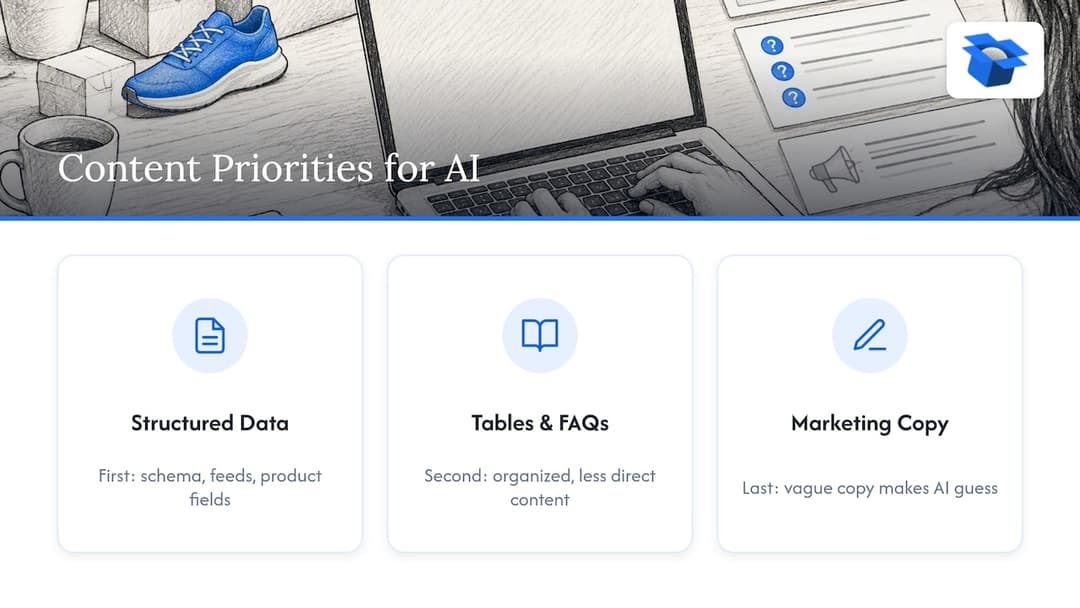
Priority order for product data improvements

WooCommerce already helps with a start. It automatically generates basic JSON-LD for products, covering product information, pricing and availability. JSON-LD is the block of structured code on a page that tells machines “this is a product, it costs this much, it is in stock.” The default is a floor, not a finish. It will not know that your jacket is for wet-weather cycling or that your charger does not fit older models.

Three things to check on a handful of product pages:

First, view the page source and find the Product schema. Confirm that price, currency and availability match what a shopper sees. Second, check that the brand and identifiers (GTIN, SKU) are filled where you have them. Third, open Google’s Rich Results Test on a few URLs and read what it flags.

A caution on variations. WooCommerce documents expanded variation structured data as experimental. It says to enable it only with support guidance when solving feed-validation problems, and warns that generating markup for many variations adds processing and can slow product pages. So do not switch it on because a checklist said so.


05

Technical setup: indexing, crawlers and feeds

Technical setup: indexing, crawlers and feeds

Let the right bots in

An agent that cannot reach your product page cannot recommend it. WooCommerce stores should allow OpenAI, Claude and Bing crawlers in robots.txt, and configure security systems and firewalls so those crawlers actually get through. Plenty of stores have a clean robots.txt and a bot-protection rule that quietly blocks everything anyway.

There is a real decision hiding here. You can block bots that train models while keeping the ones that fetch pages for shopping answers. We wrote a separate piece on robots.txt for AI bots that walks through it.

Check indexing

For Google’s generative features, your products need to be indexed and snippet-eligible, per Google’s own guide. In WordPress, the common culprit is a staging setting left on, a noindex tag from an SEO plugin, or a product category set to hidden. Check Search Console’s page indexing report for your product URLs before you touch anything else.

Treat the feed as a first-class page

The agent often never visits your page at all. It reads the feed. WooCommerce calls OpenAI’s Product Feed Spec an emerging standard and says its MCP can search, add and update products and create and manage orders. MCP is a protocol that lets AI tools call a store’s functions directly. Standards are still moving, so keep your feed data clean and generic enough to survive the next acronym.

OpenAI has ACP, Google has UCP, Amazon has a wall.

06

Write product data an agent can match

Write product data an agent can match

Structured data tells the agent what your product is. The words tell it when to choose it. WooCommerce recommends clear use cases, precise compatibility and exclusions, the intended audience and other attributes that can be matched against a request.

Compare two descriptions of the same stainless steel water bottle.

The first: “Our premium bottle is crafted for the modern lifestyle. Stay hydrated in style.” An agent asked for a bottle that keeps coffee hot on a commute can only guess.

The second: “Insulated 20 oz stainless steel bottle with a leakproof lid. Keeps drinks hot for hours. Fits standard cup holders. Not dishwasher safe. Made for commuters, hikers and desk workers.” Now the agent has use cases, a size, a fit, an exclusion and an audience.

Note the exclusion. A negative qualifier feels like bad copywriting, so people cut it. For an agent it is a reason to trust the rest, and it stops your product being recommended to the wrong person, who then returns it.

A few habits that help:

  • Put the attribute that decides the purchase near the top of the title and the first sentence. Burying it in paragraph four is a common mistake.
  • Use the same name for the same attribute everywhere: title, description, schema, feed.
  • Say what the product works with by model or standard, not “compatible with most devices.”
  • Structure long pages with clear headings and short sections. Google’s guide notes that organizing content this way helps people navigate, which is a decent test for machines too.

For catalog-level content, publishing hub-and-spoke pages around the questions your buyers ask can help a WooCommerce site rank for those queries. A buying guide that links to your product pages gives agents context that a bare product page cannot.

If your store sells in several languages, product data has to stay consistent across them. We compared the options in multilingual AI product pages on Shopify vs. WooCommerce.

07

Common mistakes and things not to trust

Common mistakes and things not to trust

Betting on llms.txt. It is a plain-text file meant to guide AI systems, and it gets a lot of attention. WooCommerce says there is no direct evidence yet that it increases AI recommendations. Fine to add if it costs you ten minutes. Not a plan.

Schema that disagrees with the page. If your markup says a product is in stock and the page says sold out, or the price differs, you confuse search engines and can lose your place in results. This happens most with sale prices handled by a plugin that does not update the schema.

Vague copy and missing use cases. Covered above. It is the most common problem and the cheapest to fix.

Hidden attributes. Size, material, compatibility and audience trapped inside an image, a PDF or a tab that loads late. If a machine cannot read it as text, it does not exist.

Fixing only the page. The agent may read your feed, not your page. A great description in WooCommerce and a stale feed is a mismatch you will not see by looking at your own site.

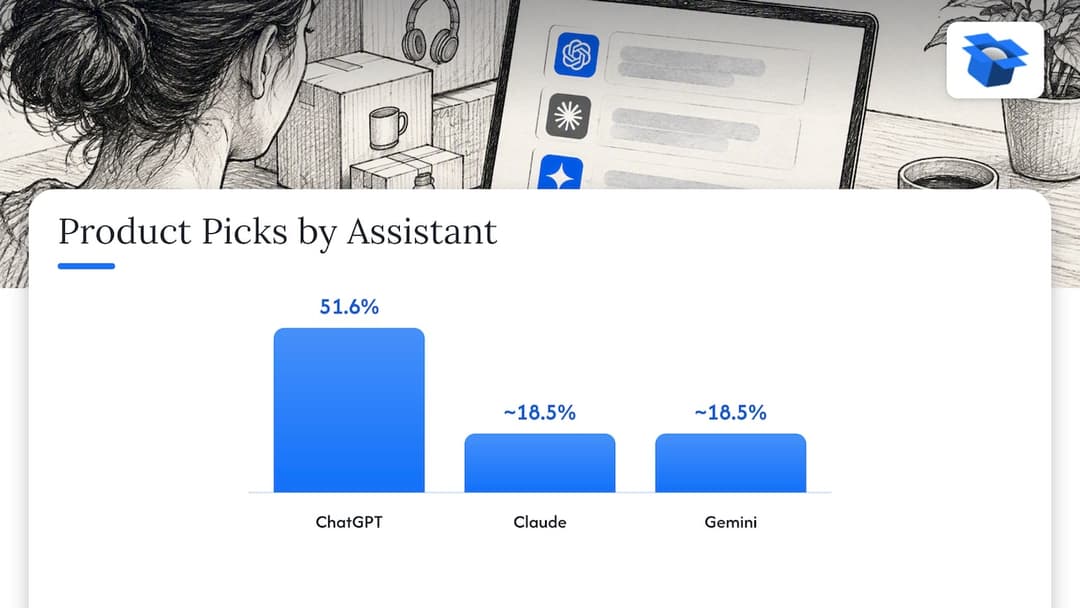
Fair caveat: nobody outside the AI labs can tell you exactly how each assistant weighs these signals, and the answers shift between models. In our own simulations of 36,797 purchases on one catalog, ChatGPT picked the product about three times as often as Claude or Gemini (51.6% versus about 18.5%). Same catalog, very different outcomes. Optimizing for one assistant’s habits is a moving target, so work on clarity and accuracy, which every model rewards.

Common mistakes and things not to trust

08

How to audit and measure

How to audit and measure

Start with what Google gives you for free. Search Console has a Generative AI performance report that helps you monitor how your content is discovered through AI-generated features on Google Search. It covers Google only, but it is the one place a first-party number exists.

For everything else, the most honest test is to ask. Take your ten best sellers, pick the competitor a shopper would compare each against, and ask several assistants which one they would buy and why. Write down what the answer cites. If the winner is picked because of a spec you never stated, you have your to-do list.

Doing that by hand works for ten products and breaks at two hundred. That gap is what we built ecentic for, which is in the next section.

A plain checklist for this week:

  1. Confirm your product URLs are indexed and not blocked by a noindex tag.
  2. Check robots.txt and your firewall rules for OpenAI, Claude and Bing crawlers.
  3. Inspect Product schema on five pages and match price and stock to the visible page.
  4. Rewrite the titles and first sentences of your top ten products with use case, audience and exclusions.
  5. Ask three assistants to recommend a product in your category and note who wins.
  6. Open the Generative AI report in Search Console and note your baseline.

For a longer program, our WooCommerce AI SEO guide goes deeper on the 2 to 4 week version, and the ChatGPT SEO simulation plan lays out a 30 to 90 day one.

09

Perspective

Perspective

We built ecentic on one observation: the agent never sees your homepage. It reads the product feed, the catalog and the structured data on your product pages. Everything a classic SEO program does for rankings still helps, but the sale now depends on whether the agent picks your product over a named competitor’s, and whether it can then buy it.

That is why we do not start from keywords. We connect to your WooCommerce store, Shopify store or a product feed, have ChatGPT, Claude and Gemini compare each product with a competitor’s, and show you in plain English why you lose. When you click Apply, ecentic rewrites the title, description and structured data and publishes them to the store.

The second half matters just as much to us. On Google’s AI Mode and Gemini in the US, shoppers can already buy inside the AI answer through UCP, Google’s open standard for agent checkout. For WooCommerce, the free ecentic plugin lets agents search, fill a cart and check out through UCP. A feed tool can tidy your data. We think a store also needs a checkout an agent can finish, and that part is what plain feed tools do not do.

We have seen what happens when it is neglected. In an anonymous audit of a spirits marketplace doing about €70M a year, 88% of its 9,699 products had a fault in the data agents read, and it came up 0 times in 20 when agents were asked where to buy two bottles it stocks. In another, a Swedish skincare brand’s agent checkouts reached payment in 0 of 6 countries because one shipping setting asked for a phone number. Small settings, big silence.

I think the stores that win this will be the boring ones with accurate data and a checkout that works. Nobody ever won a customer with a firewall rule.

Xhurian Shaba

10

Try it on your own catalog

Try it on your own catalog

ecentic helps online stores sell when AI agents do the shopping: it optimizes their product feed and catalog so AI shopping agents pick their products and can actually buy them. Get the sale when AI does the shopping.

The free scan covers your top 10 products and needs no card. After that, the plans on our pricing page are Compete at $14.90 per month for up to 100 products, Scale at $44.90 per month for up to 1,000 products with one-click fixes, and Dominate at $149 per month, which adds Google Merchant Center sync and agent checkout setup. There is also a pay-as-you-go option at 3% of AI-attributed orders, capped at $500 per month.

ecentic

Our first pilot, DUA Flavours, saw visits from AI assistants and direct traffic rise 12% from April to July 2026. That is a visits number, not a sales number, and we are not going to pretend otherwise. If you want to see how your store looks to an agent before you sign up for anything, start with the free scan or run the free WebMCP shopping audit.

11

FAQ

FAQ

What is generative SEO for WooCommerce?

It is preparing your store so AI tools can read and recommend your products. That means clear structured product information, specific attributes and organized content, which WooCommerce itself lists as the practical goal. Think of it as SEO where the reader is a machine deciding what to suggest.

Is SEO dead now that AI answers shopping questions?

No. Google’s documentation says its generative AI features are rooted in its core search systems, so crawlability, quality content and technical health still matter. What changes is that being indexed is the minimum, not the win.

Does WooCommerce add structured data by default?

Yes, it generates basic JSON-LD for products, covering product information, pricing and availability. It does not know your use cases, compatibility or audience, so check the output and fill those gaps in your product fields and descriptions.

Should I add llms.txt to my WooCommerce store?

You can, but do not expect results from it. WooCommerce says there is no direct evidence yet that llms.txt increases AI recommendations. Spend the time on product data and schema accuracy first.

How do I know if AI assistants recommend my products?

Use Search Console’s Generative AI performance report for Google’s features, and test other assistants by asking them to compare your product with a named competitor’s. A simulation across your catalog, such as the one ecentic runs, does the same at scale and shows why a rival wins.

Guides and research on winning AI shopping agents.