

WooCommerce AI Publishing: How to Do It Without Hurting Sales

· By Xhurian Shaba, co-founder and CEO of ecentic

18 min read

How to publish AI-written product content in WooCommerce safely: what to generate, what to review, how to check the structured data, and what agents read.

00

Introduction

Abstract product data moving toward checkout

Whether people google, go to Amazon or ask a chatbot, AI now answers with a product, and most e-commerce brands have no idea how to be that product. AI publishing in WooCommerce means using a model to draft product titles, descriptions and structured data, then pushing them to your live store. Done well, it fixes the data shoppers and AI agents actually read. Done badly, it puts 800 confident, identical pages on the internet.

I think the interesting part is not the writing. Writing a description has been cheap for two years. The hard part is that the reader is changing: an AI agent reads your product feed and your structured data, not your homepage, and it will not forgive a wrong shipping weight the way a human might. Publishing faster is only good if what you publish is correct, which is a slightly awkward thing to say about a technology famous for sounding correct.
ecentic
Make WooCommerce Products AI-Ready
ecentic compares your products with a named competitor, then helps update titles, descriptions and structured data for AI shopping agents.
Check my store free
01

TL;DR

TL;DR

  • AI can draft product titles, descriptions, attributes and structured data for WooCommerce. Blog posts are a separate job and matter less for agent shopping.
  • Google does not ban AI-written content, but it treats mass-produced pages with no added value as spam. Review before you publish.
  • Check the data an agent reads: price, availability, shipping and structured data. Wrong data costs you more than weak prose.
  • Compare against a named competitor’s listing before you rewrite, so you know what you are fixing.
  • ecentic helps online stores sell when AI agents do the shopping: it optimizes their product feed and catalog so AI shopping agents pick their products and can actually buy them.
02

How WooCommerce and WordPress fit together

How WooCommerce and WordPress fit together

WordPress is the content management system. WooCommerce is a plugin that adds the store: products, payment methods, inventory, cart and checkout. That matters for AI publishing because you have two kinds of content living in one install. Blog posts and pages are WordPress content. Products are WooCommerce content, with their own fields for price, stock, attributes, categories and variations.

Most “AI content” plugins were built for the first kind. They write posts, schedule them and push them out. A store needs the second kind: the thing that fills the product title, the short description, the long description, the attributes and the markup that tells a machine what the product is.

If you are scoping a custom build, such as connecting a model to your product database or a review step in your admin, a team that does custom e-commerce web development can wire that up. Most stores do not need to start there.

03

What AI can actually write and publish in WooCommerce

What AI can actually write and publish in WooCommerce

There are four kinds of content worth separating, because each carries a different risk.

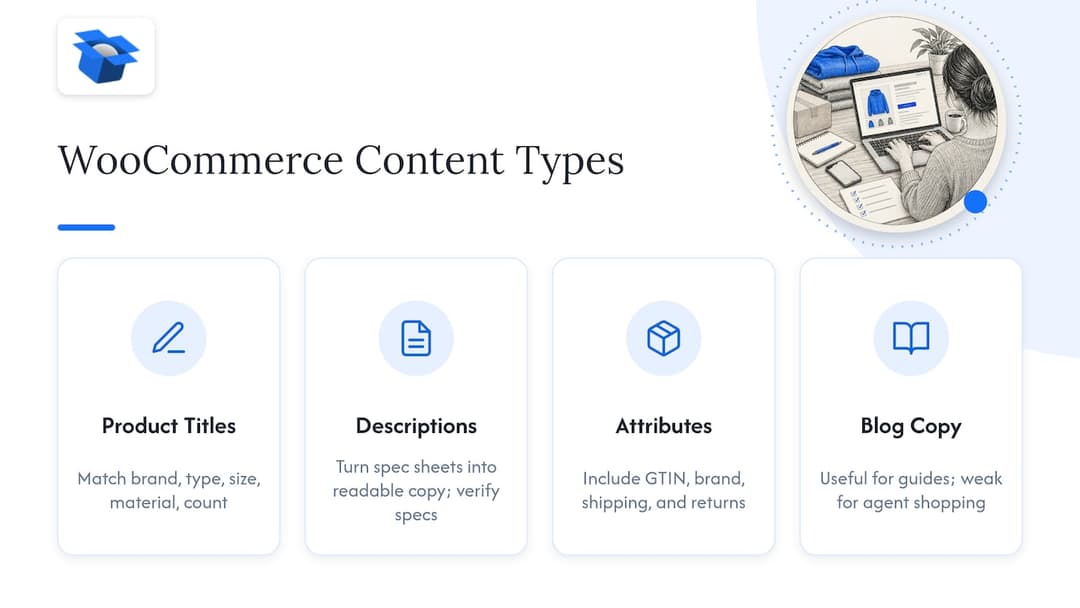
Four WooCommerce content types and categories

Product titles. Short, high-impact, easy to get wrong. A model will happily add “premium” and “best” to everything. Agents do not care about adjectives. They match on what the product is: brand, type, size, material, count.

Product descriptions. The classic use case. Models are good at turning a spec sheet into readable copy and bad at knowing which specs are real. If your source data says 250 ml and the model writes 8 oz, you now have two truths on one page.

Attributes and structured data. Size, color, material, GTIN, brand, shipping details, return policy. This is the least glamorous and most useful target. It is also where an AI can fill a gap with something plausible, which is the worst thing it can do.

Blog posts and category copy. Fine for guides and buying advice, but a weak lever for agent shopping. An agent comparing two moisturizers is not reading your blog.

One thing to settle early: where does the AI write? Some setups generate text inside the WordPress editor. Others draft in a spreadsheet and stage the result for approval before import. Some use a protocol layer. WooCommerce itself now includes support for the Model Context Protocol, which lets AI assistants perform store operations through a standard interface with permissions, though the project describes it as a developer preview whose details may change. I would not build a business process on a preview feature without a fallback.

04

What Google says about AI-written content

What Google says about AI-written content

The rules are less scary than the forums suggest. Google’s guidance is that using generative AI is not against its policies by itself. The line is what you do with it. Google says using generative AI to create many pages without adding value for users may violate its spam policy on scaled content abuse.

For a store with 2,000 SKUs that is the real risk. Run every product through the same prompt, get 2,000 descriptions with the same rhythm and the same “elevated everyday” phrasing, and you have built a template farm. It will not help you in classic search, and it does nothing for an agent that is trying to tell your product apart from the next one.

The same Google guidance asks you to review AI output for accuracy and quality, and to validate structured data against applicable guidelines. Google also says that explaining how AI or automation was used can help readers, especially when they would expect to know. For product pages this rarely needs a banner. For reviews, advice and anything with a human byline, it does.

Google’s own optimization guide points the other direction from volume. It recommends unique content with first-hand expert perspective over restating what is already available elsewhere. A model cannot supply first-hand experience. You can: how the jacket fits, what the coffee tastes like after a week, which customers return the item and why. Put that in the prompt, not just the SKU.

05

A review checklist before anything goes live

A review checklist before anything goes live

Before you publish AI-written product content, check these things on a sample, then on anything high-value.

Facts. Every number, unit, material and compatibility claim matches your source data. Models round, convert and invent. Check dimensions, ingredients, warranty and “works with” statements first.

Claims you cannot support. “Clinically proven”, “hypoallergenic”, “organic”, “FDA approved”. If you have no proof, the line goes. In regulated categories such as supplements, skincare and food, have the person who owns compliance read it, not just the person who owns marketing.

Sameness. Read five descriptions from the same category in a row. If you can swap the product names and nothing breaks, the copy is not doing its job.

Duplicates. Variants of one product should not become ten near-identical pages. Keep one canonical product with variations, and make sure the AI does not write a different story for each color.

Structured data. Google’s product documentation says markup can expose price, availability, review ratings and shipping information in Search, Images and Lens, and that merchants can supply product data through page markup, Merchant Center feeds, or both. If your markup says in stock and your feed says out of stock, you have a conflict that a human might never notice and an agent will.

Checkout path. Click through as a buyer. Fair caveat: this is the step most teams skip, and it is the one where a lot of money leaks. In our audits, a Swedish skincare brand’s agent checkouts reached payment in 0 of 6 countries because a shipping setting asked for a phone number. The product copy was fine. The sale was impossible.

06

Setting up a workflow that you can trust

Setting up a workflow that you can trust

There is no single correct setup, but the shape of a good one is the same. A model drafts, a person approves, the store updates, and someone checks what changed.

  1. Export or connect your catalog. Pull products, attributes and current structured data into one place so the model works from real data, not from the title alone.
  2. Define what the model may change. Title and description, yes. Price, stock and GTIN, no. Write that down as a rule.
  3. Give it facts and a voice. Feed it the specs, a short style note and a few real customer phrases. Tell it what not to claim.
  4. Draft a small batch first. Ten products in one category, not the whole catalog.
  5. Review and approve. A human reads every draft in the first batch. Later you can sample.
  6. Publish. Update the live products, whether through the admin, a CSV import or a connected tool.
  7. Re-test. See whether the change moved anything, using the measures in the section below.

On scheduling: plenty of plugins can schedule posts and some can stage drafts for approval before import. Whether a given tool publishes on its own or waits for you is a setting to check on its own documentation page before you install it. I would keep a human approval step on product data in any case. A scheduled blog post that goes out slightly off is embarrassing. A scheduled price or compatibility claim that goes out wrong is a refund.

07

What costs and limits to check first

What costs and limits to check first

WooCommerce is free to download, but a real store still pays for a domain and hosting. AI tools add their own layer: a monthly plugin fee, usage-based model costs, or both. Ask these before you commit.

  • Does it write to WooCommerce product fields, or only to posts and pages?
  • Does it handle variations, attributes and custom fields?
  • Does it touch structured data, or only visible text?
  • Where does the approval step sit, and can you skip it by accident?
  • How does it bill: per product, per word, per seat, or per outcome?
  • Does it work with your theme, your SEO plugin and your caching setup?

A content plugin that is excellent for blogs may know nothing about product schema. A feed tool may know everything about Merchant Center and nothing about your WooCommerce checkout. Pick for the job you actually have.

08

The case for comparing before you rewrite

The case for comparing before you rewrite

Most AI publishing starts with “rewrite this description to be better.” Better than what? A model told to improve text improves it in the direction of generic.

A sharper question is why an agent picks a competitor’s product over yours. That is a data question. Maybe their title names the size and yours does not. Maybe their structured data includes shipping and return details and yours is empty. Maybe their description answers the exact question a shopper asked and yours is a paragraph about lifestyle.

This is what we built ecentic around. It connects to Shopify, WooCommerce or a product feed. It has ChatGPT, Claude and Gemini compare each product with a named competitor’s, and shows why yours loses, in plain English. The fix is then written against a reason, not against a vague idea of quality. For more on writing for this reader, our guide to product description fixes for AI recommendations goes through them one by one, and the piece on product titles in Merchant Center covers the title side.

The models also disagree with each other. In our own simulation, 36,797 simulated purchases by October 2026, ChatGPT picked the product about 3x as often as Claude or Gemini on the same catalog: 51.6% against about 18.5%. That is ecentic’s own test data, not an industry benchmark, and I would not read it as a ranking of which model is better. I read it as a warning: one model’s opinion of your listing is not the market’s.

09

Perspective: why publishing is half the job

Perspective: why publishing is half the job

We think the AI publishing conversation in WooCommerce is aimed at the wrong target. Most tools help you produce more text. Almost none ask whether an agent can find your product, trust the data and then buy it.

The agent never sees the homepage. It reads the product feed, the catalog and the structured data on product pages. On Google’s AI Mode and Gemini in the US, it can also check out for the shopper through UCP, Google’s open standard for agent checkout. ChatGPT links to the store’s own checkout instead. So there are two jobs: make the product the pick, and make sure the purchase can finish. A beautiful description on a product whose checkout asks an agent for a phone number is a very well-written dead end.

We saw the same pattern in a data audit of a spirits marketplace doing about €70M a year, anonymous by design. A fault sat in the data agents read on 88% of its 9,699 products, and it came up 0 times in 20 when agents were asked where to buy two bottles it stocks. No one on that team had a writing problem. They had a data problem that looked like a writing problem.

So here is my opinion, and you are free to disagree: for a WooCommerce store, the order is data first, checkout second, prose third. Publish less, but publish things an agent can verify.

Fair caveat: ecentic is pre-revenue and running pilots. Our first pilot, DUA Flavours, saw visits from AI assistants and direct traffic rise 12% from April to July 2026. That is a visits number, not sales, and one store is one store. We do not have a customer base to point at, and I would rather say so than dress it up.

— Xhurian Shaba

10

Measuring whether it worked

Measuring whether it worked

Publishing without measuring is just a more expensive way to guess. Google’s advice for judging content is to ask whether it is original, accurate, useful and satisfying, and to audit the pages and searches affected when traffic drops. That works as a checklist for product pages too.

In practice, track a few things for the products you changed, against a similar set you left alone.

  • Search impressions and clicks for those product URLs in Search Console.
  • Merchant Center diagnostics, if you use it: disapprovals, missing attributes and mismatches between feed and page.
  • Visits from AI assistants, using referrer data in your analytics where the assistant passes it.
  • Simulated picks: ask the major models the questions shoppers ask and see whether your product is named.
  • Checkout completion, tested by hand, including shipping to the countries you sell in.

Give it weeks, not days. Agents and search engines both take time to re-read a catalog, and a change you made on Monday will not show on Tuesday. Resist the urge to rewrite again in the meantime, because then you will never know which change did what.

11

Where ecentic fits, and what it costs

Where ecentic fits, and what it costs

Once you know what is wrong, someone has to fix it on the store. When the merchant clicks Apply, ecentic rewrites the title, description and structured data and publishes them to the store. Nothing goes live until you click. On Shopify, it pushes the fixes into Google Merchant Center and tracks visits from AI assistants. On WooCommerce, the free ecentic plugin lets agents search, fill a cart and check out through UCP. That checkout piece is what plain feed tools do not do. They are good at feeds, and that is a real skill, but a feed does not complete an order.

You can test a store against AI shopping agents in the UCP Playground, and the WooCommerce page explains how the plugin works. For the product side, see AI product listing optimization.

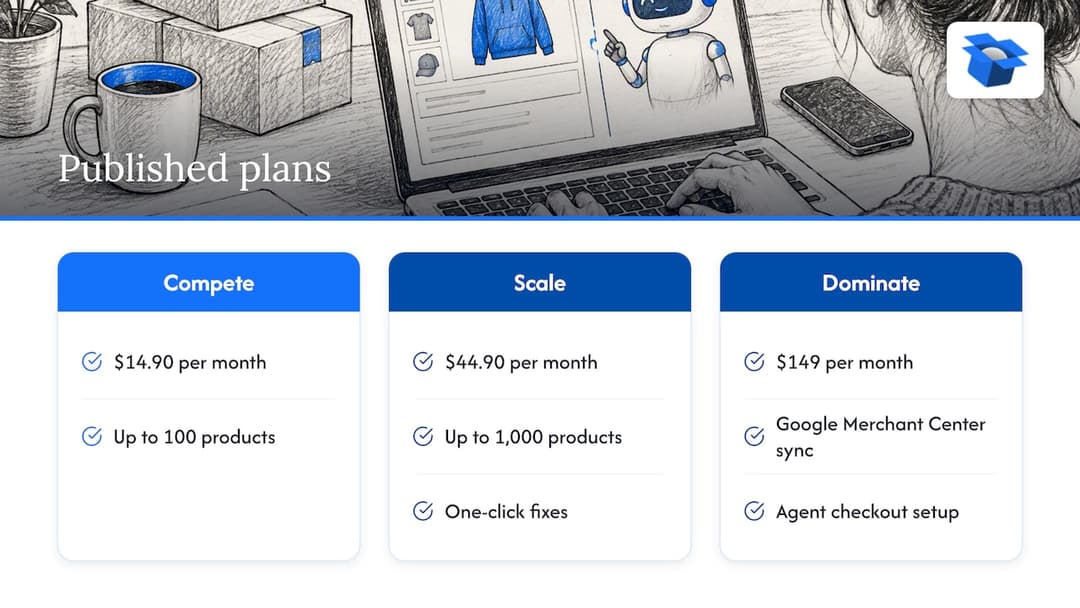
On price, the published plans are Compete at $14.90 per month for up to 100 products, Scale at $44.90 per month for up to 1,000 products with one-click fixes, and Dominate at $149 per month, which adds Google Merchant Center sync and agent checkout setup. There is also a pay-as-you-go option at 3% of AI-attributed orders, capped at $500 per month, and a free scan of your top 10 products with no card needed. Enterprise has custom limits, API and MCP access and a DPA, with no published price. Start with the free scan, since it shows you the problem before you pay to fix it.

For a wider look at what makes a WooCommerce store citable by AI shopping tools, see our piece on WooCommerce AI SEO, and if you sell abroad, the one on multilingual product pages.

Where ecentic fits, and what it costs — overview diagram

12

FAQ

FAQ

Does Google penalize AI-written product descriptions?

Not for being AI-written. Google’s guidance targets low-value content produced at scale, and says that using generative AI to create many pages without adding value for users may violate its spam policy on scaled content abuse. Review each draft for accuracy, add real product knowledge, and avoid running the whole catalog through one identical prompt.

Can I schedule AI content to publish automatically in WooCommerce?

Some plugins can schedule posts, and some stage AI drafts for approval before import. What each one does varies, so read its documentation before installing. For product data, I would keep a human approval step, because a wrong claim on a product page costs more than a late post.

Should I use AI for blog posts or product pages first?

Product pages, and within them titles, attributes and structured data. Those are what shopping agents read when they choose and compare. Blog posts help with guides and buying advice, but they are a slower lever for being the product an agent picks.

Does WooCommerce support AI assistants natively?

WooCommerce includes support for the Model Context Protocol, which lets AI assistants interact with a store through a standard interface with authentication and permissions. The project’s documentation lists it as a developer preview, so details may change between releases. Check the current docs before depending on it.

Guides and research on winning AI shopping agents.