UCP Product Profile: What It Is and How to Publish One

· By Xhurian Shaba, co-founder and CEO of ecentic

15 min read

A UCP profile is the JSON file that tells AI agents what your store can do and how to check out. Here is what goes in it, how to publish it and test it.

00

Introduction

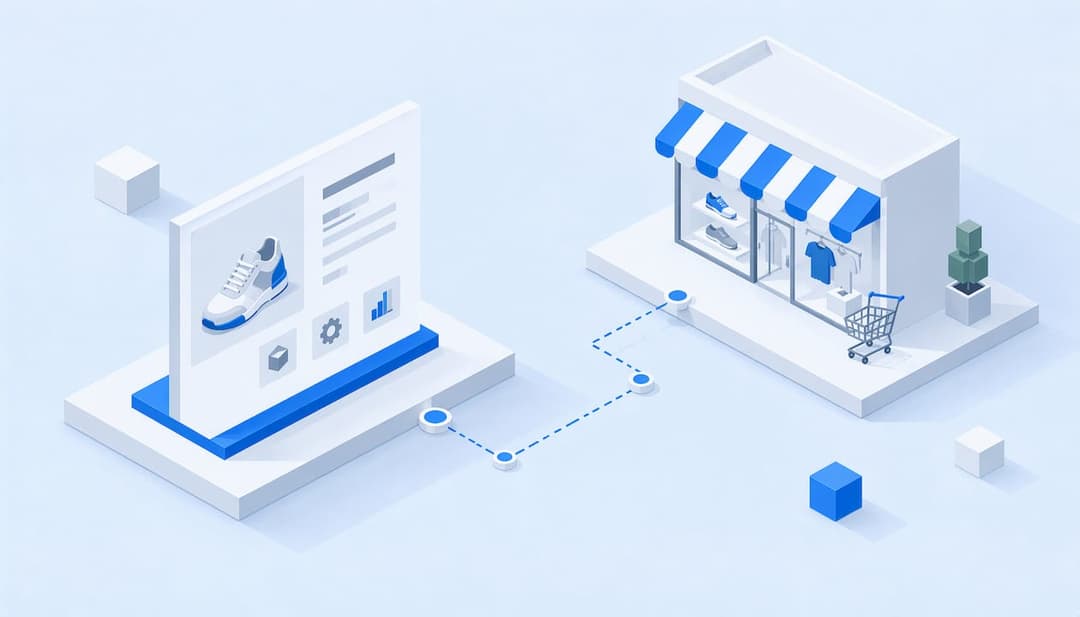
Geometric profile card linked to a store

A UCP profile is a public JSON file that tells AI shopping agents what your store can do: which capabilities it supports, where its endpoints live, how it takes payment. You host it at /.well-known/ucp on your domain, and Google reads it to decide how an agent can search, fill a cart and check out. UCP, the Universal Commerce Protocol, is Google’s open standard for agent checkout. Despite the search phrase, there is no separate “product profile”: your products live in your feed and catalog, and the profile describes the store around them.

Whether people google, go to Amazon or ask a chatbot, AI now gives them an answer with a product in it, and most e-commerce brands have no idea how to be that product. Here is the part that surprises people. The agent never sees your homepage. It reads a file. I think that is the funniest redesign brief of the decade: the most important page on your site is now one you will never style.
ecentic
Make Your Store Easier for AI to Read
ecentic checks your product feed and structured data, then helps you apply improvements so AI shopping agents can understand your products.
Check my store free
01

TL;DR

TL;DR

  • A UCP profile is a JSON file at /.well-known/ucp that declares your capabilities, versions, endpoints, payment handling and public keys.
  • It has to be public, with no login in front of it. Agents cannot negotiate with a file they cannot fetch.
  • Advertise only what your store really supports. The business picks the version and capabilities, so overpromising breaks checkouts.
  • The profile is the door. The product feed, catalog and structured data are what the agent reads once inside, and that is where most stores lose.
  • Check the file with a validator, then run a full test purchase before you call it done.
02

What a UCP profile actually is

What a UCP profile actually is

Google’s documentation describes the profile as a JSON file hosted at a well-known path on your server that publicly declares what your server can do, so Google can negotiate capabilities with it. Think of it as a business card an agent reads before it tries to buy anything. The card says: here is what I support, here is where to call me, here is how I take payment, here are the keys to verify that messages really come from me.

The negotiation part matters. Per Google’s guide, the business, not the agent, picks the protocol version and the capabilities, choosing from the overlap between its own profile and the agent’s. The UCP community describes this as a deliberate design choice: platforms and merchants negotiate locally instead of registering with some central gatekeeper. Nice for merchants. It also means nobody is going to fix your file for you.

If you want the wider context of how UCP chooses compatible capabilities between agents and business servers, AI in ecommerce examples shows where this sits among the other ways stores are now using AI.

03

What goes inside the file

What goes inside the file

Google’s implementation guide for creating a UCP profile lays out the structure. In plain words:

The ucp object holds protocol metadata: the version, the services you offer and the capabilities you support. The example in the guide lists a shopping service endpoint at https://business.example.com/ucp/v1, which is simply the address an agent calls to do shopping things. Payment configuration sits next to the ucp object as a sibling, not inside it. And there is a signing_keys array: public keys in JWK format, used to verify signatures on webhooks and other authenticated messages coming from your servers.

So the file covers four jobs:

Part of the profile What it tells the agent Why you care
Capabilities and versions Which features you support and which spec and schema versions you speak Claim too much and agents try things your store cannot do
Service endpoints Where to send search, cart and checkout requests A wrong address means a dead checkout
Payment handling How payment is configured for orders This is where agent checkouts quietly die
Public signing keys How to verify messages from your servers Without them, signed messages cannot be trusted

Notice what is missing: prices, titles, descriptions, images. None of that lives in the profile.

04

Where your products fit in

Where your products fit in

The profile says how an agent can shop with you. The product data says what it can shop for. These are two separate layers, and mixing them up is the most common confusion I see.

The agent reads your product feed, your catalog and the structured data on your product pages. That is where it learns your product’s title, attributes, availability and price. If that data is thin, vague or broken, a flawless profile just delivers the agent to a store it will not pick from.

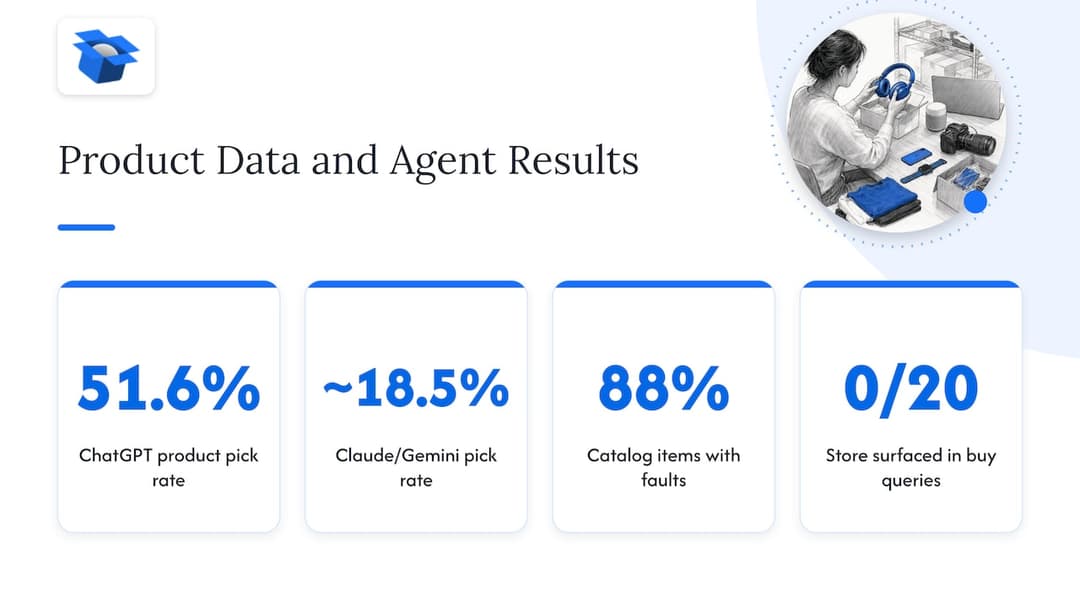
We have seen how much this matters. By October 2026 we had run 36,797 simulated purchases in ecentic, and on the same catalog ChatGPT picked the product about 3x as often as Claude or Gemini (51.6% versus about 18.5%). Same products, different agent, very different result. In one anonymous audit of a spirits marketplace doing about €70M a year, 88% of its 9,699 products had a fault in the data agents read, and the store came up 0 times in 20 when agents were asked where to buy two bottles it stocks. Great profile or not, that store was invisible.

The lesson: publish the profile, but do not stop there. We go deeper on the reading side in how AI shopping agents recommend your products.

Where your products fit in

05

How to publish your UCP profile

How to publish your UCP profile

The mechanics are short. The thinking is in step 1.

  1. Decide what you really support. List the capabilities your store can handle today, not the ones on the roadmap. Google’s guidance is to advertise only what your implementation supports.
  2. Write the JSON. Declare capabilities, specification and schema versions, service endpoints, payment handling and public keys, following Google’s profile guide.
  3. Host it at /.well-known/ucp. The path sits on your own domain, so yourstore.com/.well-known/ucp should return the file.
  4. Make it public. No login, no password, no bot challenge in front of it. Google says it must be accessible without authentication.
  5. Validate it. Load the URL in a browser, then run it through a checker (more on that below).
  6. Test a full purchase. From catalog search to payment completion, with an agent, before real shoppers do it for you.

On a hosted platform, step 3 is the one that bites. Not every platform lets you serve files from /.well-known/ paths freely, so check this early rather than at 11 pm on launch day.

06

Shopify versus WooCommerce

Shopify versus WooCommerce

The two platforms differ in who does the heavy lifting.

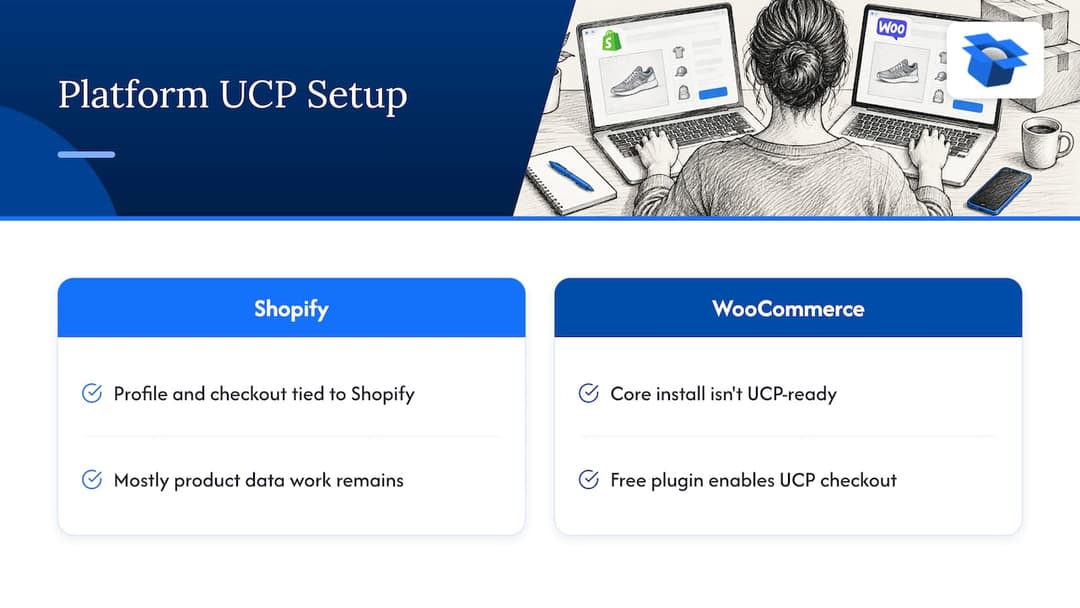
On Shopify, the profile and checkout plumbing are tied to Shopify’s side of things, and the work that remains for you is mostly product data. That is where ecentic helps: it connects to your store, has ChatGPT, Claude and Gemini compare each product with a named competitor’s, and shows why yours loses. When you click Apply, it rewrites the title, description and structured data and publishes them to the store, then pushes the fixes into Google Merchant Center and tracks visits from AI assistants. Our Shopify page has the details.

On WooCommerce, do not assume the core install is UCP-ready. A complete integration needs something between WooCommerce and the UCP specification. That something, for us, is the free ecentic plugin, which lets agents search, fill a cart and check out through UCP. See the WooCommerce page for how it fits your store.

Fair caveat: buying inside the AI answer is live on Google AI Mode and Gemini in the US today. ChatGPT sends shoppers to your store’s own checkout instead. So a UCP profile is about the Google side of the shelf, and your product data has to do the work everywhere else.

Shopify versus WooCommerce

07

How to check that your profile works

How to check that your profile works

Three checks, in this order.

First, fetch it. Open /.well-known/ucp in a private browser window. If you see JSON without logging in, the “public” test passes. If you get a redirect to a login or a firewall page, that is your bug.

Second, read it like an agent. Do the declared capabilities match what your store truly does? Are the versions right, the endpoints live, the payment handling present, the public keys there? A profile that claims a capability the checkout cannot complete is worse than a smaller honest one.

Third, run it through a validator. Our free UCP validator checks the file for you. Other free checkers exist too, such as UCPtools and UCPList, and they are fine choices if you want a second opinion or a CI step that fails a build when the file breaks. I would run two.

Then test the thing that matters: a purchase. Our UCP Playground lets you point AI shopping agents at a store and see what happens. Teams building more complex flows often borrow ideas from other fields that already test long customer journeys end to end, such as omnichannel contact center testing, where a flow is only considered live after the whole path has been exercised.

One real example of why this matters. In an anonymous audit of a Swedish skincare brand, agent checkouts reached payment in 0 of 6 countries, because a shipping setting asked for a phone number. The agent had no phone number to give, so it stopped. The profile was fine. The checkout was not.

08

Mistakes that break agent checkouts

Mistakes that break agent checkouts

Most failures are boring, which is the good news, because boring is fixable.

The file sits behind authentication or a bot filter, so agents get a login page. The profile declares a capability the store cannot complete. Endpoints point at a staging address someone forgot about. Payment settings assume a human is typing, with required fields an agent cannot fill. Cached copies go stale after a change, so cache headers are worth a look when you update the file. And the product feed has gaps, so the agent arrives, shrugs and picks a competitor.

The last one is the quiet killer. A profile failure is loud: the checkout errors out and you can find it. A data failure is silent: you just never get picked, and no dashboard rings a bell.

09

Our perspective

Our perspective

I think the industry is about to spend a year talking about protocols and forget the boring middle. Everybody wants to explain UCP. Few want to open a product feed and look at what is actually in it.

Here is how we see it. The agent decides in two stages. First it asks, can I buy from this store at all? That is the profile and the checkout. Then it asks, which product do I pick? That is the title, the description, the structured data. Fixing one without the other is like building a great checkout for a store nobody walks into.

That is why ecentic works on the store itself: the product feed, the catalog and the checkout an agent uses to buy. Plain feed tools stop at the data. We keep going to the part where the agent can actually buy. On Google AI Mode and Gemini in the US, that means UCP, and it is the part feed tools do not do.

OpenAI has ACP, Google has UCP, Amazon has a wall. Merchants will not get to pick one protocol and relax. I would rather they spend their time on product data that every agent reads, and treat each protocol as a door to open when it is live for their market.

Fair caveat: we are pre-revenue and running pilots. Our first, DUA Flavours, saw visits from AI assistants and direct traffic rise 12% from April to July 2026. That is visits, not sales, and I would not call it more than it is.

Xhurian Shaba

10

Get the sale when AI does the shopping

Get the sale when AI does the shopping

If you want to see where your products stand before you touch a JSON file, start with the free scan. It covers your top 10 products and needs no card. It shows how agents compare your products with a named competitor’s and why you lose.

When you are ready to fix what it finds, Compete covers up to 100 products at 14.90 USD per month. Scale covers up to 1,000 products with one-click fixes at 44.90 USD per month. Dominate adds Google Merchant Center sync and agent checkout setup at 149 USD per month. Prefer to pay only when it works? Pay-as-you-go is 3% of AI-attributed orders, capped at $500 per month. All of it is on the ecentic pricing page.

ecentic

Want to start with the cheapest question first? Our WebMCP shopping audit is free, and the features overview shows the rest.

11

FAQ

FAQ

Is a UCP product profile the same as a product feed?

No. The UCP profile describes your store’s capabilities, endpoints, payment handling and keys. The product feed and catalog describe the products themselves. Agents need both: the profile to know how to shop with you, the feed to know what to pick.

Where do I put the UCP profile file?

Host it on your own domain at /.well-known/ucp, and make it publicly reachable without authentication. Google’s profile guide gives the requirements. If your platform restricts that path, sort it out before anything else.

Does ecentic generate my UCP profile?

No. ecentic does not generate UCP profiles. Our free UCP validator checks one, and on WooCommerce the free ecentic plugin lets agents search, fill a cart and check out through UCP. On every platform, ecentic rewrites product titles, descriptions and structured data when you click Apply.

Do I need a UCP profile if I only care about ChatGPT?

Not for checkout. ChatGPT links shoppers to your store’s own checkout, so your product data carries the weight there. UCP matters for buying inside Google AI Mode and Gemini, which is live in the US. Strong product data helps in both places.

Guides and research on winning AI shopping agents.