How to Track ChatGPT Traffic (and What GA4 Misses)

· By Xhurian Shaba, co-founder and CEO of ecentic

14 min read

Find ChatGPT visits in GA4, understand why some arrive as Direct, and learn what referral data can't tell you about AI-driven shopping. A practical guide.

00

Introduction

Measured clicks beside an untracked path

Whether people google, go to Amazon or ask a chatbot, AI now gives them an answer with a product in it, and most e-commerce brands have no idea how to be that product. To track ChatGPT traffic, filter your analytics for sessions whose source is chatgpt.com, group them in a custom channel, and read the result as a floor, not a total. Some ChatGPT visits will always land in Direct.

I think this is the first analytics problem in years where the honest answer is “you will see part of it, and that’s fine.” The part you see is small, the part that shapes the sale happens inside a chat window you can’t instrument, and the dashboards still look very official.

ecentic
See What AI Reads About Your Products
Tracking ChatGPT referrals shows only part of the story; ecentic checks your product data and shows where your products lose to competitors.
Check my store
01

TL;DR

TL;DR

  • ChatGPT adds a utm_source=chatgpt.com tag to links it opens, so in GA4 look for chatgpt.com in Session source / medium.
  • Some visits lose that tag (copied links, app handoffs, a known bug), and they show up as Direct or (not set).
  • Build a custom channel group with a regex for ChatGPT hosts, then check landing pages and conversions per session.
  • Referral data is a lower bound. Add a “How did you hear about us?” field to catch the rest.
  • Tracking only tells you what happened. Whether ChatGPT picks your product depends on your product feed, catalog and structured data.
02

What a ChatGPT visit looks like in your data

What a ChatGPT visit looks like in your data

When someone clicks a product link inside ChatGPT, the browser opens your store and your analytics records a session. OpenAI says ChatGPT automatically includes utm_source=chatgpt.com in referral URLs, which is what makes the traffic trackable at all.

So in GA4 you usually see two signals: the referrer (chatgpt.com, sometimes chat.openai.com) and the UTM source. The strongest evidence that a visit came from ChatGPT is the first page view’s referrer host plus the campaign data in the URL, as EasyIndex’s measurement guide lays out. If both agree, you can be confident.

Two things that look like ChatGPT traffic are not. A crawler or live assistant read of your page is a bot request, not a visit. Mapp notes that bot requests fetching content for chatbot answers don’t show as tracked visits in JavaScript analytics, and you only find them in server logs. A human click runs your normal tracking. A bot read doesn’t. Your analytics will never tell you how often ChatGPT read your product page and then recommended it without a click.

Human clicks tracked; bot reads appear in server logs

03

Set up GA4 to report ChatGPT traffic

Set up GA4 to report ChatGPT traffic

You don’t need a dashboard tool for the basics. Here is the order I’d do it in.

  1. Check the standard report first. In GA4, open Reports, Acquisition, Traffic acquisition. Switch the dimension to Session source / medium and search for chatgpt.com. If you see rows, you already have data.
  2. Create a custom channel group. In Admin, under Data display, add a channel group with a rule on Source that matches a regex such as chatgpt\.com|chat\.openai\.com|openai\.com. The pattern of matching those three hosts is what analysts commonly use. Name the channel something plain, like “ChatGPT”, and place it above Referral so it wins the match.
  3. Look at landing pages. Add Landing page as a secondary dimension on the ChatGPT rows. This tells you which product pages ChatGPT actually sends people to, which is more useful than the session count.
  4. Add conversions. In the same report, read key events and revenue per channel. Mark purchase and add-to-cart as key events if they aren’t already.
  5. Save an Exploration. Build a free-form report with your ChatGPT channel as a segment, landing page as rows, and sessions, engaged sessions and purchases as values. Keep the attribution model the same as for your other channels, or the comparison is meaningless.

Google also changes how it labels AI sources from time to time, so check your channel report every few months and update the regex if a new assistant shows up under Referral. Perplexity, Claude and Gemini can go into the same pattern with their own hosts if you want one “AI assistants” channel.

04

Why some ChatGPT visits go missing

Why some ChatGPT visits go missing

This is where most guides skip the awkward part. A fair share of ChatGPT-driven visits arrives without a tag.

One more split matters. Google’s AI Overviews and AI Mode arrive as search traffic, so you read them in Search Console, not in your ChatGPT channel. EasyIndex makes the same point: AI Overview clicks look like ordinary Google search traffic.

Practical result: if Direct traffic to deep product pages (not your homepage) grows while your ChatGPT channel stays flat, some of that Direct is probably ChatGPT. Nobody types a long product URL by hand.

05

What referral data can’t tell you

What referral data can’t tell you

Treat the ChatGPT number as a lower bound. EasyIndex lists the gaps: citations read without a click produce no visit, some apps open links with no referrer, and AI Overview clicks blend into search.

There is also the shopper who sees your product in ChatGPT, doesn’t click, and comes back later by typing your brand name. Your analytics credits Direct or branded search. ReportDesk suggests a simple fix: self-reported attribution, like a “How did you hear about us?” field at checkout. It’s low tech and it works, and I think every store should add “ChatGPT or another AI assistant” as an answer option this week.

For the same reason, look at first-touch and path reports, not only last click. If you want a framework for measuring influence beyond the final click, this AI agent analytics KPI layers breakdown shows how to organize the metrics.

One more complication is ads. OpenAI’s ad product added view-through conversion reporting in August 2026, which credits a conversion to a user who saw an ad and never clicked. If you ever buy those ads, click-based and view-based numbers will disagree, and you should decide in advance which one you trust.

06

A weekly report that fits on one screen

A weekly report that fits on one screen

Keep it small enough that you actually read it. For a store with a few hundred to a few thousand products, I’d track:

Metric Where it comes from What it answers
ChatGPT sessions GA4 custom channel Is the visible volume growing?
Top landing pages from ChatGPT GA4, landing page dimension Which products does it send people to?
Engaged sessions and purchases per channel GA4 key events Do these visitors buy?
Direct sessions to product pages GA4, landing page filter How much hidden AI traffic is there?
Survey answers Checkout or post-purchase form Who mentioned an AI assistant?
Search Console AI features Search Console How does Google’s AI traffic look?

Watch trends over four to eight weeks. A single week of 14 sessions tells you nothing. If you want more on the measurement side, our guides on how to track AI shopping traffic and cookieless attribution with AI go further.

07

Perspective: tracking is the easy half

Perspective: tracking is the easy half

We built ecentic because we think most stores are asking the wrong question. “How many visits did ChatGPT send us?” is a fine question. “Why did the agent pick our competitor’s product instead of ours?” is the one that moves orders.

An AI shopping agent never sees your homepage. It reads your product feed, your catalog and the structured data on product pages. If the data is wrong, thin or contradictory, the agent picks someone else, and no click ever happens, so no analytics tool shows you the loss. Your chart just looks quiet.

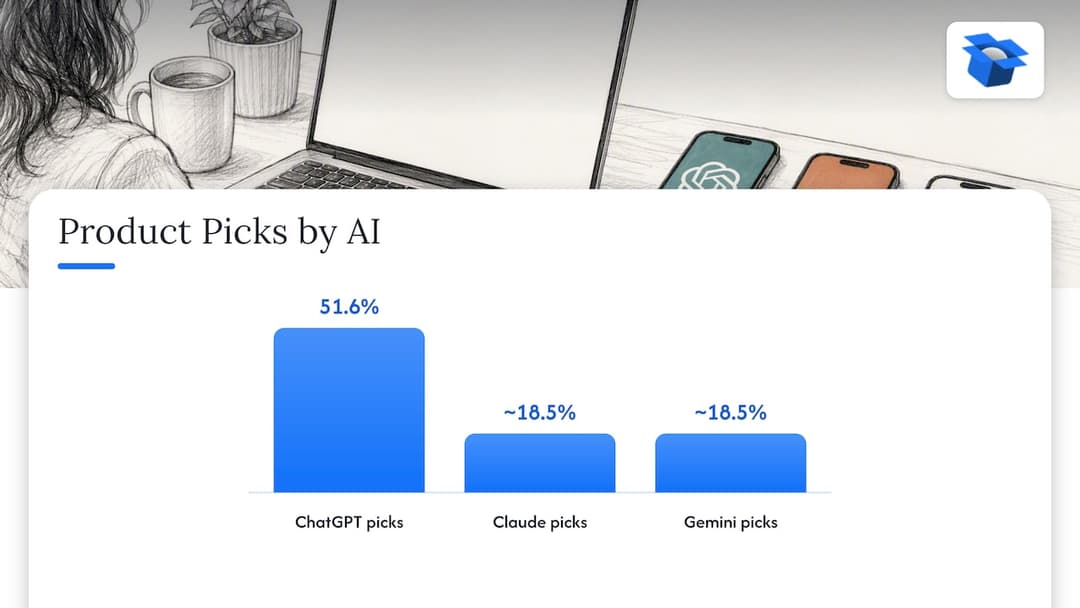
We’ve seen how stark this gets. By October 2026 we had run 36,797 simulated purchases, and on the same catalog ChatGPT picked the product about 3x as often as Claude or Gemini (51.6% vs about 18.5%). The same products, three different answers. In an anonymous audit of a spirits marketplace doing about €70M a year, 88% of its 9,699 products had a fault in the data agents read, and agents named it 0 times in 20 when asked where to buy two bottles it stocks. Strong brand, fine website, invisible to the agent.
Perspective: tracking is the easy half — overview diagram

Our first pilot, DUA Flavours, saw visits from AI assistants and direct traffic rise 12% from April to July 2026. That is a visits number, not sales, and it’s one pilot. Fair caveat: ecentic is pre-revenue and still running pilots, so treat that as an early signal, not proof.

There’s also a checkout side. Buying inside the AI answer is live on Google’s AI Mode and Gemini in the US through UCP, Google’s open standard for agent checkout. ChatGPT links to the store’s own checkout instead. OpenAI has ACP, Google has UCP, Amazon has a wall. Whichever way your shoppers buy, the agent has to find your product, trust the data and get through checkout. In another audit, a Swedish skincare brand’s agent checkouts reached payment in 0 of 6 countries because a shipping setting asked for a phone number. No analytics report would have shown that, because the agent just left.

— Xhurian Shaba

08

Fix what the agent reads, then measure again

Fix what the agent reads, then measure again

Once your tracking works, the useful order of operations is simple: find out where you lose, fix the product data, and watch the channel you just built.

That’s what ecentic does. ecentic helps online stores sell when AI agents do the shopping: it optimizes their product feed and catalog so AI shopping agents pick their products and can actually buy them. It connects to Shopify, WooCommerce or a product feed, has ChatGPT, Claude and Gemini compare each product with a named competitor’s, and shows why it loses. When you click Apply, it rewrites the title, description and structured data and publishes them to your store. On Shopify it also pushes the fixes into Google Merchant Center and tracks visits from AI assistants. On WooCommerce, the free ecentic plugin lets agents search, fill a cart and check out through UCP.

The free scan covers your top 10 products with no card. Paid plans on the pricing page start with Compete at $14.90 per month for up to 100 products, Scale at $44.90 per month for up to 1,000 products with one-click fixes, and Dominate at $149 per month, which adds Google Merchant Center sync and agent checkout setup. There is also a pay-as-you-go option at 3% of AI-attributed orders, capped at $500 per month. Get the sale when AI does the shopping.

If you want to read first, our structured data checklist for product pages and the 30 to 90 day playbook for ChatGPT product recommendations are good starting points. Search Engine Land’s analysis says product visibility in ChatGPT leans on structured data, feed quality such as GTIN, MPN and pricing, and outside signals like reviews rather than ad bidding, which matches what we see in simulations.

09

FAQ

FAQ

Does ChatGPT traffic show up in Google Analytics automatically?

Usually yes, as referral traffic from chatgpt.com, because ChatGPT tags links it opens. It won’t be a clean channel by default, though. Some visits arrive as Direct or (not set), so create a custom channel group and check your Direct traffic to product pages as well.

Why is my ChatGPT traffic so low?

Partly because it is still small for most stores, and partly because many visits lose their referrer. A shopper may also read your product in the answer and never click. Look at Direct traffic to deep product pages and add a survey question at checkout before you conclude the number is real.

Can I track what ChatGPT says about my products without a click?

Not from analytics. A read without a click leaves no session, and bot reads show up in server logs at best. The practical way is to simulate shopping prompts against your catalog and see whether your product gets picked, which is what a scan like ours does.

Is ChatGPT traffic worth tracking for a small store?

Yes, as a trend line and as a reason to check your product data. Set the channel up once, spend a few minutes a week on it, and add the survey answer. Don’t make budget decisions on a few dozen sessions.

Guides and research on winning AI shopping agents.