ecenticecentic
How it worksResourcesPricingBlog
Install now
ASCII-art illustration of a stack of books

How to Win GA4 AI Traffic for Your Shopify Store

Published: August 6, 2026 · 12 min read

Unlock GA4 AI traffic for your Shopify store by optimizing product data and setting up smart protocols. Start winning today!

00

Key Takeaways

Hands setting AI shopping integration on laptop

Winning AI shopping-agent traffic comes down to three things: clean product data, enabled agent protocols, and simulation testing to confirm agents can actually find and trust your catalog. If your Google Merchant Center feed has price mismatches, missing GTINs, or stale availability, Gemini, ChatGPT, and Perplexity will skip your products in favor of a competitor whose data is tighter. Fix the data first, then enable the protocols, then measure what comes back.

The fastest path to your first agent recommendation:

  • Audit your Merchant Center feed for disapproved items and price/availability mismatches (Day 1)
  • Populate GTIN or MPN on every SKU (Week 1)
  • Add shippingDetails and hasMerchantReturnPolicy schema to your PDPs (Week 2)
  • Enable Shopify Agentic Storefronts in Shopify Admin (Week 3)
  • Run simulation prompts across Gemini, ChatGPT, and Perplexity to validate (Week 4)

Pro Tip: Ecentic’s free product scan runs a simulation against your live store before you touch a single feed field, so you know exactly which SKUs agents skip and why.

Key Takeaways

Winning AI shopping-agent traffic requires clean feed data, enabled agent protocols, and server-side attribution capture working together.

Point Details
Fix feed data first Price/availability mismatches and missing GTINs cause agents to skip your products before any other factor.
Schema depth builds agent trust Add shippingDetails, hasMerchantReturnPolicy, and aggregateRating to every PDP to pass agent verification checks.
Server-side capture is non-negotiable Agents strip referrers and cookies; webhook-level order capture is the only way to recover agent-driven revenue accurately.
Simulate before you ship Run prompt tests across Gemini, ChatGPT, Perplexity, and Claude quarterly to catch ranking drops before they cost you revenue.
Ecentic accelerates the sprint Ecentic’s simulation-driven diagnostics and one-click publishing compress weeks of manual feed work into a single platform run.
01

What’s your 30–60 day priority checklist?

What’s your 30–60 day priority checklist?

Triage by revenue impact first. Pull your top 20% of SKUs by revenue and identify which ones have missing required fields. Those are your Day 1 targets.

Days 1–7: Critical fixes

  1. Fix every price and availability mismatch between your Merchant Center feed and your live PDPs. Agents cross-reference both.
  2. Resolve all Merchant Center disapprovals using the Diagnostics tab.
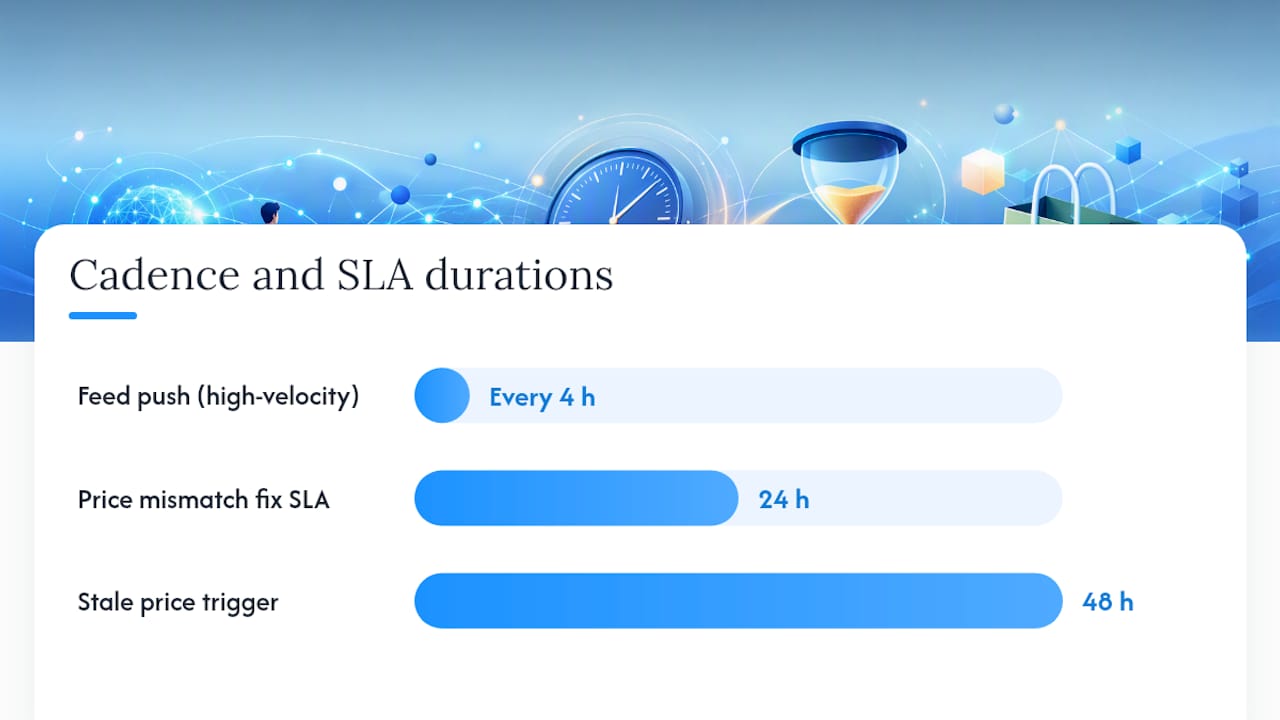
  3. Confirm your feed syncs at least every 4 hours for high-velocity SKUs.
  4. Check robots.txt to confirm Googlebot-Shopping and major AI crawlers are not blocked.

Week 1–4: Required field completion

  1. Populate gtin or mpn on every product. Stable, unique IDs are how agents match your product across sources.
  2. Rewrite titles to lead with the product type and key constraint (see Section 3).
  3. Add brand to every feed item.
  4. Collect at least 5 verified reviews per top SKU to populate aggregateRating.

Week 4–8: Schema depth and agentic checkout

  1. Add shippingDetails and hasMerchantReturnPolicy to Product schema on every PDP.
  2. Enable Shopify Agentic Storefronts (Shopify Admin → Settings → Agentic Commerce) or configure your WooCommerce feed endpoint.
  3. Run your first simulation audit across all four major assistants.
  4. Deploy server-side order capture webhooks to recover agent-completed purchases.

For WooCommerce merchants, the equivalent of Agentic Storefronts is exposing a clean, gzip-compressed product feed endpoint that agents can read without JavaScript rendering.

02

What do AI shopping agents actually read from your product data?

What do AI shopping agents actually read from your product data?

Agents do not browse your store the way a human does. They query structured data sources: your Merchant Center feed, the Shopping Graph, and on-page schema. According to Semrush’s ecommerce AI SEO guide, expanding Product schema beyond the basics and exposing machine-readable fields for shipping, returns, and ratings materially improves agent trust and verification.

Feed / Schema Field Why agents use it Where to set it
title First filter for constraint matching Merchant Center feed + <title> tag
gtin / mpn Cross-source identity verification Feed + Product schema
price + availability Real-time eligibility check Feed (sync every 4 hours)
shippingDetails Delivery promise verification On-page Product schema
hasMerchantReturnPolicy Trust and policy verification On-page Product schema
aggregateRating Social proof signal On-page AggregateRating schema
brand Brand disambiguation Feed + schema
images Visual confirmation, virtual try-on Feed (min image size)

Search Engine Land’s analysis of AI-driven shopping discovery makes the shift clear: agents filter by constraints, not keywords. A title like “Running Shoes Men Size 12 Wide Cushioned Trail” beats “Premium Athletic Footwear” because the first one answers a constraint query directly.

Good title: “Carry-On Luggage 22x14x9 Fits United Basic Economy, Spinner Wheels” Bad title: “Premium Travel Bag — Best Quality Guaranteed”

The good title answers three constraint queries at once: size, airline compatibility, and wheel type. Feed freshness and stable variant IDs are equally critical. An agent that finds a $49 price in your feed but $59 on your PDP will drop your product from the recommendation.

Pro Tip: Add use-case language to your short description and itemProperty schema: “fits under airplane seat,” “works with HE washers,” “compatible with iPhone 15 and 16.” Agents use these phrases to match shopper constraints that never appear in a keyword search.

03

How do you set up feeds, protocols, and agentic storefronts?

How do you set up feeds, protocols, and agentic storefronts?

The protocol layer sits above your feed. Your feed gets agents to your catalog; protocols like UCP, ACP, and MCP let agents complete a purchase without a human clicking through checkout.

Protocol summary:

  • UCP (Universal Commerce Protocol): Enables agent-initiated checkout. Shopify stores are UCP-enabled by default. WooCommerce merchants need a compatible plugin or custom endpoint.
  • ACP (Agent Commerce Protocol): Google’s protocol for Gemini-initiated purchases. Requires Merchant Center enrollment and feed compliance.
  • MCP (Model Context Protocol): Anthropic’s open standard for giving AI models access to external tools and data. Relevant for Claude-based shopping integrations.

Shopify action steps:

  • Connect your store to Google Merchant Center via the Google & YouTube channel in Shopify Admin.
  • Enable Agentic Storefronts under Settings → Agentic Commerce when available in your region.
  • Verify your UCP profile is active. Ecentic’s Shopify optimization tools include UCP profile generation and validation.

WooCommerce action steps:

  • Install a feed management plugin (e.g., a WooCommerce-native Google feed plugin) and configure gzip export.
  • Expose a read endpoint that does not require JavaScript rendering. Agents cannot execute client-side scripts.
  • Add the woocommerce_payment_complete webhook to capture agent-completed orders server-side.

Agentic checkout sessions often look like thin or fast checkouts to legacy fraud systems. Before you enable agentic checkout, adjust your fraud rules to allow high-confidence, low-friction sessions from verified agent sources. Validate the full order flow in a staging environment first. Signifyd’s research on AI agents in ecommerce recommends running an AI brand visibility audit and updating fraud thresholds before going live.

04

How do you audit what AI assistants actually see?

How do you audit what AI assistants actually see?

Run this simulation sequence once per quarter, and any time you make major feed or schema changes.

  1. Crawl your agent-accessible signals. Use Google’s Rich Results Test and a schema validator to confirm Product, Offer, AggregateRating, and shippingDetails are valid on your top 20 PDPs.
  2. Run prompt tests across all four assistants. Open Gemini, ChatGPT, Perplexity, and Claude and ask each one a constraint-based query for your product category.
  3. Inspect the returned product lists. Are your products appearing? If not, note which competitors are and compare their feed fields against yours.
  4. Ask the assistant where it found the information. Request a source link. That link traces back to your feed entry or PDP and reveals exactly which data the agent trusted.
  5. Run UCP Playground. Ecentic’s UCP Playground simulates agent behavior against your live store, showing which SKUs pass agentic checkout validation and which fail.

Template prompts for your audit:

  • “Find me a [product type] that [constraint 1] and [constraint 2] under $[price], ships free.”
  • “I need a gift for someone who [use case]. What do you recommend?”
  • “Which [product category] is compatible with [specific device or system]?”

Pro Tip: After each prompt test, paste the returned product URL into your Merchant Center Diagnostics. If the URL has feed errors, that is why the agent ranked a competitor above you.

05

How do you make AI-agent traffic visible and attribute orders?

How do you make AI-agent traffic visible and attribute orders?

AI-agent traffic breaks the standard attribution chain. Agents can strip referrers, bypass cookies, and skip client-side pixels entirely, which means a purchase completed through an agent often lands in your analytics as direct traffic. Two signals survive: tagged links and server-side capture.

Measurement checklist:

  • Tag every link you control (product links in merchant portals, ChatGPT merchant listings, Perplexity merchant program entries) with UTM parameters: utm_source=chatgpt, utm_medium=ai-agent, utm_campaign=agentic.
  • Capture inbound request logs server-side. Log the User-Agent and Referer headers on every product page request.
  • Identify AI-assistant referrer hostnames and segment those sessions into an “AI” cohort in your analytics platform. Compare conversion rate, AOV, and session depth against your organic and paid cohorts.
  • Deploy order-level webhook capture: Shopify’s order/create webhook and WooCommerce’s woocommerce_payment_complete hook both fire before client-side analytics can drop the session. Push those events to your analytics endpoint with agent metadata attached.
  • Enabling Shopify Agentic Storefronts provides structured referral metadata that reduces AI-to-direct misclassification, giving you a cleaner baseline immediately.

The attribution gap is not a GA4 configuration problem. It is a structural problem: agents do not send the signals GA4 was built to receive. Server-side capture and webhook recovery are the only durable fixes. GA4 AI traffic analysis is a useful lens for sessions that do carry referrer data, but it cannot recover what was never sent.

Pro Tip: Before sending agent-attributed orders into your reconciliation workflow, match UCP session IDs and ACP references on the order object. Misclassified agent orders inflate your direct-traffic conversion rate and undercount agent revenue.

06

How do you keep agentic visibility stable over time?

How do you keep agentic visibility stable over time?

How do you keep agentic visibility stable over time? — overview diagram

Cadence Task Owner
Daily Price and availability sync check; Merchant Center disapproval alerts Feed/engineering owner
Every 4 hours Feed push for high-velocity SKUs Feed/engineering owner
Weekly Merchant Center Diagnostics review; schema validation spot-check Product data owner
Quarterly Prompt audits across all four assistants; UCP Playground rescan; fraud rule review Product data owner + trust & safety

Roles that need to own this:

  • Product data owner: Maintains feed field completeness, title quality, and schema accuracy.
  • Feed/engineering owner: Manages sync cadence, endpoint health, and webhook reliability.
  • Trust & safety / fraud: Reviews and adjusts fraud rules for agentic checkout sessions.
  • Customer support: Handles policy clarifications that surface when agents misrepresent return or shipping terms.

SLA targets worth setting: fix price and availability mismatches within 24 hours of detection, and roll back any agent-related checkout error immediately. A stale price that persists for 48 hours can trigger a Merchant Center suspension.

07

Ecentic gets you to your first agent recommendation faster

Ecentic gets you to your first agent recommendation faster

Most merchants spend weeks manually auditing feeds, writing schema, and running prompt tests one assistant at a time. Ecentic compresses these into a single simulation run.

Ecentic

The platform connects directly to your Shopify or WooCommerce store, runs a simulation against Gemini, ChatGPT, Claude, and Perplexity simultaneously, and returns plain-English diagnostics: which SKUs agents skip, which fields are missing, and exactly what to rewrite. One-click publishing pushes the fixes back to your store without touching your theme or feed manually. The product listing optimization tools include UCP profile generation, feed normalization, and agent attribution analytics so you can track which agent drove which order.

Start with a free scan at Ecentic. You will see your agent recommendation rate before you change a single field.

08

What merchants getting this right do differently

What merchants getting this right do differently

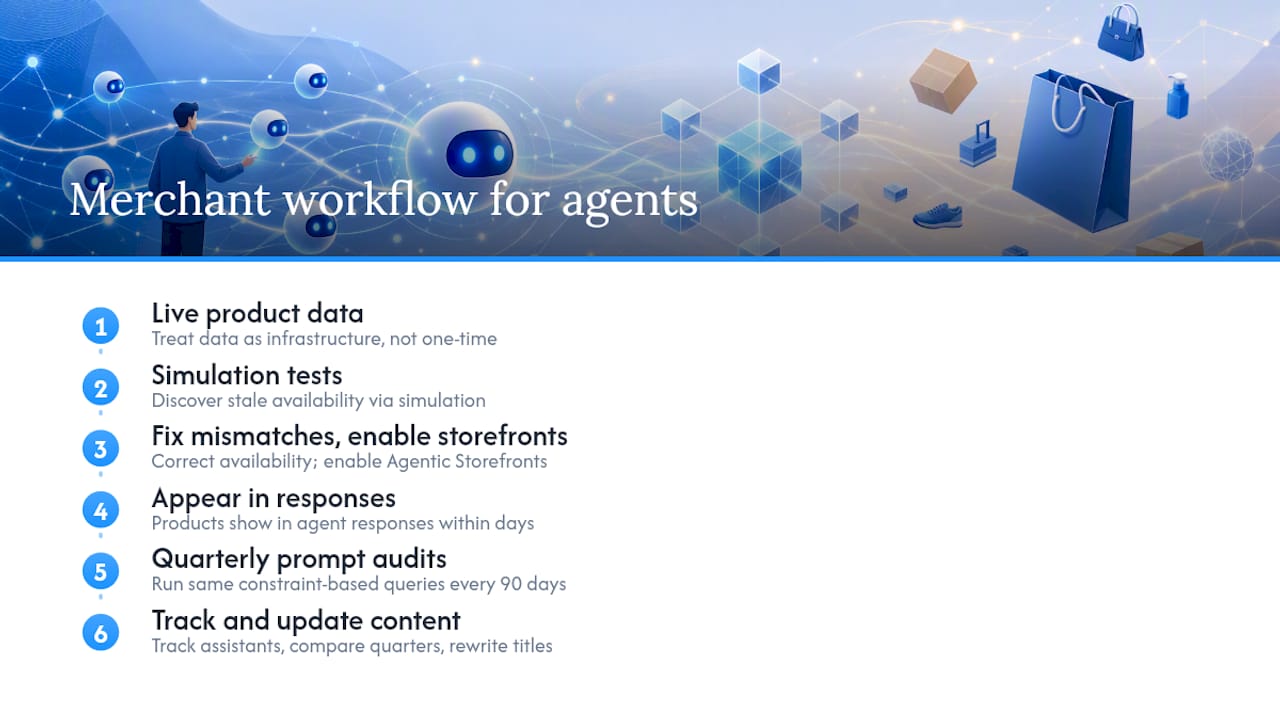
The merchants who see consistent agent-driven traffic share one habit: they treat their product data as live infrastructure, not a one-time setup. One pattern that shows up repeatedly is discovering stale availability data through a simulation test. A product marked “in stock” in the feed but “out of stock” on the PDP will fail every agent recommendation check, and most merchants do not catch it until they run a structured simulation. After fixing the mismatch and enabling Agentic Storefronts, the same products start appearing in agent responses within days, not weeks.

The discipline is quarterly prompt audits. Run the same constraint-based queries every 90 days, track which assistants surface your products, and compare against the prior quarter. Agent ranking behavior shifts as assistants update their models and data sources. A product that ranked well in Q1 may need a title rewrite by Q3 because the constraint language agents prioritize has shifted.

Pro Tip: Treat your agent-facing content the same way you treat your paid search copy: test it, measure it, and update it on a fixed cadence. It is not a campaign. It is infrastructure.

What merchants getting this right do differently — overview diagram

09

What merchants getting this right do differently

What merchants getting this right do differently

10

Sources

Sources

  • Google AI Shopping Features: How to Maximize Your Visibility (2026) - Shopify
  • Agentic PDP: What a Product Page Needs for Bots - Ryze
  • Utm

ga4 ai attributionmachine learning in GA4how to track GA4 trafficGA4 predictive analyticsAI traffic analysisAI-driven traffic optimizationGoogle Analytics 4 trafficGA4 data insightsenhancing traffic with AIga4 ai traffictrack ai traffic in ga4
Back to blogGet started

Guides and research on winning AI shopping agents.

Get picked by AI

Ready to be the product agents recommend?

Install free on Shopify or WooCommerce and see your AI score in minutes.

Install on ShopifyInstall on WooCommerce
ecentic

Win every AI shopping agent's cart.

Built for the agent economy
Product
  • Features
  • How it works
  • Pricing
  • Product Listings
Platforms
  • Shopify
  • WooCommerce
  • Enterprise
Resources
  • Resources
  • Blog
  • Compare
  • UCP Validator
  • UCP Playground
  • Book a demo
Company
  • Support
  • Privacy policy
  • Terms of service

© 2026 ecentic. All rights reserved.

Made for merchants who refuse to be invisible to AI.