
ecenticecentic
How it worksResourcesPricingBlog
Install now
ASCII-art illustration of a stack of books

Prove Gemini SEO Gains: Use Search Console and Ecentic for Shopify

Published: August 31, 2026 · 14 min read

Anchor Gemini SEO to Search Console and run Ecentic simulations. Follow a 30 day Shopify and WooCommerce playbook that proves Gemini AI impression gains.

00

Introduction

Decorative Gemini SEO analytics title card

Anchor every Gemini SEO decision to Google Search Console’s generative AI report; it is the only source that shows real impressions inside AI Overviews and AI Mode. Pair that first-party data with a diagnostic platform like Ecentic to find and fix why specific pages get cited or skipped. Vendor dashboards alone can’t prove impact. This piece breaks down what these tools actually do, how to test one before buying, and a 30-day playbook to run.


TL;DR:

  • Pair Search Console’s generative AI report with a diagnostic platform like Ecentic to verify citation improvements through actual impression data.
  • Run a 20 to 50 SKU pilot in categories where pages rank on page one organically but lack AI citations, then monitor results over two to four weeks.
  • Confirm schema accuracy, connector reliability, and prompt repeatability before investing in enterprise features or expanding the scope.
  • Use detailed prompt logs and page-specific citation history to validate vendor claims, avoiding reliance on highlight reels or unverified success stories.
  • Focus on incremental gains in AI-driven impressions and citation rates to ensure measurable, sustainable improvements in AI shopping visibility.

01

Why Ecentic Is the Practical Choice for Gemini SEO

Why Ecentic Is the Practical Choice for Gemini SEO

Most Gemini SEO tools stop at diagnosis. They tell you a page has weak schema or thin content, then leave you to figure out the fix and republish it yourself. Ecentic closes that loop. It simulates how Gemini, ChatGPT, Claude, and Perplexity actually evaluate a product page, tells you in plain language why a competitor got recommended instead of you, and then generates a rewrite you can push live with one click.

The feature set maps directly onto the tasks that matter for AI shopping visibility:

  • Simulation-driven diagnosis shows which specific attributes (price framing, review count, shipping terms) tipped an AI agent toward a competitor’s SKU.
  • Native Shopify and WooCommerce connectors mean fixes ship without a developer ticket.
  • Auto-fix suggestions come with plain-English reasoning, not a generic “improve your content” nudge.
  • Agent traffic and attribution analytics separate AI-driven visits from organic and paid traffic, so you can tie a fix to a revenue outcome.

A realistic pilot runs on 20 to 50 SKUs across two or three categories, not your entire catalog. Merchants running this scope typically see measurable gains in AI-driven visits within a few weeks, alongside better citation rates on the specific product pages that got rewritten. The rescans then track whether those gains hold or decay as competitors adjust their own listings.

Pro Tip: Pick your pilot SKUs from categories where you already rank on page one organically but suspect you’re losing the AI Overview and AI Mode citation to a competitor. That gap is easier to close than trying to win an entirely new category from zero.

The point isn’t replacing your existing SEO stack. It’s adding the one layer most teams are missing: a way to see your product pages the way an AI shopping agent sees them, before you spend budget guessing.

02

What Gemini SEO Tools Actually Do

What Gemini SEO Tools Actually Do

Before you trust any vendor claim, know what a Gemini-focused tool is supposed to deliver. Most fall into four buckets, and a serious platform should cover all four rather than specializing in one and calling it complete.

Technical audits. Gemini needs machine-readable access to ground its answers in your content. Without correct JSON-LD schema, a valid llms.txt file, clean crawlability, and passing Core Web Vitals, an AI system often can’t extract reliable facts from a page no matter how well the copy is written. Open-source projects like avalonreset’s gemini-seo toolkit document terminal-native audit commands for exactly this kind of schema and crawlability check, which is worth running even if you end up buying a commercial platform.

Content readiness. This covers topical depth, visible author signals, and content structured in a Q&A or FAQ format that AI systems can lift cleanly. A product page buried in marketing adjectives with no specification table gives an AI agent almost nothing concrete to cite.

Monitoring and testing. A tool worth paying for runs the same set of prompts repeatedly and tracks whether your brand or product shows up in the answer over time. This is prompt-level testing, and it’s different from keyword rank tracking because the same prompt can return different citations week to week as models update. Cross-platform mention tracking matters too, since a citation win on Gemini doesn’t guarantee one on Perplexity or ChatGPT.

Ecommerce-specific features. For online retailers, this means product schema validation, catalog syndication to AI shopping channels, and readiness for in-chat checkout flows. Shopify’s own documentation on connecting stores to AI shopping channels describes a free Perplexity Merchant Program built for exactly this kind of syndication, and it’s a useful benchmark for what “AI-ready catalog data” is supposed to look like.

A tool that only does technical audits without touching ecommerce catalog data isn’t wrong, just incomplete for a retail team. Know which bucket you’re buying before you sign a contract.

03

How Do You Choose a Gemini-Capable SEO Tool?

How Do You Choose a Gemini-Capable SEO Tool?

Every evaluation should run through one non-negotiable rule: map every vendor claim back to Search Console’s generative AI report. If a tool says it improved your Gemini citations, that improvement should show up as a rise in AI Overview or AI Mode impressions for the pages in question. If a vendor can’t or won’t show you that correlation, treat the claim as unproven.

Beyond that ground-truth check, run the trial through this sequence:

  1. Request raw prompt logs. Ask for the exact queries the vendor tested, timestamps, and what citation outcome resulted. A platform with nothing to show here is guessing, not measuring.
  2. Verify schema accuracy against your live pages. Pull three product pages and check the generated JSON-LD against Google’s own structured data guidelines. Errors here undercut everything downstream.
  3. Ask for citation history over time, not a single snapshot. One good result is luck. A repeatable pattern across weeks is a working process.
  4. Test the ecommerce connectors directly. Connect a sandbox Shopify or WooCommerce store and watch how the tool handles a messy, real catalog with missing attributes.
  5. Run a 10 to 20 prompt repeat test. Ask the same set of realistic shopper questions across a two-week window and log whether your product shows up consistently or only once.

Red flags show up fast once you know to look for them. A vendor that only shows screenshots of a single favorable AI response, without logs or dates, is showing you a highlight reel. A tool that can’t explain why a page failed, only that it did, isn’t diagnostic. And a platform that reports “citation share” without ever referencing your own Search Console data is asking you to trust a number nobody outside the company can verify.

On priority, don’t over-invest before you’ve proven the basics work. An MVP evaluation should confirm schema accuracy, Shopify or WooCommerce connector reliability, and a working prompt-test loop. Enterprise features like automated cross-team workflows, bulk auto-optimization across thousands of SKUs, and custom attribution dashboards matter, but only after the core diagnostic loop has already shown a real lift in Search Console impressions.

Pro Tip: If a vendor demo only ever shows you their best-case result, ask to see the worst one from the same test batch. How a tool handles failure tells you more about its ceiling than its best day does.

04

A 30-Day Workflow: Search Console Plus Ecentic

A 30-Day Workflow: Search Console Plus Ecentic

Running Search Console and a diagnostic tool side by side works best as a defined cycle rather than an open-ended project. Here’s the sequence that gets a team from zero visibility to a measurable, defensible result inside a month.

  1. Baseline your starting point. Pull the generative AI report in Search Console and identify which pages already get AI Overview or AI Mode impressions, and which comparable pages get none. This split, not raw traffic, is where the real opportunity sits.
  2. Run simulations on the gap pages. Feed those underperforming pages or SKUs into Ecentic to see exactly which attributes, schema fields, or content gaps are causing an AI agent to skip them in favor of a competitor.
  3. Implement the fixes and republish. Update content briefs based on the flagged gaps, correct the schema, and push the changes live through the Shopify or WooCommerce connector so nothing sits in a developer backlog.
  4. Prompt test and monitor on a two to four week cadence. Re-run the same set of realistic shopper queries and track whether citation behavior shifted, then check whether Search Console’s AI impression numbers moved for the same pages in the same window.

That last step is the one teams skip, and it’s the one that actually proves the work mattered. A tool telling you a page “improved” means nothing until it shows up as a real impression gain in Google’s own generative AI report. Independent vendor comparisons make the same point: pairing first-party reporting with a dedicated diagnostic tool beats relying on either one alone, since Search Console only tells you what happened on Google’s surfaces while a third-party tool can track citations across Gemini, ChatGPT, and Perplexity together.

Iterate on the pages that moved, drop the ones that didn’t respond after two cycles, and expand the pilot to the next SKU batch only once the first batch shows a repeatable pattern. Our companion breakdown on simulating parity across Gemini and Perplexity walks through how to extend this exact loop to a second AI platform without duplicating the entire audit from scratch.

05

How Do You Vet Vendor Proof Claims?

How Do You Vet Vendor Proof Claims?

Don’t take a case study at face value, including one from Ecentic. A credible proof point should let you check the work yourself, not just trust a stated outcome.

What a real case study includes:

  • A dated Search Console screenshot showing AI Overview or AI Mode impressions before and after the fix, for the specific pages in question.
  • Prompt logs showing the exact queries tested and the citation outcome for each run.
  • A description of what actually changed on the page (schema field, content rewrite, review data) tied to the observed shift.

When a vendor, including Ecentic, shows you reported gains in AI-driven visits or sales, ask for the underlying Search Console window and the prompt logs behind it. A vendor that can produce both is treating you as a peer evaluating evidence, not a lead to close.

06

Where Gemini SEO Fits in Your Roadmap

Where Gemini SEO Fits in Your Roadmap

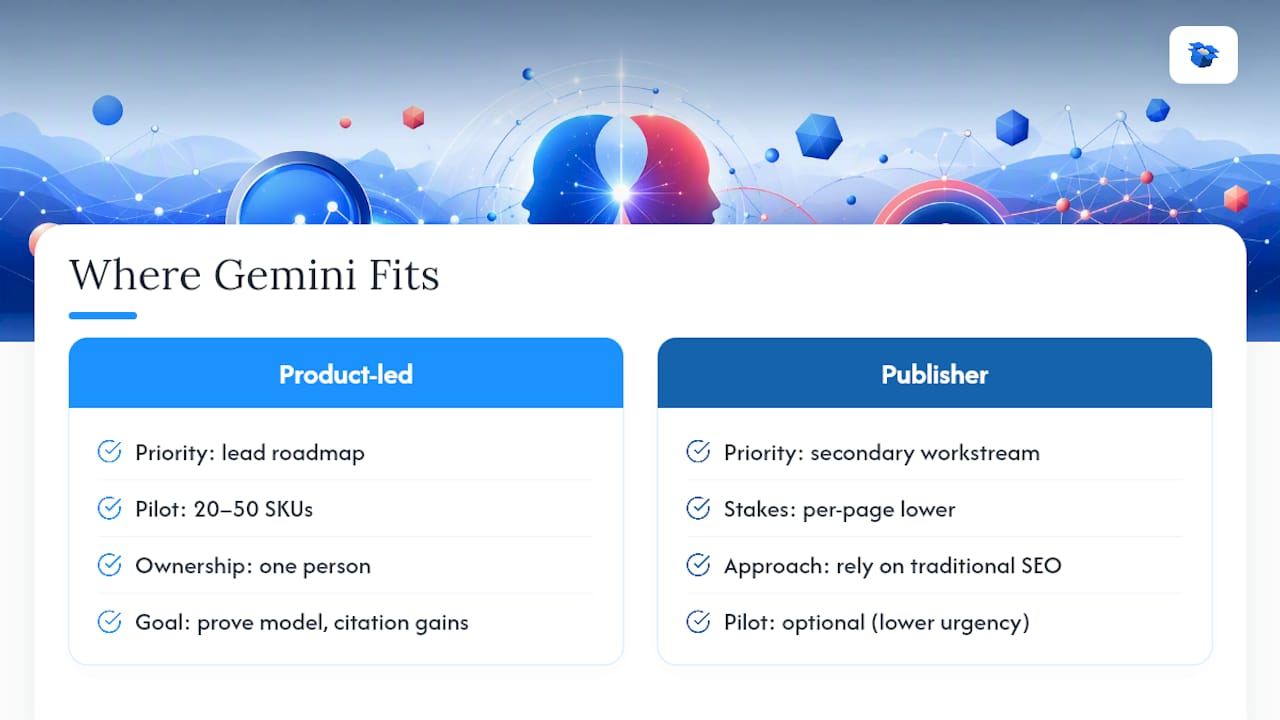
Where Gemini SEO Fits in Your Roadmap — overview diagram

Gemini-specific tooling should lead your roadmap if you run an ecommerce or product-led site where a single missed citation costs a sale, not just a click. Pure editorial and publisher sites can treat this as a secondary workstream, since the stakes per page are lower and traditional SEO signals still carry most of the weight.

For a product-led team, budget a pilot around 20 to 50 SKUs and one person who owns both the schema fixes and the prompt-testing cadence. That’s often enough to prove the model before asking for a bigger commitment. Once a pilot batch shows repeatable citation gains tied to real Search Console impressions, scale it category by category rather than all at once. A monthly monitoring cadence is the floor. Anything less and you’ll miss the point where a citation win quietly decays as competitors catch up.

— Xhurian

07

Start a Gemini SEO Pilot With Ecentic

Start a Gemini SEO Pilot With Ecentic

You’ve got the checklist and the workflow. The fastest way to see if your own catalog has a citation gap is to run it, not theorize about it. Ecentic’s free scan generates a simulation report on your live product pages, flags the specific schema and content issues costing you AI citations, and prioritizes fixes by expected impact.

Ecentic

A typical pilot runs two to four weeks: connect your Shopify or WooCommerce store, review the prioritized fix list, publish the rewrites through the built-in connector, then re-scan to confirm the gaps closed. Success looks like a measurable rise in AI-driven visits on the pages you fixed, backed by the Search Console impression data you pulled as your baseline. Start with the AI product listing optimization tools if you already know which SKUs are underperforming, or check the Shopify-specific integration page if your priority is getting your full catalog syndicated to AI shopping channels first.

08

Sources

Sources

Confirm every claim yourself: Search Console’s generative AI report, Shopify’s AI commerce documentation, and open audit tools like BabyLoveGrowth’s free AI SEO audit.

  • Search Console: Generative AI report (Google Support)
  • Perplexity shopping and AI commerce (Shopify)
09

FAQ

FAQ

Which AI tool is best for SEO?

No single tool covers everything. Use Search Console’s generative AI report as your ground-truth measurement and a diagnostic platform like Ecentic to fix what the data flags.

What Google tools are best for SEO?

Search Console remains the essential Google tool, especially its generative AI report showing AI Overview and AI Mode impressions. Google’s Rich Results Test also helps verify the schema that Gemini depends on to ground answers.

Which AI agent is best for SEO to monitor?

Gemini matters most for Google’s AI Overviews and AI Mode, but Perplexity and ChatGPT increasingly influence shopping decisions too. Cross-platform mention tracking, not a single-agent focus, gives the fuller picture.

What are the best SEO tools for Gemini specifically?

Look for tools combining schema audits, prompt-level testing, and ecommerce catalog connectors. Ecentic covers this through simulation-driven diagnosis paired with one-click Shopify and WooCommerce publishing.

How do I use Gemini for SEO without guessing?

Start by baselining your AI Overview impressions in Search Console, then run simulations on underperforming pages to see exactly why Gemini skips them in favor of a competitor before you rewrite anything.

best perplexity seo toolsbest perplexity ecommerce toolshow to use Gemini for SEOeffective SEO tools comparisonGemini SEO softwarebest gemini seo toolsbest SEO tools for Geminitop SEO tools for Gemini
Back to blogGet started

Guides and research on winning AI shopping agents.

Get picked by AI

Ready to be the product agents recommend?

Install free on Shopify or WooCommerce and see your AI score in minutes.

Install on ShopifyInstall on WooCommerce
ecentic

Win every AI shopping agent's cart.

Built for the agent economy
Product
  • Features
  • How it works
  • Pricing
  • Product Listings
Platforms
  • Shopify
  • WooCommerce
  • Enterprise
Resources
  • Developer docs
  • API reference
  • Resources
  • Blog
  • Compare
  • UCP Validator
  • UCP Playground
  • Book a demo
Company
  • Support
  • Privacy policy
  • Terms of service

© 2026 ecentic. All rights reserved.

Made for merchants who refuse to be invisible to AI.