ecenticecentic
How it worksResourcesPricingBlog
Install now
ASCII-art illustration of a stack of books

How to Optimize Your Product Listings for AI Shopping Agents

Published: August 6, 2026 · 12 min read

Discover how to enhance your product listings for AI shopping agents, boosting visibility and recommendations in just a few steps.

00

Key Takeaways

Hands organizing product feed sheets on table

Fix your product feed in Google Merchant Center first. That single action, combined with adding conversational attributes and running a Universal Commerce Protocol (UCP) simulation on your top SKUs, is the fastest path to getting recommended by AI shopping agents like ChatGPT, Gemini, Claude, and Perplexity. The industry term for this work is AI shopping agent optimization, and it operates on a different logic than traditional SEO.

  • Feed health check: Pull your Merchant Center diagnostics and resolve every GTIN mismatch, price error, and availability disapproval before touching anything else.
  • Conversational attributes: Add Q&A entries that answer “Can I…?” and “Will this work if…?” queries directly in your feed.
  • Simulate before you ship: Run a UCP Playground simulation on your top 10 SKUs to record a baseline agent-selection rate, then measure lift after each change.

Key Takeaways

Fixing your product feed in Google Merchant Center is the single highest-leverage action a Shopify or WooCommerce merchant can take to increase selection by AI shopping agents.

Point Details
Feed accuracy gates inclusion Resolve every GTIN, price, and availability disapproval in Merchant Center before any other optimization.
Conversational attributes lift ranking Add Q&A pairs, document_link, and popularity_rank fields to answer “Can I…?” queries agents receive.
Reviews below 50 rarely get cited Prioritize review generation on hero SKUs; products under roughly 50 reviews are rarely recommended by AI agents.
Simulate before going live Run UCP Playground queries on target SKUs to record a baseline agent-selection rate and measure lift after each change.
Ecentic automates the full workflow Ecentic’s free scan, simulation tools, and one-click publishing replace manual audits and speed up the fix cycle.
01

Why AI shopping agents read your feed before your product page

Why AI shopping agents read your feed before your product page

AI shopping selection is feed-driven. Agents query structured product catalogs, not raw HTML, to decide which products to include in a response. Your feed supplies the canonical facts: GTIN, exact price, real-time availability, brand string, and product category. A page can say whatever it wants; the feed is what agents trust for inclusion and ranking.

That said, product detail pages still matter. Once an agent selects your SKU, it often pulls review text, long-form specs, and supporting evidence from the PDP to build its recommendation. The feed gets you in the room; the page closes the sale.

What feeds supply that pages cannot:

  • A canonical, machine-readable price (not a rendered JavaScript value)
  • A GTIN that cross-references product databases
  • Structured availability status agents can parse in milliseconds
  • Variant-level data mapped to item groups

Pro Tip: Treat feed accuracy as your inclusion gate and PDP detail as your conversion layer. If your feed has errors, no amount of page copy will get you recommended.

Agents build a shortlist using overlapping signals: crawlability, structured data, review evidence, and feed accuracy. Improving all four channels raises your selection probability more than perfecting any single one.

02

Which feed fields and conversational attributes should you prioritize?

Which feed fields and conversational attributes should you prioritize?

Non-negotiable fields every SKU must have:

  • GTIN: Missing or wrong GTINs are the single most common reason products disappear from AI results.
  • Price: A concrete number. Tests confirm that “starting at” ranges reduce citation likelihood; agents favor a single default variant price.
  • Availability: Real-time or near-real-time. Stale “in stock” signals erode agent trust fast.
  • Clean image: High-resolution, white or neutral background, no watermarks.
  • Brand and product_category: Consistent strings that match your Schema.org markup exactly.

Optional conversational attributes (introduced at Google Marketing Live 2025) that lift ranking:

  • Q&A pairs: Structured question-and-answer entries agents can quote verbatim.
  • related_product types: Cross-sell and compatibility signals.
  • document_link: Links to PDFs (manuals, spec sheets) agents can cite.
  • popularity_rank: A numeric signal for your bestsellers.
  • sale-duration fields: Start and end dates for promotions so agents surface time-sensitive offers accurately.

For variant products, set a concrete default price on the parent item. “From $29” tells an agent nothing useful; “$34.99 (black, medium)” gives it something to cite.

03

A 10-step action plan for Shopify and WooCommerce stores

A 10-step action plan for Shopify and WooCommerce stores

  1. Run Merchant Center diagnostics. Fix every disapproval. GTIN and price errors gate visibility entirely.
  2. Sync price and availability in real time. Use Shopify’s native feed connector or a WooCommerce plugin that pushes updates within minutes of a change.
  3. Confirm server-rendered product facts. Name, price, availability, and rating must appear in crawlable HTML, not only in JavaScript.
  4. Add Schema.org Product / Offer / AggregateRating. Values must match your feed exactly. A $49.99 feed price paired with a $52 Schema price is a red flag agents penalize.
  5. Write Q&A conversational attribute entries. Cover the top five “Can I…?” and “Will this work if…?” questions for each hero SKU. ChatGPT’s Shopping Research feature models exactly this behavior: it asks clarifying questions and pulls structured answers.
  6. Set a concrete default variant price. In both your feed and Schema.org Offer.price, use a single number tied to your most common variant.
  7. Map variants and item_group titles. Agents need to answer “show me this in black, medium” without guessing.
  8. Publish spec PDFs and add document_link attributes. Manuals and spec sheets give agents citable, authoritative detail they cannot get from a product description alone.
  9. Run a UCP Playground simulation. Record your agent-selection rate for target SKUs before any changes go live. That number is your baseline.

Pro Tip: Steps 1 and 10 are the bookends. Fix disapprovals first so your feed is eligible, then simulate so you know your starting point. Everything in between is iterative.

04

How to test changes and measure what actually moved

How to test changes and measure what actually moved

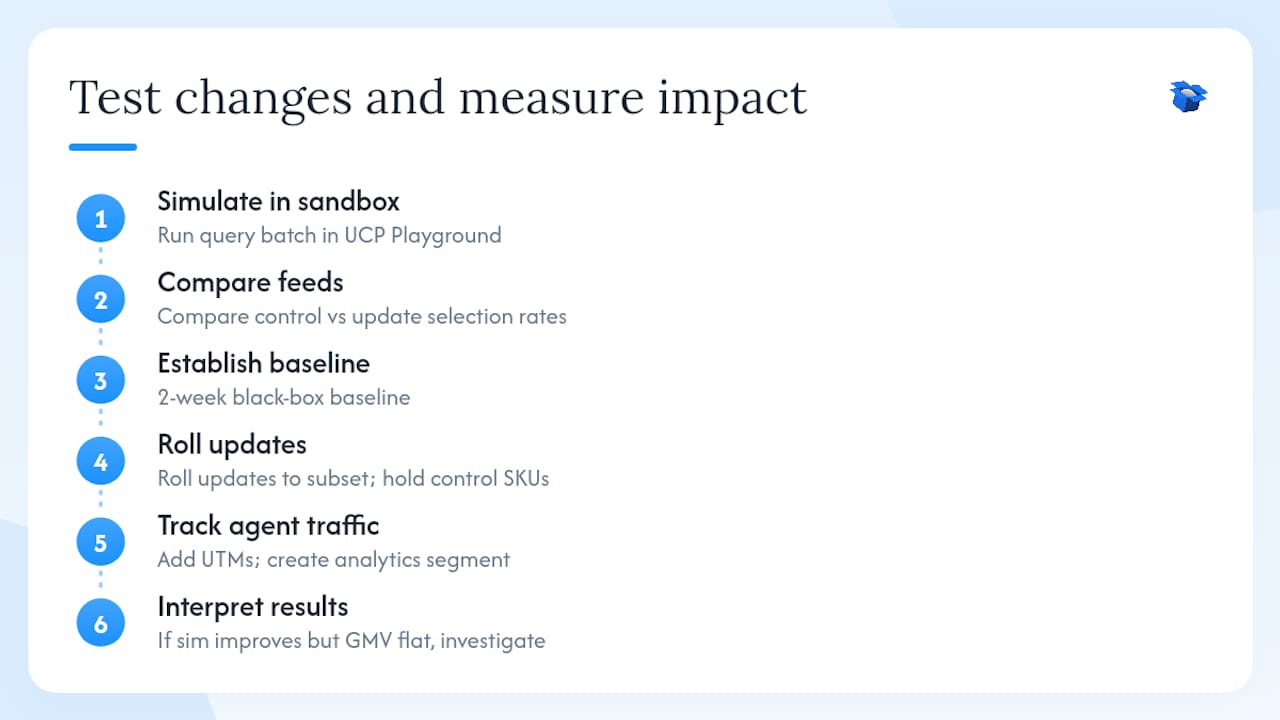
Simulation first, live experiment second. Run controlled query batches through the UCP Playground with your current feed as the control, then swap in the updated feed and compare selection rates. This catches regressions before they reach real shoppers.

KPIs to track:

For live experiments, establish a black-box baseline for two weeks before making changes. Then roll updates to a subset of SKUs and hold the rest as a control group. Tracking agent-attributed traffic requires UTM parameters on agent referral links and a separate segment in your analytics platform.

Research on LLM-based ranking shows that content signals need to be balanced with engagement signals in ranking pipelines. A simulation score that improves while live GMV stays flat usually means your content is more relevant but your reviews or price competitiveness are dragging conversion. Treat neutral business metrics as a signal to investigate, not a green light.

Pro Tip: Run simulations on the same query set every time. Changing the queries between runs makes it impossible to know whether your feed improved or your query mix just got easier.

How to test changes and measure what actually moved — overview diagram

05

Product copy patterns that AI agents prefer

Product copy patterns that AI agents prefer

Lead with the answer, not the setup. An agent quoting your product needs a fact in the first sentence, not a brand story.

Before: “Our premium ergonomic chair is designed for professionals who demand comfort.” After: “Supports up to 300 lbs, adjusts from 17–21 inches seat height, and ships assembled in 2 days.”

For Q&A attributes, write 40–60-word answers that an agent can quote directly. Structure them as:

  • Question: “Can I use this with a Mac?”
  • Answer: “Yes. The USB-C hub is plug-and-play on macOS 12 and later. No driver installation needed. Works with MacBook Air M1, M2, and M3.”

Common constraint categories to cover: fit/size compatibility, battery life and charging specs, travel or airline carry-on eligibility, assembly time and tools required, and return window. Self-alignment research shows that product descriptions optimized for buyer utility, not just keyword density, align better with how agents rank purchase intent.

Pro Tip: Write one Q&A pair per common objection, not per feature. Agents answer objections; they do not recite feature lists.

06

Which SKUs should you fix first?

Which SKUs should you fix first?

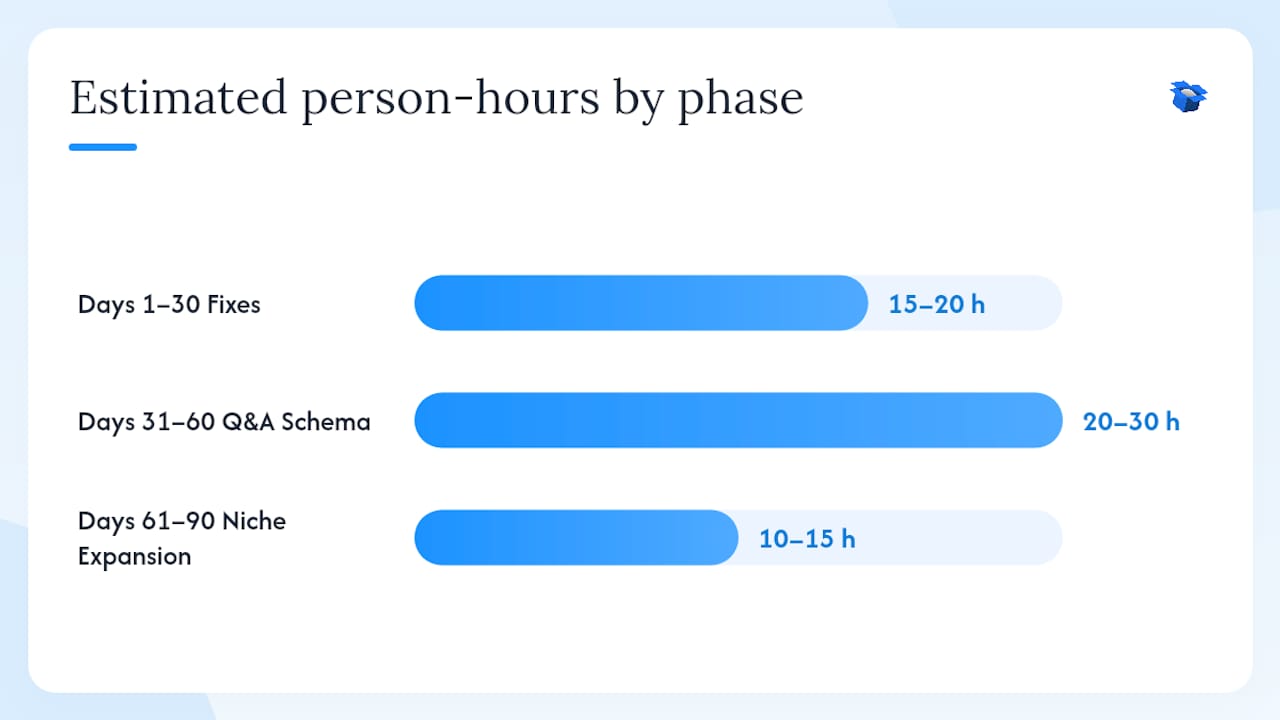
Which SKUs should you fix first? — overview diagram

Start with your top 20 revenue SKUs. These have the most to gain from AI selection and usually already have enough review volume to be citation-eligible. Then move to high-margin niche SKUs where a single AI recommendation can swing a week’s worth of sales.

Selection criteria for prioritization:

  • Revenue rank (top 20 first)
  • Review volume above 50 (below that, citation likelihood drops sharply)
  • Category research complexity (higher complexity queries need more Q&A coverage)
  • Current Merchant Center status (disapproved SKUs get fixed before anything else)

30/60/90-day rollout:

  1. Days 1–30: Fix disapprovals, add concrete prices, and run baseline simulations on top 20 SKUs. Estimated 15–20 person-hours.
  2. Days 31–60: Add Q&A attributes, variant mapping, and Schema.org updates. Estimated 20–30 person-hours.
  3. Days 61–90: Expand to high-margin niche SKUs, add document_link attributes, and run comparative simulations. Estimated 10–15 person-hours.

Expect measurable agent-selection rate lift within 30–45 days of feed fixes. Conversion lift from PDP improvements typically takes 60–90 days to show in GMV data.

07

Common audit failures that block AI recommendations

Common audit failures that block AI recommendations

Most merchants have at least three of these. All of them are fixable in a single sprint.

  • GTIN mismatches: The feed GTIN does not match the manufacturer’s database. Agents cross-reference; a mismatch signals unreliable data.
  • Price or availability drift: Feed says $39.99 and in stock; PDP says $44.99 or “ships in 3–5 days.” Agents penalize inconsistency.
  • Variant ambiguity: Parent product has no default price or the item_group mapping is broken. Agents cannot answer “show me the blue one.”
  • Reviews hidden behind JavaScript: If a crawler cannot see your star rating in the HTML source, it does not exist for an agent. Schema.org completeness strongly predicts citations.
  • Missing or low-quality images: No image means no visual confirmation for agents that surface product cards.
  • Inconsistent brand strings: “BrandName” in the feed, “Brand Name Inc.” in Schema.org, and “brandname” in the page title are three different entities to a machine.

Pro Tip: Run a free Merchant Center disapproval export and a Schema.org validation crawl on the same day. The overlap between those two reports is your highest-priority fix list.

08

What Ecentic does to speed this up

What Ecentic does to speed this up

Ecentic connects directly to your Shopify or WooCommerce store and runs the diagnostics, simulations, and attribute editing in one place. Core capabilities that map to the checklist above:

  • Feed validation with plain-English disapproval explanations
  • Conversational attributes editor for Q&A, document_link, and popularity_rank
  • UCP Playground simulation with per-SKU agent-selection rate scoring
  • Agent-attribution analytics that separate AI-driven sessions and GMV from organic traffic
  • Auto-optimization and continuous rescans so feed drift triggers an alert before it costs you selections
  • One-click publishing of feed and Schema.org updates back to your store

Ecentic customers have reported significant lifts in AI-driven visits and overall sales after running the platform’s optimization workflow. The free scan returns feed diagnostics, disapproval counts, Q&A coverage gaps, and a prioritized fix list with expected impact estimates.

Pro Tip: Run the free scan before your 30-day sprint starts. It replaces the manual audit steps and gives you a ranked fix list in minutes rather than days.

09

The part most guides skip about simulation results

The part most guides skip about simulation results

The gap between a simulation score and real agent behavior is real, and teams that ignore it waste weeks optimizing for the wrong thing.

Simulation tools, including the UCP Playground, model agent behavior based on feed signals and structured data. They are accurate for diagnosing inclusion failures and ranking gaps. What they cannot fully replicate is the weight an agent places on third-party corroboration: editorial reviews, retailer listings, and user-generated content that sits outside your feed entirely.

The practical implication: if your simulation score improves but live agent-attributed sessions stay flat after 45 days, the bottleneck is almost certainly off-site. Your feed is clean; your third-party footprint is thin. The fix is review generation and distribution to retail partners, not more feed work.

The other surprise teams encounter is how stable agent behavior is once a product earns a citation. A well-optimized SKU tends to stay cited across query variations, which means the compounding return on fixing your top 20 SKUs is larger than the initial lift suggests.

10

Your free AI shopping scan is ready

Your free AI shopping scan is ready

Most Shopify and WooCommerce merchants have feed errors they have never seen because Merchant Center buries them three clicks deep. Ecentic surfaces them in a single scan, scores your agent-selection rate on your top SKUs, and hands you a ranked fix list with expected impact before you spend a single hour on manual edits.

Ecentic

The free product listing scan returns feed diagnostics, Q&A coverage gaps, disapproval counts, and a simulation score for your target SKUs. From there, you can fix and publish changes directly from the platform, or book a demo to see the UCP Playground run live against your store. Start with the scan at Ecentic and have your baseline agent-selection rate in hand before the end of the week.

11

Sources

Sources

  • AI shopping starts with your product feed, not your product page
  • ChatGPT shopping research — OpenAI
  • How ChatGPT Picks Products — Inside the Ranking Signals | Heartly
  • How AI Shopping Agents Rank Products (and How to Win)
  • Integrating LLMs into product ranking model training (arXiv)
  • Prospect-theoretic self-alignment for LLM-based e-commerce recommendation (RANLP 2025)
AI overview optimizationAI overview insightsenhance AI report techniqueswhat is AI optimizationoptimize for ai overviewsbest practices for AI overviewsimprove AI summariesAI content optimization tipszero click ai search
Back to blogGet started

Guides and research on winning AI shopping agents.

Get picked by AI

Ready to be the product agents recommend?

Install free on Shopify or WooCommerce and see your AI score in minutes.

Install on ShopifyInstall on WooCommerce
ecentic

Win every AI shopping agent's cart.

Built for the agent economy
Product
  • Features
  • How it works
  • Pricing
  • Product Listings
Platforms
  • Shopify
  • WooCommerce
  • Enterprise
Resources
  • Resources
  • Blog
  • Compare
  • UCP Validator
  • UCP Playground
  • Book a demo
Company
  • Support
  • Privacy policy
  • Terms of service

© 2026 ecentic. All rights reserved.

Made for merchants who refuse to be invisible to AI.