ecenticecentic
How it worksResourcesPricingBlog
Install now
ASCII-art illustration of a stack of books

AI Competitor Analysis: A Practical Workflow for Marketers

Published: August 14, 2026 · 22 min read

Transform your marketing strategy with AI competitor analysis. Discover how to harness AI for actionable insights, enhancing decision-making.

00

Key Takeaways

Decorative title card illustration for AI competitor analysis article

AI competitor analysis uses large language models, embeddings, and automated data pipelines to pull competitor signals from dozens of sources, synthesize them into plain-language insights, and route those insights directly into Slack channels, dashboards, and battle cards your team actually opens. It replaces the quarterly PDF nobody reads with something closer to a live feed. If you’re starting today, do three things in the next hour:

  • Pick five data sources you can legally access right now (competitor site, pricing page, App Store reviews, one job board, one ad library).
  • Run a single crawl or manual pull on one competitor and paste the raw text into ChatGPT or Claude with a summary prompt.
  • Turn that summary into a one-page brief and send it to whoever owns positioning on your team.

That last step is the quick win worth testing this week: take one competitor, one hour, and one AI summary, then judge whether the output actually changes a decision. If it does, you’ve validated the approach before spending a dollar on tooling.

Key Takeaways

AI competitor analysis works when structured data collection feeds a scoring system that routes only high-priority signals into the formats teams already use, like battle cards and Slack alerts.

Point Details
Start with five sources Pick pricing, reviews, ads, product pages, and job listings before adding more.
Normalize before you automate Structure scraped text into consistent fields so your LLM summaries stay accurate.
Score signals, don’t react to all of them Use a weighted formula so only high-impact moves trigger a cross-functional review.
Push insights into existing workflows Battle cards and Slack alerts get used; static reports usually don’t.
Diagnose AI agent visibility separately Ecentic simulates how ChatGPT, Gemini, Claude, and Perplexity evaluate your product listings against competitors, a signal general CI tools don’t cover.
01

What Does AI Actually Add to Competitor Analysis?

What Does AI Actually Add to Competitor Analysis?

The honest answer: speed and synthesis, not magic. A task that used to take an analyst two days (reading ten competitor sites, categorizing features, drafting a summary) now takes an LLM minutes once the data is collected. The bottleneck moves from “reading everything” to “making sure the input data is clean.”

Here’s what AI-driven competitor analysis genuinely improves over manual research:

  • Faster teardowns. An LLM can compare feature lists, pricing tiers, and messaging across five competitors in one prompt instead of five separate documents.
  • Cross-source synthesis. Retrieval-augmented generation (RAG) lets you ask one question and pull from pricing pages, reviews, and job postings simultaneously, rather than manually stitching sources together.
  • Automated monitoring. Scheduled crawls catch a pricing change or new feature the day it happens, not the day someone remembers to check.
  • Actionable battle cards. Instead of a wall of bullet points, a well-prompted model can output “if a prospect mentions X, say Y” directly usable by sales.
  • Context that persists. A vector database means every new data point gets compared against history automatically, so you see trends, not just snapshots.

None of that is free. Two failure modes show up constantly, and both are worth flagging before you build anything.

Data quality and scraping ethics. Scraping a competitor’s site at high frequency can violate its terms of service, and pulling review data from platforms that restrict automated collection creates legal exposure. Always check robots.txt, rate limits, and terms of service before automating collection, and prefer official APIs where they exist.

Hallucination risk. LLMs will confidently invent a feature or misstate a price if the source text is ambiguous or missing. This is the single biggest reason AI competitor analysis fails in practice: teams trust an AI summary without checking it against the actual source page.

Humans still need to validate anything that goes into a customer-facing battle card or a board deck. Treat AI output as a draft an analyst reviews, not a finished product. Orbit Media’s testing on quick AI-scoring methods found the approach works well for relative comparisons but still benefits from a human sanity check on the underlying claims.

02

How Do You Run an AI-Driven Competitive Analysis Workflow?

How Do You Run an AI-Driven Competitive Analysis Workflow?

The workflow has eight steps, and skipping the middle ones (normalization, embeddings) is why most teams end up with a pile of screenshots instead of a working system.

  1. Discovery. List every competitor worth tracking, tiered by threat level. Don’t track twenty companies with the same rigor as your top three.
  2. Data collection. Pull from the sources in the next section, scheduled by how often each one changes.
  3. Normalization. Convert scraped HTML, PDFs, and screenshots into structured text with consistent fields (competitor name, date, source type, raw content).
  4. Embeddings and RAG indexing. Chunk the normalized text, generate embeddings, and store them in a vector database so an LLM can retrieve relevant context on demand instead of reading everything every time.
  5. LLM summarization. Prompt a model to generate summaries, feature comparisons, or win/loss diagnostics from the retrieved chunks.
  6. Scoring. Apply a weighted scoring formula (covered below) to decide which signals deserve attention now versus a monthly digest.
  7. Distribution. Push high-priority findings to Slack or Teams; route lower-priority items to a dashboard or weekly email.
  8. Review cadence. A standing weekly or biweekly meeting where marketing, product, and sales look at what the system flagged and decide what to act on.

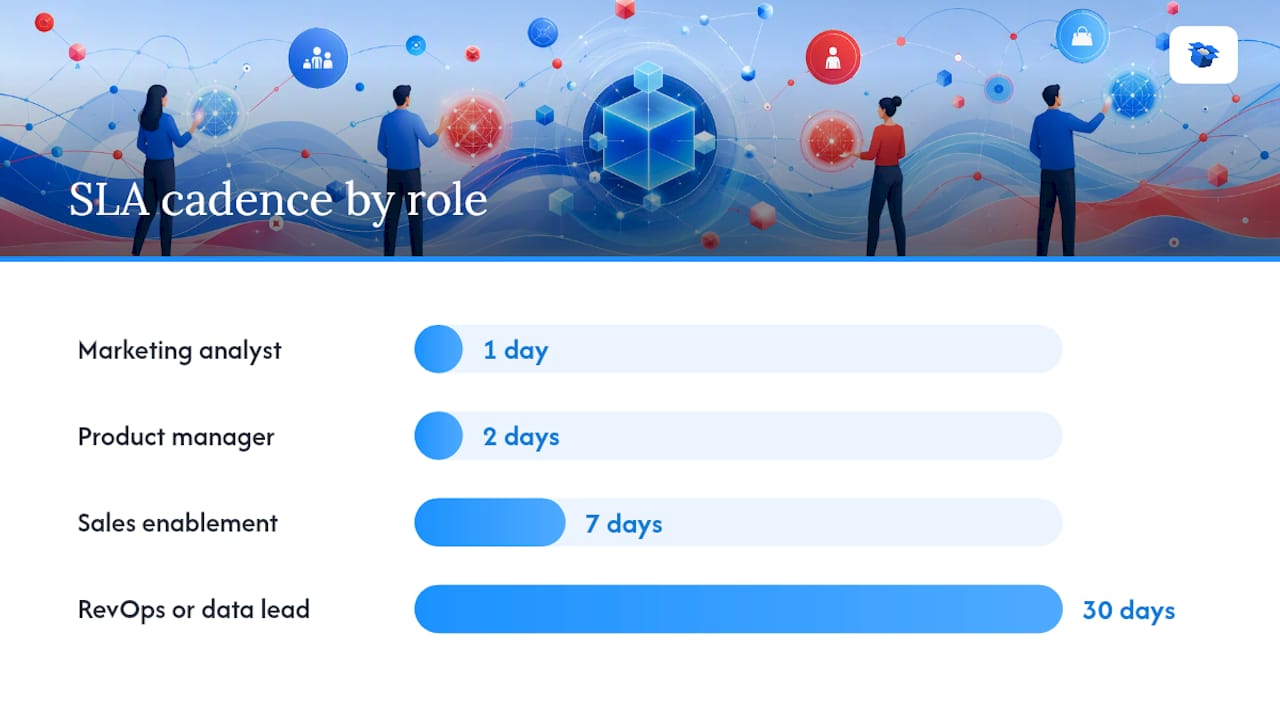
A simple responsibility matrix keeps this from collapsing into “everyone assumes someone else is watching it”:

Role Task Typical SLA
Marketing analyst Owns data collection and normalization Daily checks, weekly report
Product manager Reviews feature-gap findings 48-hour response on flagged gaps
Sales enablement Turns diagnostics into battle cards Weekly update cycle
RevOps or data lead Maintains the vector DB and automation Monthly pipeline audit

AI competitor analysis workflow roles and tasks diagram

Each sprint should produce a consistent set of outputs: one or two updated battle cards, a one-page teardown on any competitor with a major move, real-time Slack alerts for price or feature changes, and a dashboard card showing trend lines over the last 30 days.

Pro Tip: Set your crawler schedule by volatility, not convenience. Pricing pages and ad libraries change fast and deserve daily or hourly polling; job listings and SERP rankings move slowly and are fine on a weekly cadence. Polling everything hourly just burns compute and clutters your alerts with noise.

03

What AI Models and Prompt Patterns Work Best for This?

What AI Models and Prompt Patterns Work Best for This?

The architecture that holds up in practice looks like this: scrapers and APIs feed raw data into an ETL layer that normalizes formats, that normalized text gets embedded and stored in a vector database, a RAG layer retrieves relevant chunks on query, and an LLM handles the final synthesis before an orchestration tool routes the output to Slack, a dashboard, or a CRM.

Use embeddings and RAG when you’re querying across a large, growing archive of competitor content (you want the model to pull only relevant chunks instead of processing everything every time). Use direct LLM prompting without retrieval for one-off tasks, like summarizing a single page you just pasted in. Reindex your vector database on the same cadence as your fastest-moving source, typically daily if you’re tracking pricing.

Here are prompt patterns worth copying directly:

Executive summary prompt: “Summarize the following competitor page content in one paragraph for a marketing VP. Focus on positioning changes, pricing shifts, and any new claims about performance or ROI. Flag anything that seems inflated or unverifiable.”

Battle card generation prompt: “Using the attached feature list and pricing for [Competitor], generate a battle card with these sections: their strengths, their weaknesses, how we compare on [specific feature], and one talking point for a sales rep when this competitor comes up in a deal.”

Feature extraction prompt: “Extract a structured table of features from this product page. Columns: feature name, description, tier availability, and whether it’s new since [last date checked].”

Win/loss diagnostic prompt: “Given this list of closed-lost deal notes mentioning [Competitor], identify the three most common objections raised and rank them by frequency.”

Automated Slack alert prompt: “If the pricing on this page has changed from the last recorded value, generate a two-sentence Slack alert stating the old price, the new price, and the percentage change.”

Orbit Media’s testing found that asking an AI chatbot to score competitors on a simple 1 to 10 scale across a handful of criteria produces surprisingly consistent, defensible comparisons when you give it the same rubric every time. The trick isn’t a fancier model. It’s a stable, repeatable prompt structure you don’t rewrite every week.

04

How Do You Score and Prioritize Competitor Signals?

How Do You Score and Prioritize Competitor Signals?

Not every competitor move deserves a Slack alert and a war room. A simple weighted scoring system stops your team from treating a minor blog post the same way it treats a major price cut.

Score each incoming signal on a scale, weighted by potential business impact:

  1. Feature launch matching a core use case: weight 8 to 10 (high impact if it targets your primary buyer persona).
  2. Price change: weight 7 to 9 (higher if it undercuts your primary tier).
  3. Major ad campaign push: weight 5 to 7 (signals a demand-gen shift worth watching, not usually urgent).
  4. Spike in negative reviews: weight 4 to 6 for competitors (opportunity signal), 9 to 10 if it’s about your own product.
  5. New hire pattern (e.g., sudden sales hiring surge): weight 3 to 5 (early signal, rarely urgent alone).

Set threshold tiers to translate the score into action: a score under 4 goes to a monthly digest, 4 to 7 triggers a one-page brief within 48 hours, and anything above 7 triggers an immediate cross-functional review with sales and product.

Averaged and adjusted for co-occurrence, that signal lands around 8.5, well above the review threshold. The right response isn’t a Slack emoji reaction. It’s a same-week call between product, pricing, and sales leadership to decide whether you match, differentiate, or hold.

05

What Tools Should You Use for AI Competitor Analysis?

What Tools Should You Use for AI Competitor Analysis?

The right tool depends on which part of the workflow you’re solving, and buying an all-in-one enterprise suite on day one is usually a mistake for smaller teams. U.S. Chamber guidance for small businesses points the same direction: start with a lean, targeted stack and expand as your process matures.

Here’s how the categories break down and what to check before you commit budget:

  • Scrapers and APIs: the collection layer. Check for rate-limit transparency and whether they offer structured JSON output versus raw HTML you’ll have to parse yourself.
  • SEO and traffic datasets: tools like Ahrefs and Semrush give you backlink profiles, keyword rankings, and estimated traffic, and Semrush in particular bundles traffic, keyword, and ad data with built-in monitoring alerts.
  • Traffic and market benchmarking: Similarweb is the standard reference for estimated traffic volume and channel mix comparisons across competitors.
  • Social listening: Sprout Social covers engagement tracking and sentiment across social channels, useful for catching a competitor’s campaign momentum before it shows up anywhere else.
  • LLM providers: ChatGPT and Claude are the two most widely used for summarization, extraction, and battle card drafting, and both handle long-context documents well enough for most competitor teardowns.
  • Automated teardown platforms: tools like Competely advertise instant, continuously monitored competitive reports across a wide set of data points, which is a useful reference point for what “automated” looks like at the report level.
  • Vector databases and orchestration: the plumbing layer connecting your data to your LLM and your delivery channels (Slack, dashboards, CRM).

For readers evaluating options, Zapier’s tool roundup is a solid starting shortlist, and cross-checking any shortlist against G2 reviews before committing budget catches red flags that vendor marketing pages won’t show you. If your business runs on ecommerce and your core concern is whether AI shopping agents recommend your products over a competitor’s, that’s a distinct category from general competitive research tools, and it’s where a platform like ecentic fits specifically.

Wiring it together: crawlers and APIs feed the ETL layer, normalized data lands in the vector database, the RAG layer retrieves relevant context per query, and orchestration tools push the LLM’s output to the channel where your team will actually see it.

06

How Do You Turn AI Insights Into Team Action?

How Do You Turn AI Insights Into Team Action?

An insight nobody acts on is worthless, no matter how good the model that generated it. The gap between “the AI flagged something” and “someone changed a decision” is where most competitive intelligence programs quietly die.

A battle card needs specific fields to be usable in a live sales call, not just informative in a document: competitor name and tier, top three differentiators (ours), top three of theirs, pricing comparison snapshot, common objections with rebuttals, and a “last updated” date so reps know if it’s stale. A defensive play addresses a competitor’s strength directly (“they’ll mention faster onboarding, here’s our counter”). An offensive play highlights something they can’t match (“lead with our real-time attribution, which they don’t offer at any tier”).

For Slack or Teams alerts, structure matters more than volume. A good alert states the competitor, the change detected, the source link, and a one-line recommended next step, routed to the specific channel that owns that decision (pricing changes go to a pricing channel, not the general marketing channel).

Ownership prevents alerts from becoming noise everyone ignores:

  1. Assign one owner per competitor, not one owner for “competitive intelligence” broadly.
  2. Set a response SLA: high-priority alerts get acknowledged within 24 hours, medium-priority within a week.
  3. Require every acted-on alert to close the loop with a one-line outcome note (what we did, or why we chose not to act).
  4. Review the alert-to-action ratio monthly. If 90% of alerts get ignored, your scoring thresholds need recalibrating, not more alerts.

The pattern industry practitioners keep pointing to is the same one: competitive intelligence works when it’s operationalized inside the tools teams already use, not stored in a folder nobody opens.

07

What Does This Look Like Applied to Ecommerce? A Mini Case Study

What Does This Look Like Applied to Ecommerce? A Mini Case Study

A mid-size DTC apparel brand came into this problem from an unusual angle: it wasn’t losing to competitors in Google search, it was losing to them inside ChatGPT and Gemini when shoppers asked for product recommendations. Traditional competitor analysis (SEO rankings, ad spend, social engagement) told them nothing about why an AI shopping agent kept recommending a rival’s near-identical product instead of theirs.

The brand connected its Shopify store to ecentic to run simulations of how AI shopping agents evaluate its product pages against named competitors. The platform’s diagnostics highlighted specific gaps: missing structured attributes AI agents rely on to compare materials and sizing, thin product descriptions that gave the model nothing concrete to cite, and pricing information that wasn’t clearly parseable on the page.

Hands annotating product page competitor analysis notes

Using the plain-English win/loss diagnostics, the team prioritized fixes on its ten highest-traffic product pages first rather than attempting a full catalog overhaul. Rewrite suggestions were published directly through ecentic’s one-click publishing into the Shopify backend, and the platform’s continuous rescans tracked whether AI selection rates on those pages improved over the following review cycles.

Directional result reported by the platform’s early customers: measurable increases in both AI agent-driven visits and downstream sales after implementing listing changes, though exact figures vary by store and category, and any brand running this should treat its own baseline scan as the reference point, not an industry average.

The integration notes matter as much as the outcome. Because rewrites published directly to the live store, there was no separate CMS step where recommendations sat waiting for a developer. Rescans ran automatically after each publish, which meant the team could see within days, not months, whether a specific product page change moved the needle on agent selection. That feedback loop is the part general-purpose competitor analysis tools don’t offer, because they weren’t built to simulate how an LLM reads and ranks a specific page.

08

What Should Your First 90 Days Look Like?

What Should Your First 90 Days Look Like?

Rolling this out works best in three phases rather than trying to build the full pipeline on day one.

Days 1 to 30 (owner: marketing lead): Pick your top three to five competitors. Manually collect data from five core sources. Run your first LLM summaries by hand, pasting content directly into ChatGPT or Claude. Ship one battle card.

Days 31 to 60 (owner: marketing lead plus a data or ops resource): Automate collection for your two fastest-moving sources (usually pricing and ads). Stand up a basic vector database. Build your first Slack alert rule. Establish the weekly review meeting.

Days 61 to 90 (owner: cross-functional, including product and sales): Expand automated coverage to all core sources. Implement the scoring formula and threshold-action map. Formalize ownership and SLAs. Present the first monthly trend report to leadership.

A compact prompt bank to keep on hand covers the five patterns already detailed above (executive summary, battle card generation, feature extraction, win/loss diagnostics, and alert generation) plus one more worth adding once you’re automating: a normalization prompt that asks the model to convert scraped text into a consistent JSON structure before it hits your vector database.

For that structure, a simple schema works for most teams:

Field Example value
competitor_name “Acme Co.”
source_type “pricing_page”
source_url “https://example.com/pricing”
date_collected “2026-02-14”
raw_content “Full extracted text…”
change_detected “true”
score “7.5”

Feed that structure consistently and both your LLM summaries and your vector search stay reliable months later, when you’ve forgotten the context behind any single data point.

09

Starting Small Beats Waiting for the Perfect System

Starting Small Beats Waiting for the Perfect System

Most teams overbuild before they’ve proven the workflow adds value, and I’d rather see a marketer run a scrappy version of this for two weeks than spend a month evaluating vector database vendors. Start with one competitor, five sources, and a single ChatGPT summary prompt. If that doesn’t change a real decision, no amount of automation will fix it, because the problem isn’t speed, it’s that nobody was going to act on the insight anyway.

The trap small teams fall into isn’t lack of tooling, it’s data quality creep. You start with clean, timestamped records from three sources, and six months later you’ve got a folder of half-labeled screenshots and a Slack channel full of alerts nobody reads. The fix isn’t more automation, it’s discipline: every new source needs a provenance field and a defined collection cadence before it gets added, not after.

Scaling from one person to a cross-functional program happens naturally once the first battle card actually changes a sales conversation or the first pricing alert prompts a real pricing review. That’s the signal to bring in product and sales as formal stakeholders rather than recipients of your reports. Trying to build the ownership matrix before you have a single proven win just adds process to a system nobody’s bought into yet.

10

How Ecentic Fits Into Your AI Competitor Analysis Workflow

How Ecentic Fits Into Your AI Competitor Analysis Workflow

Everything in this guide covers competitive intelligence broadly, but there’s one battlefield general-purpose tools weren’t built for: how AI shopping agents like ChatGPT, Gemini, Claude, and Perplexity decide which product to recommend when a shopper asks for one. Ecentic simulates that exact decision, showing you where your product listings win or lose against named competitors inside an AI agent’s evaluation, not just in a traditional search ranking.

Ecentic

Ecentic connects directly to Shopify or WooCommerce stores and plugs straight into the workflow described above: it runs the simulation (data collection and scoring, done for you), delivers plain-English win/loss diagnostics (your LLM synthesis layer, pre-built), and lets you publish listing rewrites with one click (no waiting on a developer to push the fix). Continuous rescans track whether your AI selection rate improves after each change, giving you the feedback loop that generic SEO or social listening tools simply don’t measure.

For ecommerce teams already running the broader workflow this article outlines, ecentic handles the one signal source that’s easy to miss and increasingly decides where sales come from: how you show up inside an AI agent’s product recommendation. Run a free product listing scan to see where your current pages stand against competitors before you decide what to fix first.

11

Where to Go Next for AI Competitor Analysis

Where to Go Next for AI Competitor Analysis

A few resources are worth bookmarking as you build out your own process, each covering a different piece of the puzzle:

  • Zapier’s competitor analysis tool roundup is a fast way to build an initial tool shortlist across categories.
  • U.S. Chamber’s guide to AI tools for small businesses is useful if you’re starting lean and don’t want to buy an enterprise suite yet.
  • Orbit Media’s walkthrough of AI-powered scoring gives concrete prompt examples for quick brand comparisons.
  • Semrush’s competitive research suite is worth reviewing if you need integrated traffic, keyword, and ad monitoring in one place.
  • Babylovegrowth’s guide to analyzing competitor content breaks down how to extract SEO and content signals systematically.

Before automating any scraper, check the target site’s terms of service and robots.txt, and confirm your chosen tool’s API rate limits so you don’t get your access revoked mid-project.

12

Sources

Sources

Not every source deserves the same attention. Pricing pages and ad libraries move fast; job listings and backlink profiles move slowly. Matching your collection frequency to how often each source actually changes is what keeps the system useful instead of noisy.

  • AI Tools Small Businesses Need for Competitive Analysis | CO
  • The AI-Powered Competitive Analysis: 3 Quick Ways to Score Your …

A few collection habits separate reliable systems from ones that quietly drift into garbage:

Review platforms and buyer directories deserve a specific mention here. Peer review sites like G2 and Capterra are useful not just for your own product positioning but for understanding how buyers talk about competitors in their own words, which is exactly the kind of unstructured text an LLM handles well.

13

FAQ

FAQ

What Is AI Competitor Analysis?

It’s the use of LLMs, embeddings, and automated data pipelines to collect competitor signals from sources like pricing pages, reviews, and ads, then synthesize them into prioritized, actionable outputs like battle cards and alerts.

Which AI Tools Are Best for Competitor Analysis?

ChatGPT and Claude handle summarization and extraction well, Semrush and Ahrefs cover SEO and traffic data, Similarweb benchmarks traffic estimates, Sprout Social covers social listening, and Competely automates full teardown reports.

How Is AI Competitor Analysis Different for Ecommerce?

Ecommerce brands increasingly compete for visibility inside AI shopping agents like ChatGPT and Gemini, not just in search rankings, which requires tools like ecentic that simulate how those agents evaluate and recommend product listings.

How Often Should You Update Competitor Data?

Fast-moving signals like pricing and ad creatives deserve daily or weekly polling, while slower signals like backlinks and job listings are fine on a monthly cadence.

Is Scraping Competitor Websites Legal?

It depends on the site’s terms of service, the data being collected, and your jurisdiction. Always review robots.txt and terms of service, and prefer official APIs when they’re available.

Can Small Teams Do This Without Enterprise Tools?

Yes. Combining public sources like SERP data, ad libraries, and job listings with an LLM-driven summarization layer gets meaningful signal without an all-in-one enterprise suite on day one.

ai competitor analysis ecommercebest ai competitor analysis toolsai shopping competitor analysisAI-driven competitive insightsAI-powered market researchautomated competitor trackingai competitor analysishow to analyze competitors with AIAI business intelligenceAI market analysisbest AI competitor toolssmart competitor analysis techniquescompetitor research toolscompetitive analysis automationAI analysis software
Back to blogGet started

Guides and research on winning AI shopping agents.

Get picked by AI

Ready to be the product agents recommend?

Install free on Shopify or WooCommerce and see your AI score in minutes.

Install on ShopifyInstall on WooCommerce
ecentic

Win every AI shopping agent's cart.

Built for the agent economy
Product
  • Features
  • How it works
  • Pricing
  • Product Listings
Platforms
  • Shopify
  • WooCommerce
  • Enterprise
Resources
  • Resources
  • Blog
  • Compare
  • UCP Validator
  • UCP Playground
  • Book a demo
Company
  • Support
  • Privacy policy
  • Terms of service

© 2026 ecentic. All rights reserved.

Made for merchants who refuse to be invisible to AI.