ecenticecentic
How it worksResourcesPricingBlog
Install now
ASCII-art illustration of a stack of books

AI Auto Optimization for Ecommerce Product Listings

Published: August 22, 2026 · 15 min read

Unlock higher sales with AI auto optimization for your ecommerce listings. Enhance visibility, accuracy, and trust with automated fixes today.

00

Key Takeaways

Decorative title card illustration for AI ecommerce optimization article

AI auto optimization means using automated tools to continuously fix, monitor, and republish your product listings so ChatGPT, Gemini, Perplexity, and Claude can read them, trust them, and recommend them. Do this today: confirm your product facts (name, price, stock, rating) render server-side and your merchant feed validates cleanly. Everything else builds on that foundation.

  • Unblock OAI-SearchBot, GPTBot, and Google-Extended in robots.txt
  • Confirm price and availability show up without JavaScript
  • Validate your feed against Merchant Center and ChatGPT merchant feed specs

Reality check: AI shopping agents rank products by machine-readable pages, review evidence, and feed accuracy first, brand reputation second. A platform like Ecentic can run this diagnosis and republish fixes automatically once you know where you stand.

Key Takeaways

AI auto optimization succeeds when server-rendered product facts, validated merchant feeds, and continuous rescans work together to keep listings visible as AI models evolve.

Point Details
Unblock crawlers first Allow OAI-SearchBot, GPTBot, and Google-Extended in robots.txt before anything else.
Pass the no-JS test Confirm name, price, stock, and reviews render in raw HTML without JavaScript.
Upgrade schema and feeds Add Merchant Listing schema, FAQ schema, and validate feeds in Merchant Center and ChatGPT’s portal.
Track AI traffic separately Use distinct UTM tags and a custom GA4 channel grouping to avoid burying AI-attributed conversions.
Automate the ongoing loop Ecentic runs simulation-driven scans, flags fixes in plain English, and publishes them with one click.

Where to Verify Feed Specs and Schema Requirements

  • OpenAI’s merchant feed documentation for submission requirements and field definitions
  • Google Merchant Center’s help center for Shopping and AI-surfaced listing specs
  • Schema.org’s Product and Offer reference pages, paired with a rich results testing tool to confirm markup validates
  • A partner resource like this ecommerce AI SEO playbook for broader tactical context
01

What Is the One-Hour Priority Audit for AI Visibility?

What Is the One-Hour Priority Audit for AI Visibility?

You don’t need a full technical review to know if you’re invisible to shopping agents. You need one hour and these six checks.

  1. Robots.txt and WAF test. Open your robots.txt file and confirm it doesn’t block OAI-SearchBot, GPTBot, or Google-Extended. Then fetch a product page using each bot’s user agent string (curl or a browser extension works) and check for a 200 response, not a 403 or a bot-challenge page.
  2. Server-side rendering test. Disable JavaScript in your browser, then reload a product page. If the name, price, stock status, and at least one review line vanish, AI agents can’t read them either. This single test catches more invisible-product problems than any other step on this list.
  3. Schema scan. Run the page through a rich results tester and check for Product, Offer, and AggregateRating. Then check the extras that separate a passing grade from a strong one: gtin, mpn, shippingDetails, and hasMerchantReturnPolicy.
  4. Feed presence check. Confirm you have an active, error-free feed in Google Merchant Center and, separately, a submitted ChatGPT merchant feed. Required fields keep price and stock correct; recommended fields like GTINs and rich media push you up the ranking.
  5. Review rendering check. View the page source and search for your star rating and review count in the raw HTML, not just in a JavaScript widget.
  6. Fragment and FAQ check. Scan your product copy for standalone, quotable sentences that answer a specific use case, and confirm an FAQ section exists with FAQ schema attached.

Pro Tip: Run the JavaScript-disabled test on your three best-selling products first. If even your top sellers fail, fix those before touching anything else. That’s where the revenue is.

02

What Is the 90-Day Roadmap for AI Auto Optimization?

What Is the 90-Day Roadmap for AI Auto Optimization?

Audit results only matter if they turn into a sequenced plan. Here’s how to stage the work so nothing gets stuck waiting on a developer who’s busy with something else.

  1. Days 1 to 7: Unblock and stabilize. Fix robots.txt exclusions, confirm server-side rendering for name, price, and stock, and run a sanity check on your existing feed for outright errors like missing GTINs or expired price data.
  2. Days 8 to 30: Upgrade the machine-readable layer. Move from basic Product snippets to full Merchant Listing schema, add AggregateRating, shippingDetails, and hasMerchantReturnPolicy, then build out FAQ schema on your top-converting pages. Rewrite thin product copy into fragment-friendly, use-case-specific sentences an agent can lift directly, since specificity beats size when a smaller brand is competing against a bigger one for a narrow query.
  3. Days 31 to 90: Go agentic. Submit and validate your merchant feed in both Google Merchant Center and the ChatGPT merchant portal, then enable the newer agentic commerce fields tied to protocols like UCP. Set up a refresh cadence, since ChatGPT’s shopping pipeline can pull updated feed data as often as every 15 minutes, and a stale price is worse than no listing at all.
  4. Beyond day 90: Automate the loop. Continuous rescans catch drift before it costs you visibility. A model update, a pricing change, a competitor’s schema upgrade. All three can knock you out of contention without warning. Set up staged publishing with rollback safety so automated fixes don’t go live untested, and treat this as ongoing maintenance, not a project with an end date.

Pro Tip: Don’t skip the 8 to 30 day schema upgrade to rush toward feed submission. A validated feed with weak on-page schema still leaves agents guessing about returns policy and shipping cost, two details that kill a recommendation fast.

03

How Do You Measure AI-Driven Traffic and Conversions?

How Do You Measure AI-Driven Traffic and Conversions?

Standard UTM tagging is where most merchants get this wrong. Tag every AI-sourced link with a consistent scheme: utm_source=chatgpt, utm_source=gemini, utm_source=perplexity, paired with utm_medium=ai_shopping. Build a custom channel grouping in GA4 so this traffic doesn’t get folded into “referral” or, worse, “direct.”

Beyond tagging, track these on a recurring basis:

  • AI-driven sessions and their trend line, week over week
  • Conversion rate for AI-sourced traffic versus your site average
  • Average order value (AOV) for AI-attributed purchases
  • SKU-level recommendation frequency, sampled by running your own shopping prompts against ChatGPT and Gemini monthly

AI-referred traffic tends to convert at a higher rate but lower volume than search traffic, which means a small sample size can mislead you if you’re not tracking long enough to smooth out noise.

Metric What to Watch For
AI-driven sessions Sustained growth over 4+ weeks, not a single spike
Conversion rate Compare against site average, not against zero
AOV (AI-attributed) Often higher if agents surface higher-intent shoppers
SKU recommendation frequency Track manually via monthly prompt sampling

The most common attribution error is lumping AI referrals into generic “referral” traffic in GA4, which erases the signal entirely. Fix your channel grouping before you run any pilot, or you’ll be optimizing against numbers that don’t exist.

04

How Does Ecentic Automate AI Listing Optimization?

How Does Ecentic Automate AI Listing Optimization?

Everything above can be done manually, but a small catalog with dozens of SKUs and frequent price changes turns this into a full-time job fast. Ecentic exists to run this audit and fix loop automatically, using a simulation-driven approach that shows brands exactly which factors are helping or hurting their standing with ChatGPT and Gemini.

  • Connects directly to Shopify or WooCommerce and scans your existing product listings for gaps in schema, feed data, and copy
  • Runs simulations against multiple AI shopping agents to show plain-English win and loss reasons, not just a generic score
  • Publishes fixes with one click instead of routing every schema change through a developer queue
  • Rescans continuously to catch drift after a model update or a competitor’s feed upgrade

Merchants using simulation-based diagnostics can see precisely why an agent picked a competitor’s product over theirs, whether that’s a missing return policy field or a thinner review count, rather than guessing at the cause.

The suggested pilot: run Ecentic’s free scan on your top 20 to 50 SKUs, implement the top three flagged fixes, then re-scan at 30 days to confirm the win rate moved. Ecentic reports customers have seen measurable increases in both AI-driven visits and sales after running this loop, though your baseline and catalog size will shape how fast that shows up.

Pro Tip: Start your pilot with SKUs that already have solid review volume. Fixing schema and feed gaps on a well-reviewed product shows results faster than starting with something that has zero reviews to work with.

05

How Do You Handle Data Privacy When Automating AI Optimization?

How Do You Handle Data Privacy When Automating AI Optimization?

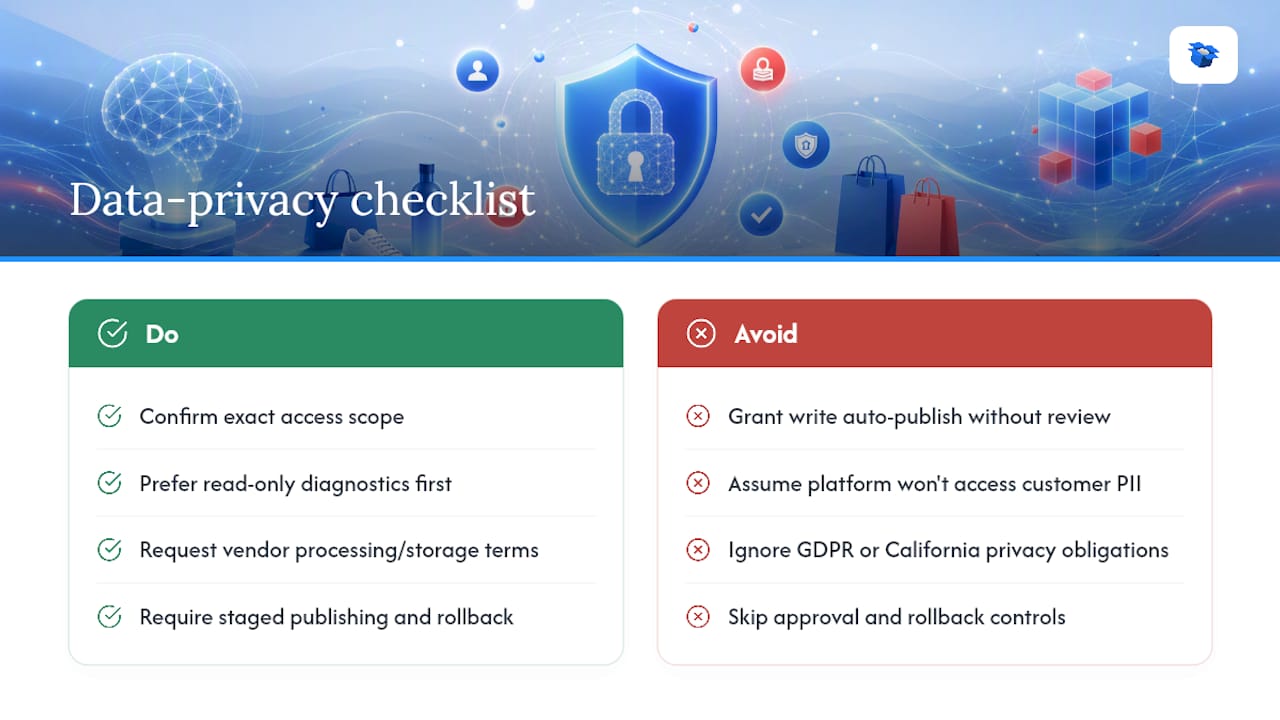
Auto optimization tools need read access to your product catalog and, in most integrations, write access to publish schema and copy changes. Before connecting any platform to Shopify or WooCommerce, confirm exactly what scope of access it requests. Read-only for diagnostics is a much lower risk than write access for auto-publishing, and you should know which one you’re granting.

Customer review data deserves particular attention. If a tool pulls in review content to render aggregateRating markup or surface review snippets, check that it’s not exposing customer names, emails, or other personal details beyond what you already display publicly. Most legitimate platforms only touch product-level data, not customer PII, but that’s worth confirming in writing, not assuming.

If you sell into the European Union, GDPR governs how customer data tied to your reviews and order history can be processed, even indirectly through a third-party optimization tool. If a portion of your customer base is in California, similar obligations apply under state privacy law. Ask any vendor for their data processing terms and confirm where data is stored and how long it’s retained.

Staged publishing and rollback capability matter here too. An automated tool that pushes schema or copy changes live without a review step can introduce errors at scale faster than a person could catch them. Look for platforms that let you approve changes before they go live, at least during your first few months, so you can build trust in the automation before handing over full control.

How Do You Handle Data Privacy When Automating AI Optimization? — overview diagram

06

How Do You Set Up an AI Optimization Platform on Shopify or WooCommerce?

How Do You Set Up an AI Optimization Platform on Shopify or WooCommerce?

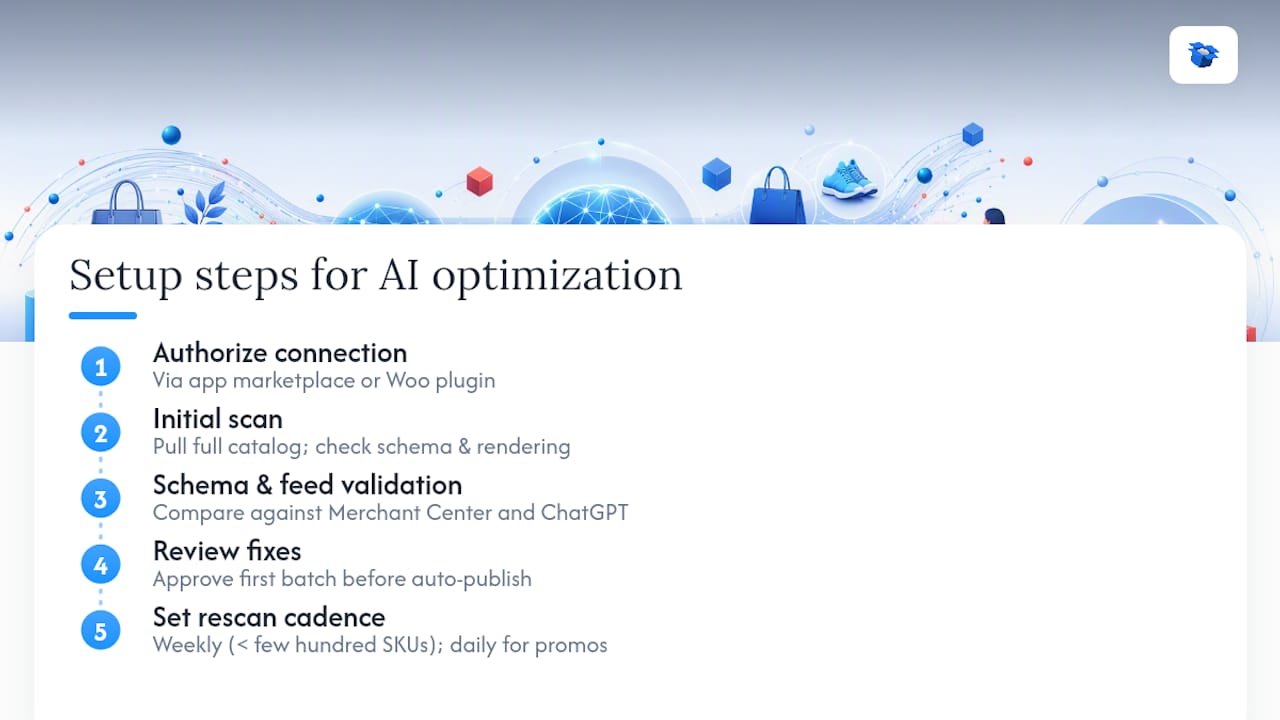
Connecting an automation platform to your store follows a similar sequence regardless of which tool you choose, though the exact screens differ between Shopify and WooCommerce.

Start with the connection itself: authorize the platform through your store’s app marketplace or, for WooCommerce, install a plugin that grants API access to your product catalog. This step typically takes minutes, not hours.

Next comes the initial scan. A properly configured platform pulls your full catalog, checks schema completeness, tests server-side rendering, and cross-references your existing feed data against Merchant Center and ChatGPT feed requirements. This is where you’ll see your baseline, often for the first time in plain language rather than a technical error log.

Diagram illustrating AI optimization platform setup steps

From there, review the prioritized fix list before enabling auto-publish. Most platforms let you approve the first batch of changes manually, which is worth doing even if the plan is to automate later, since it shows you what “good” looks like for your catalog specifically.

Finally, set your rescan cadence. Weekly is reasonable for a catalog under a few hundred SKUs; daily makes sense if you run frequent promotions or price changes that could otherwise go stale in a merchant feed.

07

How Do You Keep Listings Relevant as AI Models Change?

How Do You Keep Listings Relevant as AI Models Change?

AI shopping agents update their ranking logic without warning, the same way search engines used to roll out unannounced algorithm changes. A listing that ranked well against Gemini’s shopping results in January can quietly lose ground by March if a model update shifts how heavily it weighs review recency or shipping detail completeness.

The defense against this isn’t a one-time fix. It’s a monitoring habit. Rescan your catalog on a set schedule rather than only after you notice a traffic drop, since by the time the drop is visible in GA4, you’ve likely already lost weeks of visibility. Sampling shopping prompts monthly, the same query a real customer might type, gives you a live read on where you stand relative to competitors right now, not where you stood at your last audit.

Review freshness matters more than most merchants expect. A product with 200 reviews from two years ago can lose ground to a competitor with 40 recent ones, since recency and specificity carry real weight in how agents evaluate trustworthiness. Build a lightweight process to request reviews on a rolling basis rather than treating review collection as a launch-day task you finish once.

Treat your product copy the same way. Language that felt fragment-friendly a year ago may no longer match the phrasing shoppers use when prompting an agent today. Revisit your top-selling SKUs’ copy quarterly, not annually.

Author’s take: DIY versus automation isn’t really about catalog size

The real dividing line isn’t how many SKUs you carry, it’s how often your prices, stock, and promotions change. A 50-SKU catalog with weekly pricing shifts needs automation more than a 500-SKU catalog that barely moves. Set checkpoints at 30, 60, and 90 days: by 30, expect schema and feed fixes live; by 60, early visibility shifts; by 90, real conversion data. If nothing’s moved by 90 days, revisit your review volume and copy specificity before blaming the platform.

— Xhurian

08

Get Your Product Listings Ready for AI Shopping Agents

Get Your Product Listings Ready for AI Shopping Agents

Manually running the audits, schema upgrades, and rescans covered above works, but it takes ongoing attention most merchants don’t have spare hours for every week. Ecentic replaces that manual grind with a platform built specifically for this job: connect your Shopify or WooCommerce store, run a free simulation scan, and see exactly which factors are costing you recommendations from ChatGPT, Gemini, Claude, and Perplexity.

Ecentic

Where this article walked through a one-hour audit and a 90-day roadmap, Ecentic’s product listing optimization tools compress that timeline by flagging the fixes automatically and publishing approved changes with one click, rather than routing each schema update through a developer. Customers report meaningful gains in both AI-driven visits and sales after running the loop described above. Start with a free scan on your top-selling SKUs, review the prioritized fix list, and decide from there whether to automate or handle changes yourself.

09

Sources

Sources

  • How AI Shopping Agents Rank Products (and How to Win) (2026)
  • Ecommerce AI SEO (Semrush)
  • How AI shopping works: get recommended by ChatGPT
10

FAQ

FAQ

What Does AI Auto Optimization Mean for Ecommerce?

It’s the automated process of continuously fixing and republishing product listing data, schema, and copy so AI shopping agents like ChatGPT and Gemini can find, evaluate, and recommend your products.

How Long Does an AI Visibility Audit Take?

A priority audit covering robots.txt, server-side rendering, schema, and feed status takes about one hour per product template, not per individual SKU.

Can Ecentic Automate These Fixes for Me?

Yes. Ecentic connects to Shopify or WooCommerce, runs a simulation-driven scan of your catalog, and publishes prioritized fixes with one click after you approve the initial batch.

How Often Should I Rescan My Product Listings?

Weekly works for catalogs under a few hundred SKUs; daily rescans make sense if you run frequent price changes or promotions that could otherwise go stale in your feed.

Do I Need Both a Google Merchant Center Feed and a ChatGPT Feed?

Yes, they’re separate submissions with overlapping but distinct requirements, and each platform treats its own feed as authoritative for price and availability data.

auto optimization for aihow does AI optimize performanceintelligent automation solutionsautomated AI tuningAI optimization strategiesmachine learning optimizationai auto optimizationautomated ai seoAI-driven performance enhancement
Back to blogGet started

Guides and research on winning AI shopping agents.

Get picked by AI

Ready to be the product agents recommend?

Install free on Shopify or WooCommerce and see your AI score in minutes.

Install on ShopifyInstall on WooCommerce
ecentic

Win every AI shopping agent's cart.

Built for the agent economy
Product
  • Features
  • How it works
  • Pricing
  • Product Listings
Platforms
  • Shopify
  • WooCommerce
  • Enterprise
Resources
  • Developer docs
  • API reference
  • Resources
  • Blog
  • Compare
  • UCP Validator
  • UCP Playground
  • Book a demo
Company
  • Support
  • Privacy policy
  • Terms of service

© 2026 ecentic. All rights reserved.

Made for merchants who refuse to be invisible to AI.