ecenticecentic
How it worksResourcesPricingBlog
Install now
ASCII-art illustration of a stack of books

Agent-Driven Traffic Analytics: A 2026 Implementation Guide

Published: August 23, 2026 · 20 min read

Discover how agent-driven traffic analytics enhances your insights by accurately measuring non-human actions and their outcomes on your site.

00

Key Takeaways

Decorative title card illustration

Agent-driven traffic analytics is the practice of capturing, classifying, and attributing requests made by non-human actors, then measuring the tasks those agents complete on behalf of human principals. It replaces the session as the unit of measurement with a simpler model: actor, task, outcome.

If your dashboards still show a flat line for “bot traffic” next to a growing wedge of AI-agent visits with zero conversion data attached, you’re not measuring what’s actually happening on your site. Shopping agents from ChatGPT, Gemini, and Perplexity are reading product pages, comparing specs, and handing recommendations to buyers who never scroll past the fold themselves. Your analytics stack probably has no idea this is happening.

Three moves fix the biggest blind spots fast:

  • Turn on CDN or edge log forwarding so you capture requests that never load a browser or fire a JavaScript tag.
  • Add an actor property at the point of ingestion, tagged as human, agent, or crawler, before the data ever reaches a dashboard.
  • Route those logs into a warehouse instead of a client-side tool, so you can join agent events to outcomes over time.

Agent reads often happen well before a purchase, pre-educating a buyer who arrives already decided. That’s revenue your legacy analytics setup is currently attributing to “direct” or missing altogether.

Key Takeaways

Agent-driven traffic analytics works when teams replace session metrics with an actor, task, and outcome model backed by server-side capture and identity-linked logging.

Point Details
Capture at the edge first CDN and edge log forwarding catches the majority of agent requests that skip client-side JavaScript entirely.
Retire session metrics for agents Bounce rate and scroll depth are meaningless for non-human actors; use actor, task, and outcome instead.
Report task completion, not pageviews Define retrieval, form flow, and integration success criteria before reporting any completion metric.
Close the attribution gap deliberately Canary protocols and immutable, identity-linked logs reduce legal and audit exposure from unauthorized agent actions.
Optimize what agents actually read Ecentic simulates AI shopping agent evaluations on product pages and reports the specific factors driving or blocking recommendations.
01

What Agent-Driven Traffic Is and Why Session Metrics Fail

What Agent-Driven Traffic Is and Why Session Metrics Fail

Three actor types hit your servers today, and they behave nothing alike. A human browses interactively, with pauses, scrolls, and mouse movement. A crawler indexes content for a corpus, usually without any interest in a specific task. An agent acts on behalf of a person, fetching a page, extracting data, and often completing a task like a comparison or a purchase step, without ever rendering the page visually.

Standard web metrics assume a human is on the other end. That assumption breaks immediately with agents.

  1. Bounce rate means nothing when an agent fetches one page, extracts the price and spec table, and leaves. That’s a completed task, not an abandoned visit.
  2. Time on page can’t apply to a request that finishes in milliseconds because there’s no rendering, no reading, no scrolling.
  3. Scroll depth requires a viewport. Headless agents making raw HTTP calls never generate one.

The fix is a different mental model entirely: actor, task, outcome. You classify who made the request, define what they were trying to do, and record whether they succeeded. That framework works whether the actor is a shopper, a crawler, or an autonomous agent comparing five competitors before recommending one to a buyer.

02

How Agent Detection and Capture Actually Work

How Agent Detection and Capture Actually Work

Most agent activity is invisible to the tools marketing teams already trust. That’s the uncomfortable part. Google Analytics, Adobe Analytics tags, and most tag-manager setups depend on JavaScript execution in a browser. Agent traffic increasingly skips that step entirely.

Server-side and edge capture is what actually catches this traffic. Vendor telemetry shows that roughly 59% of ChatGPT agent traffic arrives through raw HTTP clients that never execute a script, which means client-side analytics tools miss more than half the activity by design, not by accident. If your only instrumentation lives in a tag manager, you’re measuring a shrinking slice of what’s really happening.

Server racks with network cables and lights

CDN and edge logs solve this because they record every request that hits your infrastructure, regardless of whether a browser ever paints a pixel. That’s the layer where agent-driven traffic analytics actually starts.

A handful of signals reliably separate agents from humans and generic bots once you’re looking at raw logs:

  • Declared user-agent strings. Many agents identify themselves honestly, at least for now, with strings referencing the model or platform behind the request.
  • Asset-to-request ratios. A human loading a page pulls dozens of images, fonts, and scripts. An agent extracting structured data often requests just the HTML or a JSON payload.
  • Beacon absence. No analytics pixel firing on a page view that clearly happened at the server level is itself a signal.
  • Header and timing patterns. Agents tend to request pages at machine speed, with header orders and timing entropy that differ from typical browser behavior.
  • llms.txt and structured assets. A growing number of sites now publish an llms.txt file alongside OpenAPI schemas, giving agents (and your logs) a documented, declared interface to check requests against.

Validating declared model IP ranges or matching request strings against published vendor documentation adds another layer of confidence, though it’s never airtight on its own.

Pro Tip: Don’t rely on user-agent strings alone. Pair them with asset-ratio scoring so a spoofed string still gets flagged if the request pattern doesn’t match a real browser session.

03

Key Metrics That Actually Show Agent Impact

Key Metrics That Actually Show Agent Impact

Reporting on agent traffic with pageviews and sessions gives stakeholders numbers that look impressive or alarming for the wrong reasons. The metrics that matter track requests, tasks, and business outcomes, not visits.

Metric What it tells you
Agent share of requests Percent of total requests by page and by model, revealing which pages agents actually read
Task completion rate Whether an agent’s retrieval, form flow, or integration call finished successfully
Agent-to-human handoff rate How often an agent’s session converts into a human follow-up visit or purchase
Block/error rate by actor How often agents get rate-limited, blocked, or served errors versus humans
Model-level operational cost Token usage, latency, and error rate per model hitting your infrastructure

Task completion needs a real definition before you can measure it. A retrieval task succeeds when an agent extracts the data it came for, like price or availability. A form flow task succeeds when a multistep process, like adding to cart, completes without an error. An integration task succeeds when an API-style call returns a valid, usable response. Define these upfront or the metric is meaningless noise.

Agent-assisted conversions deserve their own line in every report. Guides tracking this properly show agent-referred traffic can convert at multiples of generic organic traffic once it’s isolated and measured correctly, rather than folded into an undifferentiated “other” bucket. That’s the number that gets a CFO’s attention, not raw request volume.

  • Break out agent share by individual model, not just an aggregate “bot” category.
  • Report task completion and handoff rate together. One without the other hides whether agent traffic is doing anything useful.
  • Track block and error rates separately from human error rates. A spike here often signals a misconfigured firewall rule, not malicious traffic.
04

Building the Pipeline: Schema, Tagging, and Storage

Building the Pipeline: Schema, Tagging, and Storage

Shipping agent-driven traffic analytics is mostly a plumbing problem before it’s an analysis problem. Here’s the order that works in practice.

  1. Turn on CDN log forwarding first. Capture fields including timestamp, full user-agent string, request path, response code, byte size, and any TLS fingerprint data your CDN exposes.
  2. Add actor and actor_name properties at ingestion. Every event gets tagged human, agent, or crawler, plus a specific name when identifiable (a model or platform string), before it lands in any table.
  3. Layer your classification logic. Start with declared user-agent, cross-check against behavioral signals like asset ratio and timing, then confirm with auth tokens or API keys where they exist. No single signal should carry the whole decision.
  4. Join agent events to human principals wherever possible. Auth tokens, session cookies, and correlation IDs let you connect an agent’s retrieval task back to the person who deployed it, closing the gap between “an agent visited” and “this customer’s agent visited.”
  5. Route everything into a warehouse, not just a dashboard tool. BigQuery’s agent analytics pipeline streams raw interaction events using the Storage Write API and supports trace reconstruction after the fact, which matters when you need to reconstruct what an agent actually did three weeks after the fact.
  6. Tier your storage. Keep raw, granular logs for a defined audit window, then sample or aggregate older data. Full-fidelity retention forever is a cost problem waiting to happen, and most audits only need a recent window anyway.

Pro Tip: Set your audit retention window based on your longest realistic dispute or compliance cycle, not an arbitrary 30 or 90 days. If a chargeback or regulatory question can surface six months later, your traces need to survive that long.

05

Closing the Attribution Gap

Closing the Attribution Gap

Knowing an agent visited your site is one thing. Proving which human or organization deployed that agent is a much harder problem, and it’s the one keeping compliance teams up at night.

The attribution gap exists because most enterprises can log that an agent acted, but not prove which human authorized the action. That gap turns into real legal and regulatory exposure the moment an agent does something a company later needs to disown or defend.

That’s the core finding behind Okta’s analysis of AI compliance risk, and it applies directly to any team building agent-driven traffic analytics for audit purposes, not just security teams.

One practical mitigation gaining traction is the canary protocol: a vendor-mediated approach where agent interactions carry a traceable marker back to the originating account. Research evaluating this approach across web, communication, and cyber agents found it reliably links observed behavior back to a source account in non-adversarial settings, though it’s realistic to expect gaps once an actor is actively trying to evade detection.

A few operational habits close most of the remaining distance:

  • Treat agent logs as immutable records, not something you overwrite or compact away early.
  • Link every agent event to an identity where a token, cookie, or API key makes that possible.
  • Build a standing coordination point between security, legal, and your platform vendors before an incident forces the conversation.
06

Tooling and Dashboard Patterns That Work

Tooling and Dashboard Patterns That Work

You don’t need to build every piece of this from scratch. A few concrete tools already cover most of the pipeline.

  • BigQuery Agent Analytics handles the capture-to-analysis pipeline: streaming raw events, reconstructing traces, and running programmatic evaluations against agent behavior at scale, which matters once you’re past a few thousand agent requests a day.
  • Adobe’s Agentic Traffic dashboard gives you a prebuilt view once CDN log forwarding is in place, with filters for traffic distribution, trend lines, and top and bottom movers across markets, categories, and individual agents.
  • Tag-based tools like GA4 still have a place for measuring human behavior, but they consistently undercount agent activity because so much of it never triggers a client-side tag. A useful pattern is layering GA4 alongside server-side capture rather than replacing it outright, so you keep human-behavior reporting intact while adding the agent layer on top.
  • Vendor dashboards are genuinely useful for monitoring trends, but they don’t replace a warehouse-led trace model when you need reproducible evaluations for an audit or a root-cause investigation.
07

How Agent Traffic Changes Performance and Resource Planning

How Agent Traffic Changes Performance and Resource Planning

Agent requests hit your infrastructure differently than human traffic, and that has real capacity implications most teams haven’t planned for yet.

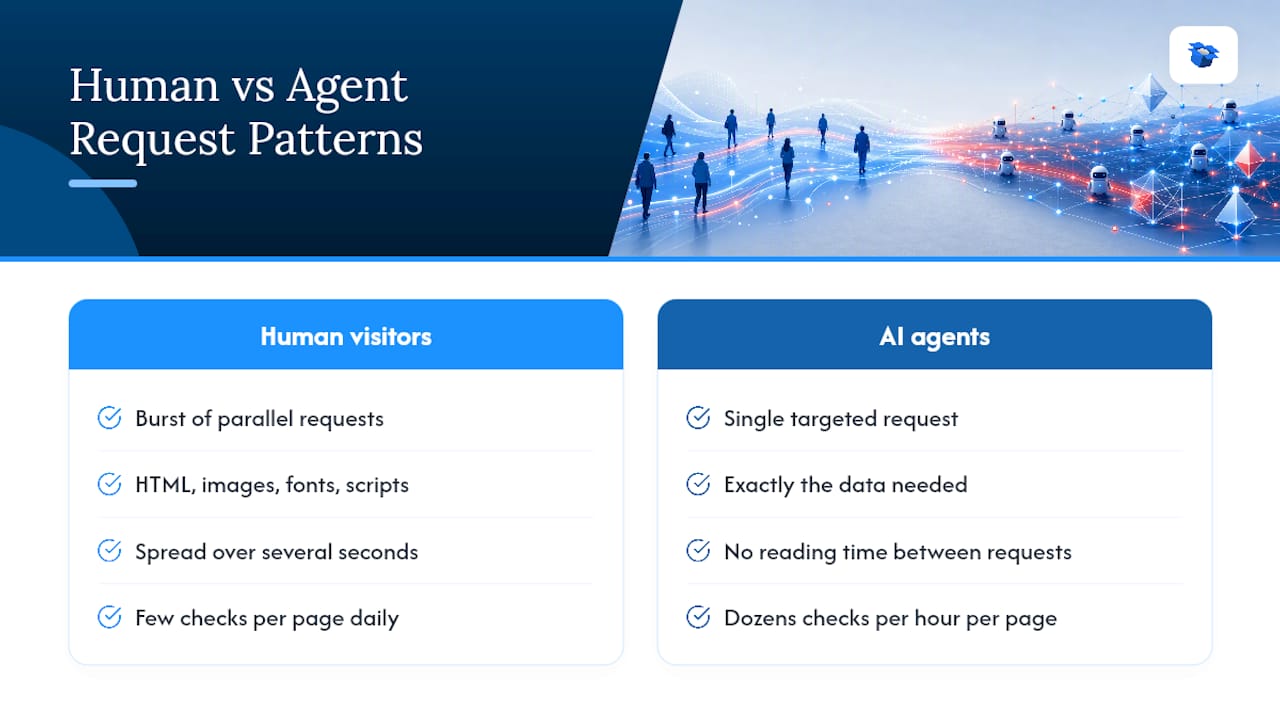
A human visitor triggers a burst of parallel requests: HTML, then images, fonts, scripts, and analytics beacons, spread across several seconds. An agent extracting structured data often makes a single, efficient request for exactly what it needs, then moves on. That sounds lighter on paper, but at scale it isn’t. Agents can hit the same set of high-value pages, like pricing or product detail pages, at a volume and frequency no individual human ever would, since there’s no reading time between requests.

Diagram comparing agent and human request traffic patterns

That pattern shows up as unexpected load on specific endpoints rather than an even spread across the site. Rate limiting and caching decisions that were tuned for human browsing patterns can misfire against agents, either blocking legitimate agent traffic that would have driven a sale or letting a poorly behaved agent hammer an endpoint your team assumed was low-traffic.

The practical response is treating agent load as its own capacity planning category. Monitor request rates by actor type, not just aggregate traffic, and set caching and rate-limit rules with agent behavior patterns specifically in mind. A product page that gets checked by shopping agents dozens of times an hour needs a different caching strategy than one that gets checked by humans a few times a day, even if the total request count looks similar in a combined dashboard.

08

The Legal and Ethical Line in Agent Traffic Monitoring

The Legal and Ethical Line in Agent Traffic Monitoring

Logging agent activity raises questions that don’t have fully settled answers yet, and pretending otherwise is a mistake.

Capturing detailed request data, including headers, timing, and behavioral fingerprints, means you’re also capturing data that can be tied back to individuals in some cases, particularly when an agent is acting on behalf of a named customer account. That puts agent traffic logs inside the same privacy frameworks that already govern any other data collection your organization runs, whether that’s a regional privacy law or an internal data governance policy.

The ethical questions run alongside the legal ones. Blocking agents wholesale might protect server resources, but it can also cut off a growing channel of buyers who now do their comparison shopping through an AI agent instead of a browser tab. Over-permissive access, on the other hand, opens the door to scraping abuse dressed up as legitimate agent traffic.

A workable middle ground treats agent access the way you’d treat any other automated integration: documented, rate-limited, and monitored, with clear terms for what’s permitted. Publishing an llms.txt file is one part of that, giving well-behaved agents a documented interface instead of forcing them to guess at your site’s structure.

Retention policy matters just as much as collection policy. Keep detailed agent logs only as long as your audit or dispute window actually requires, and apply the same access controls to those logs that you’d apply to any other dataset containing behavioral or identity-linked information.

09

Integrating Agent Analytics With Security and Fraud Detection

Integrating Agent Analytics With Security and Fraud Detection

Agent traffic analytics and fraud detection are solving overlapping problems, and treating them as separate systems creates blind spots on both sides.

A malicious scraper and a legitimate shopping agent can look nearly identical at the network layer: automated requests, no JavaScript execution, a declared or spoofed user-agent string. The layered classification approach that identifies legitimate agents, checking declared identity, behavioral signals, and authentication together, is the same approach that flags abuse. Building these as one system instead of two means your fraud team isn’t reinventing signal detection that your analytics team already built.

Practical integration starts with a shared actor taxonomy. If your analytics pipeline tags a request as agent, crawler, or human, your security tooling should read and act on that same tag rather than running its own separate bot-detection layer with different definitions. Divergent taxonomies between teams are how a legitimate AI shopping agent gets blocked by a security rule nobody on the analytics side knew existed.

Shared alerting is the other half. A sudden spike in agent requests to a checkout endpoint might be a well-known shopping agent testing price changes across your catalog, or it might be a credential-stuffing attempt disguised as agent traffic. Routing agent-related anomalies through the same incident workflow security already uses for fraud, rather than a separate analytics-only alert nobody on the security team monitors, is what actually catches the difference in time to matter.

10

How Agent Analytics Priorities Shift by Industry

How Agent Analytics Priorities Shift by Industry

Not every industry needs the same emphasis inside an agent-driven traffic analytics setup, and treating it as one-size-fits-all wastes engineering time on the wrong signals.

Ecommerce and retail sites care most about task completion on product and pricing pages, plus the agent-to-human handoff rate, since that’s the metric that ties agent activity directly to revenue. A retailer’s biggest blind spot is usually pricing pages getting hammered by comparison agents without any corresponding conversion tracking in place.

Media and publishing sites weight crawler-versus-agent distinction more heavily, since the business question is often about licensing and content reuse rather than conversion. Distinguishing a corpus-building crawler from an agent retrieving a single article for a user’s specific question changes how that traffic should be valued and governed.

B2B software and SaaS platforms tend to prioritize the integration task category, since agents interacting with these sites are frequently making API-style calls on behalf of another system rather than a single human shopper. Error and block rates by actor matter more here than handoff rate, because the “human” on the other end may be several steps removed from the request itself.

Financial services sites sit closest to the attribution and governance concerns described earlier, since regulatory exposure around unauthorized agent actions is highest in that category. The canary-based attribution approach and immutable logging matter more here than in almost any other vertical.

11

What Analytics Teams Should Actually Change

What Analytics Teams Should Actually Change

Keep your default, human-facing reports exactly as they are. Don’t rebuild a dashboard a marketing lead already trusts just to shoehorn agent data into it. Build a parallel view instead, one that’s allowed to look different because it’s measuring something structurally different.

The bigger organizational shift is where agent telemetry lives day to day. It belongs in incident response and procurement conversations, not buried in a quarterly analytics deck nobody reads until something breaks. And if you’re going to spend engineering time optimizing anything for agent readability first, spend it on pricing and product pages. That’s where agents actually make decisions on a buyer’s behalf, and it’s where the return on that work shows up fastest.

— Xhurian

12

Turning Agent Visibility Into Optimized Listings

Turning Agent Visibility Into Optimized Listings

Measuring agent traffic tells you agents are reading your product pages. It doesn’t tell you why an agent recommended a competitor instead of you, and that gap is exactly what Ecentic closes.

Ecentic

Ecentic connects directly to your Shopify or WooCommerce store and simulates how ChatGPT, Gemini, Claude, and Perplexity actually evaluate your listings against competitors, then hands back plain-English diagnostics on exactly what’s costing you a recommendation. Customers using Ecentic’s optimization tools have reported meaningful increases in both AI-driven visits and sales after implementing its suggested listing rewrites. Instead of just counting agent requests, you get a UCP profile validated for agent readability and a rescan cycle that tracks your selection rate over time as models change.

If you’re already forwarding CDN logs and tagging actors, the missing piece is knowing what to do with that visibility. Run a free introductory scan on your store and see exactly where your listings stand with the agents already reading them.

13

Sources

Sources

  • Canary-based agent attribution (arXiv)
  • Why AI compliance is a C-suite identity problem (Okta blog)
  • BigQuery agent analytics documentation
  • Agentic Traffic | Adobe Brand Visibility
14

FAQ

FAQ

What Is Agent-Driven Traffic Analytics?

It’s the practice of capturing, classifying, and attributing requests made by AI agents acting on behalf of humans, then measuring the tasks they complete rather than relying on session-based metrics.

Why Do Session Metrics Fail for Agent Traffic?

Metrics like bounce rate and time on page assume a human is rendering and reading a page, but agents often make a single efficient request and leave, making those numbers meaningless.

How Do You Detect AI Agent Traffic on a Website?

Server-side and CDN log capture, combined with user-agent analysis, asset-to-request ratios, and llms.txt validation, reliably surfaces agent activity that client-side tools miss.

What Is the Attribution Gap in Agent Analytics?

It’s the difficulty proving which human or organization authorized a specific agent’s action, creating legal and compliance risk that canary-based protocols and immutable logging help reduce.

Can Ecentic Help With Agent Traffic Optimization?

Yes. Ecentic simulates how AI shopping agents evaluate product listings on Shopify and WooCommerce stores and provides specific recommendations to improve agent-driven visibility and conversions.

ai agent attributionagent-based analyticsreal-time traffic monitoringperformance metrics for agentsagent-driven traffic analyticstraffic analysis toolshow to analyze traffic dataautomated traffic reportsai agent analyticsdata-driven traffic insights
Back to blogGet started

Guides and research on winning AI shopping agents.

Get picked by AI

Ready to be the product agents recommend?

Install free on Shopify or WooCommerce and see your AI score in minutes.

Install on ShopifyInstall on WooCommerce
ecentic

Win every AI shopping agent's cart.

Built for the agent economy
Product
  • Features
  • How it works
  • Pricing
  • Product Listings
Platforms
  • Shopify
  • WooCommerce
  • Enterprise
Resources
  • Developer docs
  • API reference
  • Resources
  • Blog
  • Compare
  • UCP Validator
  • UCP Playground
  • Book a demo
Company
  • Support
  • Privacy policy
  • Terms of service

© 2026 ecentic. All rights reserved.

Made for merchants who refuse to be invisible to AI.